8
ENGLISH
Quick guide
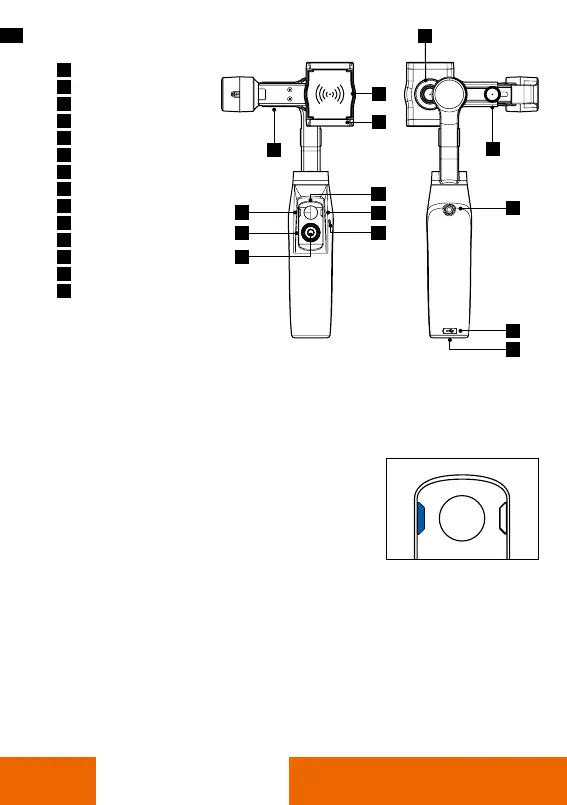
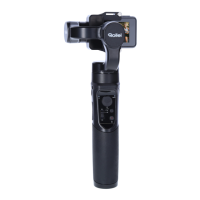
Wireless Charging Point
Smartphone Holder
USB Port
Joystick
Battery Light
Status Light
Control Wheel
Photo/Video button
Power Button
Retaining Screw
Adjustment Screw
1/4 inch Screw Thread
Micro-USB Port
1/4 inch Screw Thread
1
2
3
4
5
6
7
8
9
10
11
12
13
14
10
11
12
13
14
3
5
1
4
6
9
2
7
8
Battery and charging
• To charge the Rollei Go! use the Micro USB cable. Please note a power
adapter for the mains is not included.
• When charging, the battery indicator lights red.
• Please charge the Rollei GO! completely before using it for the rst time.
Battery Indicator:
• Steady blue light on both upper and lower indicators:
Battery charged 70 – 100%
• Steady blue light on only lower indicator:
Battery charged 30 – 70%
• Flashing blue light: Battery charged 0 – 30%
• Steady red light: Battery is charging.
When charging is complete, all LED lights are off.




 To Next Page