EasyManua.ls Logo

ROLLEIFLEX SL 2000F - FITTING AND CHANGING THE LENSES

ROLLEIFLEX SL 2000F
68 pages
Print Icon
To Next Page IconTo Next Page
To Previous Page IconTo Previous Page
Loading...
TIilIlIG
AND
CHANGING
THE
]E]ISES
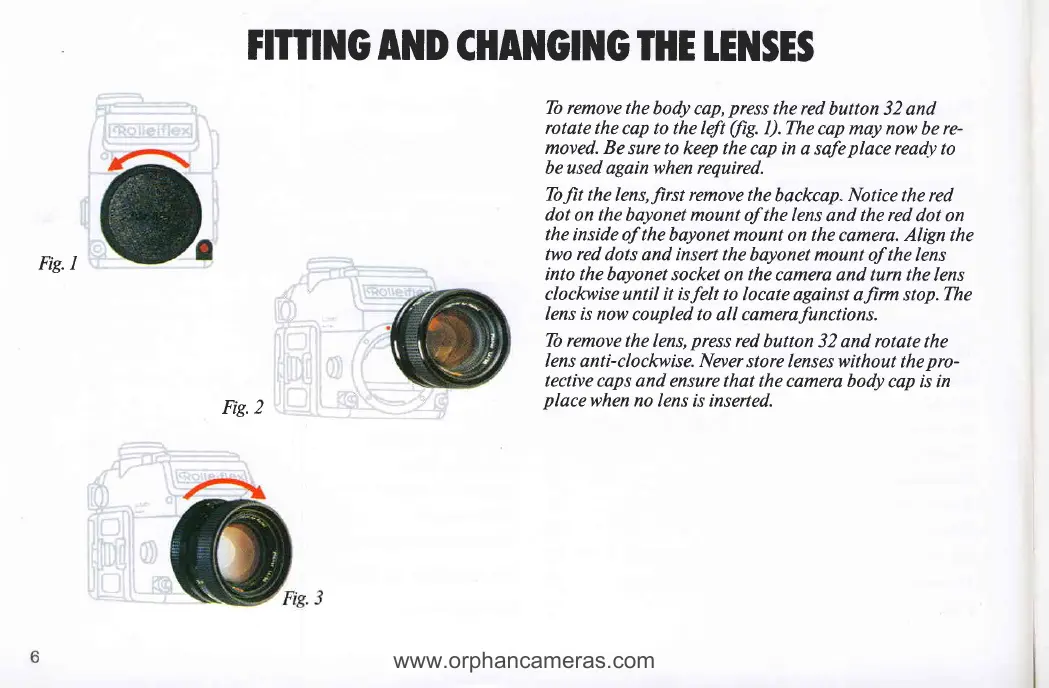
Fig.l
Tb remove the
body cap,
press
the red
button 32 and
rotate the
cap to the left
(fig.
I).The
cap may now be re-
moved. Be
sure to keep the
cap in a safe
place
ready to
be used again when required.
Tofit the
lens,first
remove
the
backcap" Notice the red
dot on the bayonet
mount of the lens
and
the red
dot on
the inside of the
bayonet mount on the
camera.
Align
the
two
red
dots
and
insert the
bayonet mount
of
the
lens
into the bayonet socket
on
the
camera and turn the
lens
clockwise until it isfelt
to locate against
alirm stop.The
lens is now
coupled to all camerafunctions.
Tb remove
the lens,
press
red
button 32 and rotate
the
lens
anti-clockwise. Never store lenses without
the
pro-
tective caps
and ensure that the camera body
cap is in
placewhen
no lens is inserted.
Fig.2
www.orphancameras.com

Related product manuals