EasyManua.ls Logo

ROLLEIFLEX SL 2000F - Page 18

ROLLEIFLEX SL 2000F
68 pages
Print Icon
To Next Page IconTo Next Page
To Previous Page IconTo Previous Page
Loading...
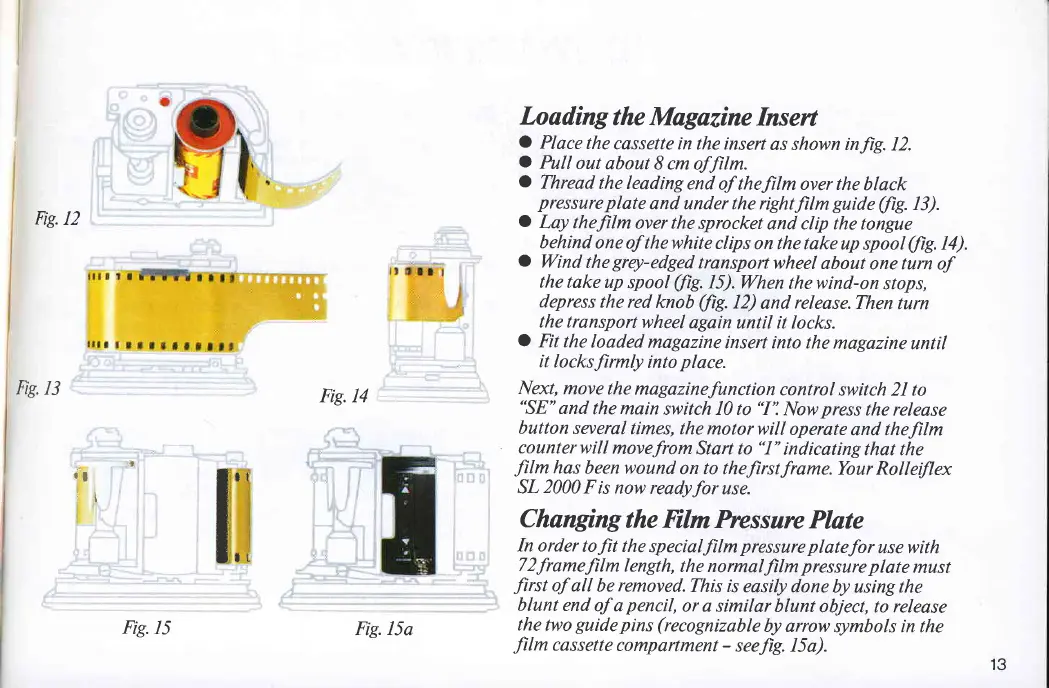
Fig.12
Fig.
13
Fig. 14
Loading
the Magazine
Insert
O
Place
the
cassette
in the insert
as shown inJig.
12.
a
Pull
out
about
8 cm ofJilm.
C
Thread
the leading
end
of thefilm over the
black
pressure
plate
and under the rightJilm
guide (/iS.
13).
C
Lay theJilm
over the
sprocket
and clip the tongue
behind
one of thewhite
clips
on the take
up spool
(fi7.
I4).
O
Wind
the
grqt-edged
transportwheel
about
one turn of
the
take up
spool
(fi7.
I5).When
thewind-on
stops,
depress the red
knob
(/iS.
12)
and
release.Then
turn
the transport
wheel
again
until it locks.
C
Fit the
loaded
magazine
insert into the
magazine
until
it
locksfirmly
into
place.
Next, move
the magazinefunction
control
switch 2I to
"SE"
and
the main
switch I0 to
"I':
Now
press
the release
button
several
times, the
motorwill
operate
and theJilm
counterwill
movefromStart
to
"I"
indicatingthat
the
Jilm
has beenwound
on to theJirstframe.Your
Rollelflex
SL
2000
Fis
now readyfor
use.
Changing
the Film Pressure
Plate
In order
tofit the
specialfilm
pressure platefor
use with
T2framefilm
length,
the normalJilm
pressure
plate
must
Jirst
of
all be
removed.This
is
easily done
by using the
blunt
end
of a
pencil,
or a similar
blunt
object, to release
the
two
guide pins (recognizable
by arrow
symbols in the
film
cassette
compartment
-
seeJig. I5a).
.:n
rl
il
I::
Fig.
15
Fig.I5a
13

Related product manuals