VIEWTI
NDER
IlI TORilIAIION
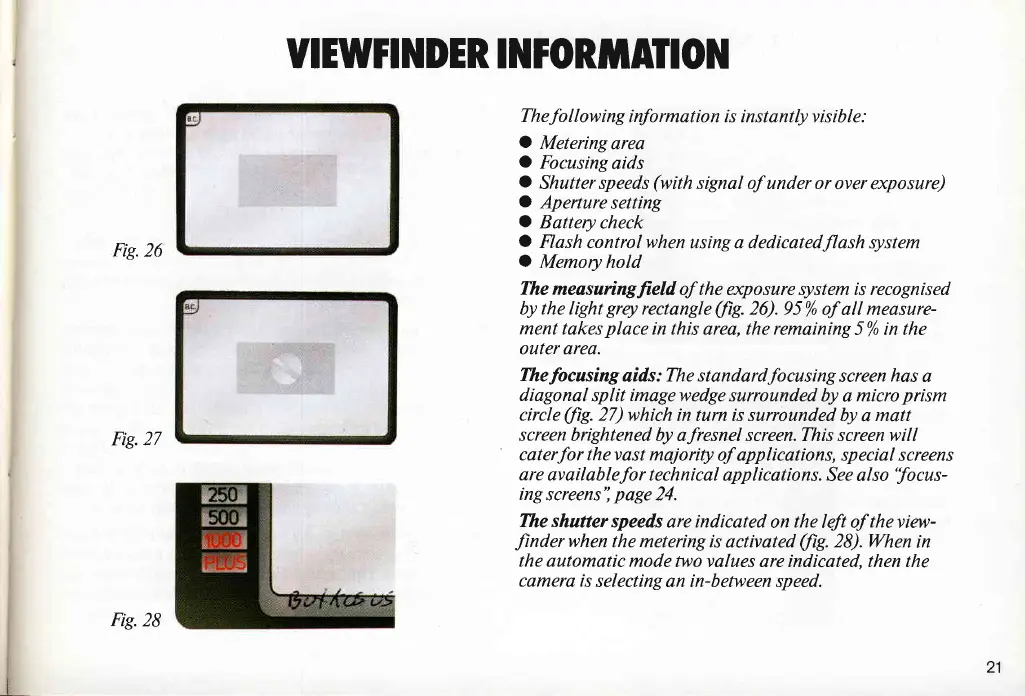
Fig.26
Fig.27
The
fo
I I
ow
ing
info
rmat
io n i s i n s t ant ly v i s ib I e :
tO
Metering
area
O
Focusing
aids
C
Shutter speeds
(with
signal of under or
over exposure)
rO
Aperture
setting
O
Battery
check
O
Flash
control when using a dedicatedflash system
O
Memory hold
The
measaringfield of the exposure system is recognised
by the light
grqt
rectangle
(fig.
26).95%
of all measure-
ment takes
place
in this
area,
the remaining
5% in the
outer area.
Thefocusing
aids:
The standardfocusing
screen
has
a
diagonal
split imagewedge surrounded
by a
micro
prism
circle
(fig.
27)
which in turn is surrounded by
a
matt
screen
brightened by afresnel screen. This screen will
caterfor thevast
majorily of applications, special screens
are
availablefor technical applications.
See also
'focus-
ing
screens'i
page
24.
The shutter
speeds are indicated
on
the
left of
theview-
Jinderwhen
the metering is
activated
(/iS.
28).Wen
in
the automatic
mode two values are indicated, then the
camere is
selecting an in-between speed.
I
Fig.28
21


 To Next Page