EasyManua.ls Logo

Romstal KJRP-86A1-E - User Manual

Romstal KJRP-86A1-E
2 pages
Print Icon
To Next Page IconTo Next Page
Loading...
Electronic temperature controller installation
and operation manual
Product functions:
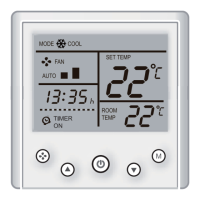
Electronic temperature controller KJRP-86A1-E is suitable for
the industrial, commercial and civilian buildings.It controls the
fan coils in the terminal of the central air conditioner. This
temperature controller has a large screen liquid crystal display,
and it can be easily operated and has stable performance.
Room temperature Setting, temperature compensation, four
kinds of fan speed mode,working mode switch, timing on and
timing off , clock functions .
M
Key functions: Power key( ), mode key ( ), fan speed
key ( ),key of adjusting the setting ( , ).
ON/OFF: Press the “ ” key once, then the unit and the dis-
play screen will be operated; press again, the unit and the dis-
play screen will be off.
Setting mode: Under default interface, press “M” key, switch the
mode (Heat, Cool).
Setting fan speed: Under default interface, press “ ” key,
switch the fan speed (Auto, Low, Med, High).
Setting temperature: Under default interface, press the “
button to decrease the setting temperature (long press 3s for
continue adjusting), press “ ” to increase the setting temper-
ature (long press 3s for continue adjusting); each pressing will
change 1 .
Timing on setting: Press “M” key, until the “hh” in the “hh:mm”
flashes (at the time “TIMING ON” icon display), press
” or
”to adjust the timing on hour (long press 3s for continue adjust-
ing); press “ ” key again,
the “mm” in the “hh:mm” flashes ,
press
” or “ ” to adjust the timing on minute (long press 3s
for continue adjusting), press “M” key for confirmation (no key
operation for 5s will be auto confirmed, press “M” key before
confirmation will enter to the timing off setting) and back to the
default interface.
Timing off setting: Enter to the timing on setting, press “M” key,
until the “hh” in the “hh:mm” flashes (at that time “TIMING OFF”
icon display), press “ ” or “ ” to adjust the timing off hour
(long press 3s for continue adjusting); press “ ” key again, the
“mm” in the “hh:mm” flashes , press “ ” or “ ” to adjust the
timing off minute(long press 3s for continue adjusting), press “M”
key for confirmation (no key operation for 5s will be auto
confirmed, press “M” key before confirmation will enter to the
clock setting) and back to the default interface.
Clock setting: Enter to the timing off setting, press “M” key, until
the “hh” in the “hh:mm” flashes (at that time “TIMING ON” and
“TIMING OFF ” icons will not display), press “ ” or “ ” to
adjust the clock hour (long press 3s for continue adjusting);
press “ ” key again, the “mm” in the “hh:mm” flashes , press
” or “ ” to adjust the clock minute (long press 3s for cont-
inue adjusting), press “M” key for confirmation (no key operation
for 5s will be auto confirmed, press “M” key before confirmation
will enter to the clock setting) and back to the default interface.
Cancel the timing on: during the timing on setting, adjust the time
to be “00:00” or under default interface press “ ” key for 3s to
cancel the timing on.
Cancel the timing off: during the timing off setting, adjust the time
to be “00:00” or under default interface press “ ” key for 3s to
cancel the timing off.
Temperature compensation setting: Under the power off, press
&” key for 3s, the display of “
SETTING TEMP
” will display the
temperature compensation value; press “ ” key to change the
temperature compensation plus-minus, press “ ” or “ ” to
adjust the temperature compensation value (long press for continue
adjusting), press “M” key for confirmation (no key operation for 5s
will be auto confirmed) and back to the power off state.
2 Technical parameters
1 Operation
1
installation manual
Name
Model
Power voltage
Power consumption
Loaded current
Accuracy of control temperature
Display accuracy of indoor
temperature
Setting temperature range
Storage temperature
Working temperature
Relative humidity
Installation method
Surface material
Surface size
Electronic temperature
controller
<2W
<1A
<92%
standard 86 box installation
PC+ABS antiflaming
86×86×15mm
KJRP-86A1-E
AC220V±10,50Hz
±1
1
1730
-555
545
Question and Answer IconNeed help?

Do you have a question about the Romstal KJRP-86A1-E and is the answer not in the manual?

Summary

Controller Operation

Power On;Off Control

Controls the unit's power state, turning it on or off via the key.

Mode Selection

Allows switching between heating, cooling, and auto modes for the unit.

Fan Speed Adjustment

Enables selection of fan speed from Auto, Low, Medium, to High settings.

Temperature Setting

Adjusts the desired room temperature using up/down keys, changing by 1°C increments.

Timing On Setting

Sets a specific time for the unit to automatically turn on.

Timing Off Setting

Sets a specific time for the unit to automatically turn off.

Clock Setting

Configures the device's internal clock for accurate time display and scheduling.

Temperature Compensation

Adjusts the displayed temperature to compensate for sensor inaccuracies.

Technical Specifications

Alarm Indicator

Wiring Diagram

Packing Accessories

Installation Instructions

Connect Terminals

Connect the controller's terminals to the reserved wires within the 86 box.

Open Front Cover

Detach the front cover of the controller by pressing the two lower button positions.

Install Box Bottom

Secure the controller's bottom part to the standard 86 box using M4 bolts.

Fasten Front Cover

Reattach and secure the front cover to the installed controller unit.

Overview

Electronic Temperature Controller

This electronic temperature controller, model KJRP-86A1-E, is designed for use in industrial, commercial, and residential buildings. It specifically controls the fan coils within central air conditioning systems. The device features a large liquid crystal display for easy operation and offers stable performance.

Function Description

The controller provides comprehensive temperature management and fan control. Key functions include:

  • Room Temperature Setting: Users can set their desired room temperature within a specified range.
  • Temperature Compensation: This feature allows for fine-tuning the temperature readings to ensure accuracy.
  • Fan Speed Modes: The controller offers four distinct fan speed modes: Auto, Low, Medium, and High, providing flexibility in airflow management.
  • Working Mode Switch: Users can switch between different operating modes, such as Heat and Cool, to suit environmental conditions.
  • Timing On/Off: The device includes a programmable timer function, allowing users to schedule when the unit turns on and off.
  • Clock Function: A built-in clock displays the current time.

Usage Features

The controller is designed for intuitive operation through its user-friendly interface and dedicated keys:

  • Power Key (①): A single press turns the unit and display screen on or off.
  • Mode Key (M): Used to switch between operating modes (Heat, Cool) and navigate through timing settings.
  • Fan Speed Key ( ): Cycles through the available fan speed modes (Auto, Low, Med, High).
  • Adjustment Keys (▲/▼): These keys are used to adjust various settings, such as desired temperature, clock hour/minute, and timing on/off hours/minutes. Long presses enable continuous adjustment.

Detailed Operation:

  • ON/OFF: Press the "①" key once to power on the unit and display. Press it again to power off.
  • Setting Mode: From the default interface, press the "M" key to switch between Heat and Cool modes.
  • Setting Fan Speed: From the default interface, press the " " key to cycle through Auto, Low, Medium, and High fan speeds.
  • Setting Temperature: From the default interface, use the "▼" button to decrease the setting temperature and the "▲" button to increase it. Each press changes the temperature by 1°C. Long presses allow for continuous adjustment.
  • Timing On Setting: Press the "M" key until the "hh" (hour) in "hh:mm" flashes, accompanied by the "TIMING ON" icon. Use "▼" or "▲" to adjust the hour (long press for continuous adjustment). Press the " " key again, and the "mm" (minute) will flash. Use "▼" or "▲" to adjust the minute. Press "M" to confirm. If no key is pressed for 5 seconds, it will auto-confirm. Pressing "M" before confirmation will lead to the timing off setting.
  • Timing Off Setting: Enter the timing on setting, then press "M" until the "hh" in "hh:mm" flashes, accompanied by the "TIMING OFF" icon. Adjust the hour and minute using "▼" or "▲" and confirm with "M". Similar to timing on, auto-confirmation occurs after 5 seconds of inactivity, and pressing "M" before confirmation will lead to the clock setting.
  • Clock Setting: Enter the timing off setting, then press "M" until the "hh" in "hh:mm" flashes (without "TIMING ON" or "TIMING OFF" icons). Adjust the hour using "▼" or "▲". Press " " again, and the "mm" will flash. Adjust the minute using "▼" or "▲". Press "M" to confirm. Auto-confirmation occurs after 5 seconds of inactivity. Pressing "M" before confirmation will return to the default interface.
  • Canceling Timing On/Off: During the timing on/off setting, adjust the time to "00:00". Alternatively, from the default interface, press the " " key for 3 seconds to cancel the respective timing function.
  • Temperature Compensation Setting: While the unit is powered off, press the " " key for 3 seconds. The "SETTING TEMP" display will show the compensation value. Use " " to toggle between positive and negative compensation, and "▼" or "▲" to adjust the value. Press "M" to confirm. Auto-confirmation occurs after 5 seconds of inactivity.

Maintenance Features

  • Alarm System: If the controller's internal temperature exceeds its working limit, the "room temp" display area will show "E1", indicating an error.
  • Wiring Precautions: It is crucial to wire the device correctly according to the provided diagram. The controller cover has air vents; therefore, it should be installed after wall painting to prevent water, sand, or other debris from entering and damaging the unit.
  • Troubleshooting: If the controller fails to control the fan coil normally, users are advised to contact customer service for assistance.
  • Installation: The device is designed for standard 86 box installation. The process involves connecting terminals to reserved wires, opening the front cover, securing the box bottom with M4 bolts (requiring a minimum depth of 50mm), and then fastening the front cover.

Romstal KJRP-86A1-E Specifications

General IconGeneral
Control AlgorithmPID
Protection ClassIP20
InputThermocouple: K, J, PT100
DisplayLED
MountingPanel