INDICATEUR D’HUMIDITE VI-D4 | Rèf. 93270
12
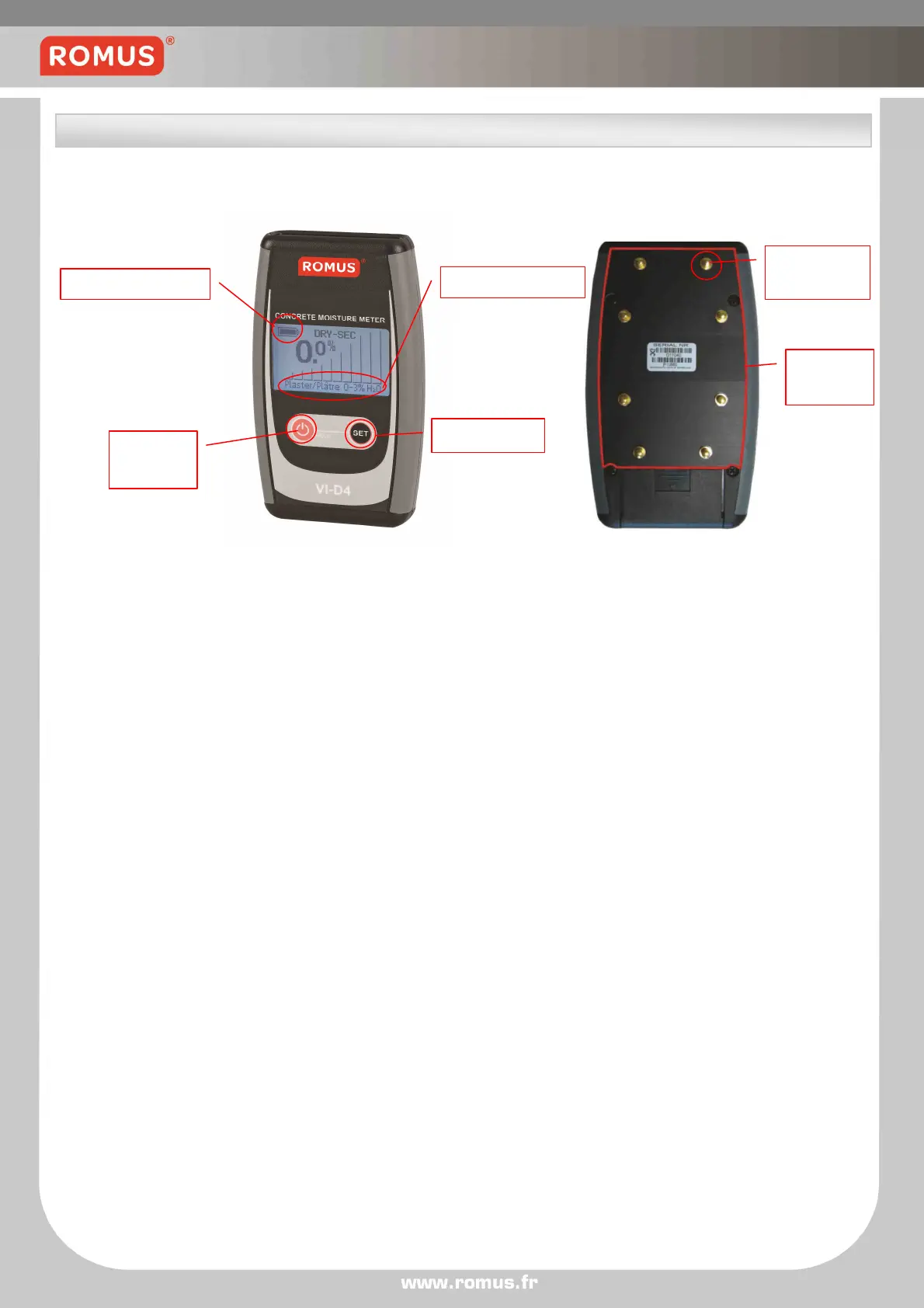
Picture below illustrates meter’s front and back panel with most important elements marked:
• To turn on the meter press ON/HOLD button.
• To set the scale press SET button. There are several available scales :
- Beton CM (0-6%H2O)
- Anhydrite Screed CM (0-3.5% H2O)
- 0.3-15.3 Scale (0.3-15.3m)
- Relative Scale (0-100%)
Name of chosen scale will appear in the scale indicator field.
To see detailed description of each scale go to Available scales section.
• To set the mode of measurement press ON/HOLD button. There are 2 available modes:
- Normal
- Max. Hold
The display color will change depending on which mode was chosen.
To see detailed description of each mode go to Modes & functions section.
ON/HOLD
Button
Set Button
Spring
Electrode
Sensor
Plate


 To Next Page