DVA-3210 7
DVD/VCD/CD-AUDIO PLAYBACK
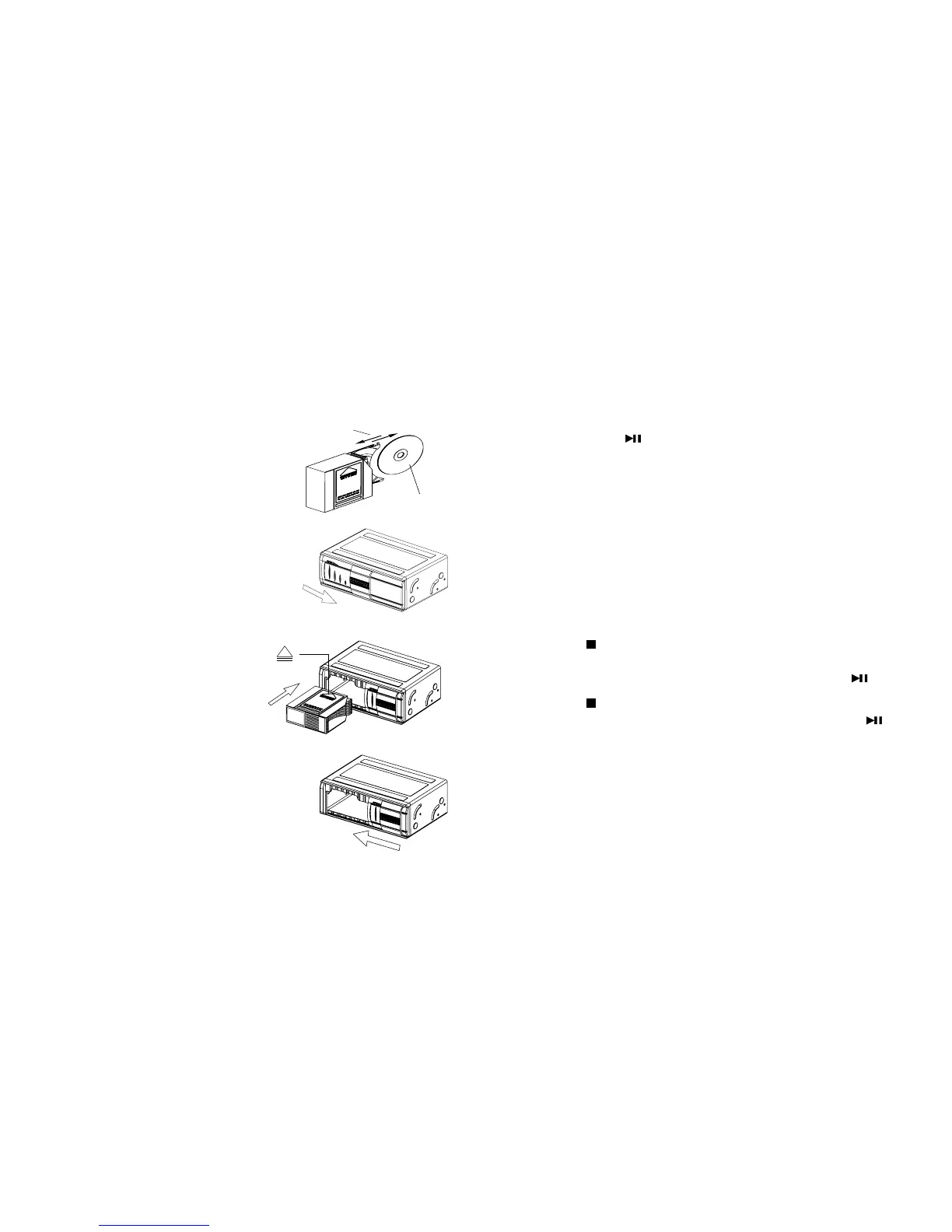
Inserting a DVD/VCD/CD
1 Insert discs label side down
into the magazine as shown.
2 Open the sliding door.
3 Insert the magazine as shown.
4 Close the sliding door.
Disc Playback
DVD playback will often begin automatically when the
magazine is inserted. With some DVD discs, you will need to
press [ENTER] or [ ] to begin playback.
CD-Audio discs will begin playback automatically.
CDs with MP3 files may require you to navigate the file
structure menu. For more information, see “MP3 Playback on
CD-R Discs.”
Stopping Playback
There are two ways to stop playback:
• Pressing [
] once will stop playback, and the 410X will
store the location last played on the disc. Playback can be
resumed at the same point on the disc by pressing [ ].
• Pressing [
] twice will stop playback and clear the 410X’s
memory of the last point played on the disc. Pressing [ ]
at this point will cause the 410X to begin playback from the
beginning of the disc.
Changing Discs
To change discs, use the [Next Disc]/[ Previous Disc]
buttons.
Data Side
Label Side
OPEN
CLOSE



 To Next Page