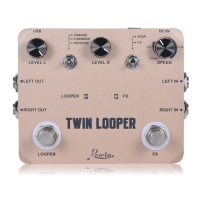
◆ Working Current:96mA
◆ Dimensions:75(d)*36(w)*26(h) mm
◆ Weight:133g
Mini loop station box
◆ DC In power Jack
◆ INPUT Jack
1/4” mono audio jack,
for connecting Guitar.
◆ USB interface
◆ OUTPUT Jack
◆ Mode switch
◆ Switch
◆ LED
DC 9V (negative in the
center )
Use to import file to the
box or export file from the
box, and also use to
upgrade fireware of the
box.
Indicate looper status.
Models:
●½SPEED: ½ speed
playback recording
●NORMAL: Forward play
●REVERSE: Reverse play
(Recording function
disable)
1/4” mono audio jack,
outputs the signal
Adjust the play output
volume.
ManualLooper Station
Operating Instructions
Specifications
◆ LEVEL Knob
OPERATION STATUS LED STATUS
Power on(no data) Empty Off
Power on(with data) Stop Green LED Flash
Tap footswitch(no data) Record Red Led light up
Tap footswitch when
recording/overdubbing
Play Green LED light up
Tap footswitch when playing Overdub Red Led light up
Hold footswitch when
playing/overdubbing
Undo/Redo
(last recording)
Green LED Flash fast
Hold footswitch when recording Delete Green LED Flash fast
Tap footswitch twice when
playing/recording/overdubbing
Stop Green LED Flash
Hold footswitch when stopped Delete Green LED Flash fast
Recording(around 10 minutes) Memory full,Play Green LED light up

 Need help?
 General

 To Next Page