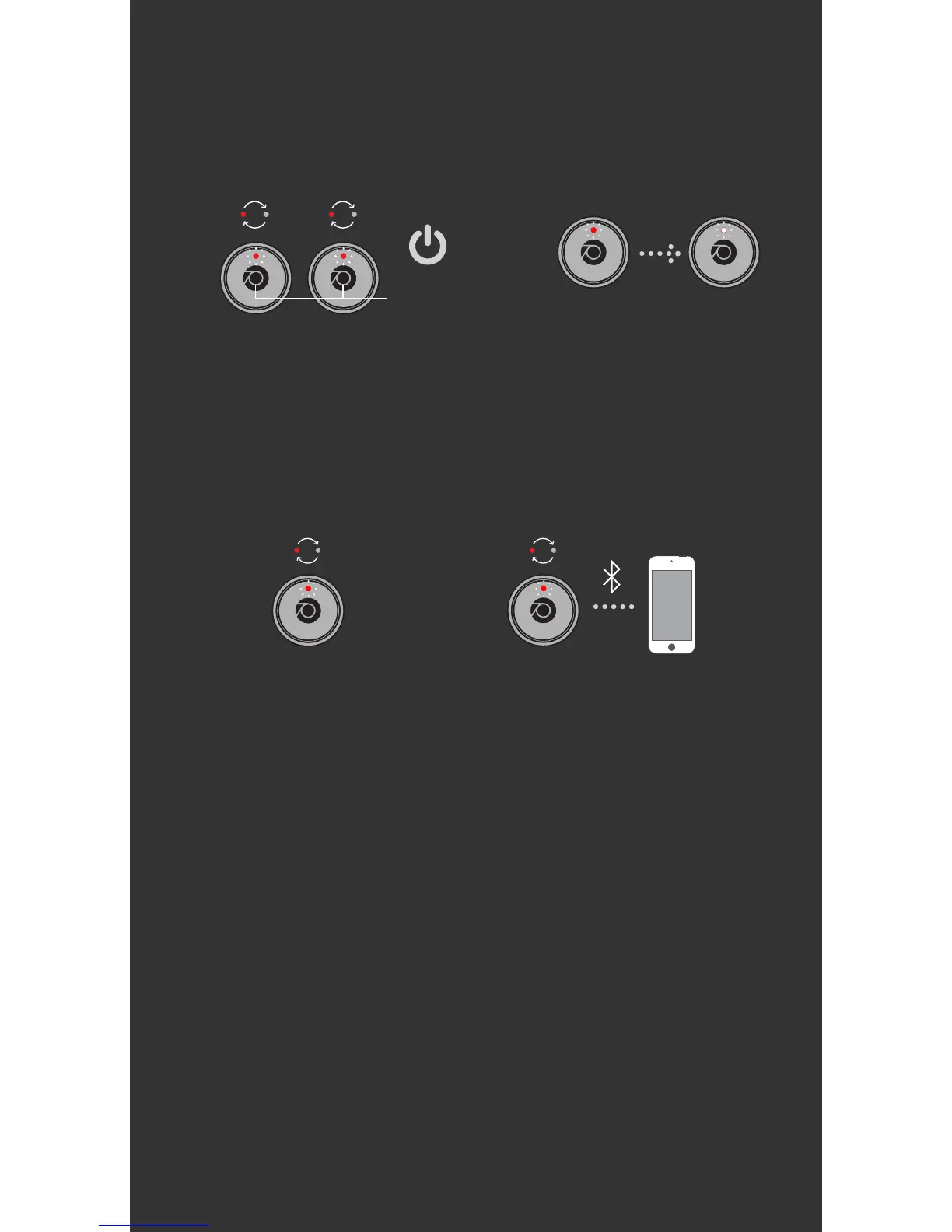
3. SYNC & PAIR YOUR EARBUDS
User Manual
For Subsequent Use:
• To Power ON: Simply take the earbuds out of
the case.
• To Power OFF: Place in the case. If you don’t
want to put the earbuds back in the case,
simply press and hold the button for 5 seconds
until you hear “Power Off".
Wait for
6-8 sec.
Wait
5 sec.
Primary
(Right Channel)
Primary
(Right Channel)
1. Take earbuds out of
case and place next
to each on a flat
surface. Be sure to
place on the ear tip or
on the side so you can
see the LEDs.
2. The Red LED will
be lit for 5 seconds.
While syncing, both
earbuds will flash
white.
3. Once the
earbuds are synced
to each other, the
Right earbud will
flash red and white
to indicate it has
entered pairing
mode.
4. Go to Bluetooth
settings on your
device and select
“Rowkin Bit Touch R.”
Once the LED stops
flashing on the Right
earbud, you are
connected and ready
to go.


 To Next Page