EasyManua.ls Logo

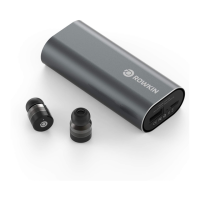
Rowkin BIT CHARGE TOUCH TRUE WIRELESS - User Manual

Rowkin BIT CHARGE TOUCH TRUE WIRELESS
10 pages
Print Icon
To Next Page IconTo Next Page
Loading...
BIT
CHARGE
TOUCH
TRUE WIRELESS
User Manual
All manuals and user guides at all-guides.com
all-guides.com
Question and Answer IconNeed help?

Do you have a question about the Rowkin BIT CHARGE TOUCH TRUE WIRELESS and is the answer not in the manual?

Summary

WHAT YOU GET

Included Items

Lists the contents of the product box, including earbuds, charger, and cable.

WHAT DOES WHAT

Right Earbud Functions

Details the touch controls and operations specific to the right earbud.

Left Earbud Functions

Outlines the touch controls and operations specific to the left earbud.

Common Earbud Controls

Explains functions applicable to either earbud, such as call management.

SYNC & PAIR YOUR EARBUDS

Pairing Procedure

Step-by-step guide for initial synchronization and Bluetooth pairing of the earbuds.

Post-Pairing Usage

Instructions for powering the earbuds on and off after the initial pairing process.

CHARGING AND BATTERY LEVELS

Charging the Device

Guide on how to charge the earbuds and the portable charging case.

External Device Charging

Information on using the charging case to power other USB devices.

Battery Indicator Guide

Explanation of the LED indicators for battery charge status.

HOW TO RESET

Resetting the Earbuds

Instructions for performing a factory reset on the earbuds.

Troubleshooting and Specifications

Troubleshooting Common Problems

Solutions for issues like sound quality, connectivity, and power.

Technical Specifications

Comprehensive details on dimensions, weight, battery, frequency response, and Bluetooth version.

Safety and Compliance

Usage Safety Guidelines

Precautions for responsible use, driving, and listening to prevent hearing damage.

Compliance Information

Details FCC, EU, and other regulatory compliance statements, plus disposal instructions.

Summary

WHAT YOU GET

Included Items

Lists the contents of the product box, including earbuds, charger, and cable.

WHAT DOES WHAT

Right Earbud Functions

Details the touch controls and operations specific to the right earbud.

Left Earbud Functions

Outlines the touch controls and operations specific to the left earbud.

Common Earbud Controls

Explains functions applicable to either earbud, such as call management.

SYNC & PAIR YOUR EARBUDS

Pairing Procedure

Step-by-step guide for initial synchronization and Bluetooth pairing of the earbuds.

Post-Pairing Usage

Instructions for powering the earbuds on and off after the initial pairing process.

CHARGING AND BATTERY LEVELS

Charging the Device

Guide on how to charge the earbuds and the portable charging case.

External Device Charging

Information on using the charging case to power other USB devices.

Battery Indicator Guide

Explanation of the LED indicators for battery charge status.

HOW TO RESET

Resetting the Earbuds

Instructions for performing a factory reset on the earbuds.

Troubleshooting and Specifications

Troubleshooting Common Problems

Solutions for issues like sound quality, connectivity, and power.

Technical Specifications

Comprehensive details on dimensions, weight, battery, frequency response, and Bluetooth version.

Safety and Compliance

Usage Safety Guidelines

Precautions for responsible use, driving, and listening to prevent hearing damage.

Compliance Information

Details FCC, EU, and other regulatory compliance statements, plus disposal instructions.

Rowkin BIT CHARGE TOUCH TRUE WIRELESS Specifications

General IconGeneral
BrandRowkin
ModelBIT CHARGE TOUCH TRUE WIRELESS
CategoryWireless Headphones
LanguageEnglish

Related product manuals