3. SYNC & PAIR YOUR EARBUDS
User Manual
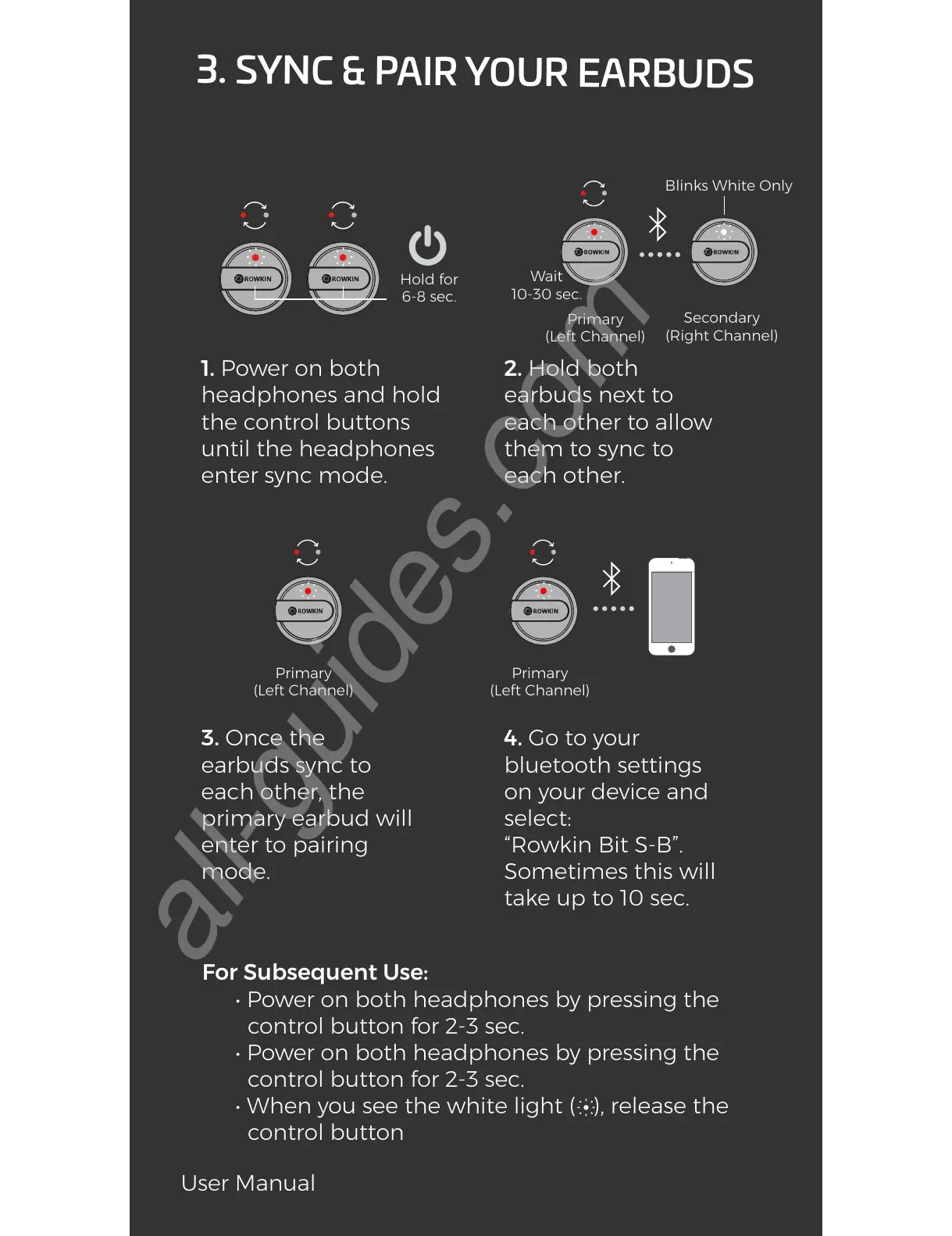
1. Power on both
headphones and hold
the control buttons
until the headphones
enter sync mode.
2. Hold both
earbuds next to
each other to allow
them to sync to
each other.
3. Once the
earbuds sync to
each other, the
primary earbud will
enter to pairing
mode.
For Subsequent Use:
• Power on both headphones by pressing the
control button for 2-3 sec.
• Power on both headphones by pressing the
control button for 2-3 sec.
• When you see the white light ( ), release the
control button
4. Go to your
bluetooth settings
on your device and
select:
“Rowkin Bit S-B”.
Sometimes this will
take up to 10 sec.
Hold for
6-8 sec.
Wait
10-30 sec.
Primary
(Left Channel)
Primary
(Left Channel)
Secondary
(Right Channel)
Blinks White Only
Primary
(Left Channel)


 To Next Page