EasyManua.ls Logo

Rowkin micro - Single Earbud and Multi-Device Pairing

Rowkin micro
10 pages
Print Icon
To Next Page IconTo Next Page
To Previous Page IconTo Previous Page
Loading...
Rowkin Bit S
Bluetooth
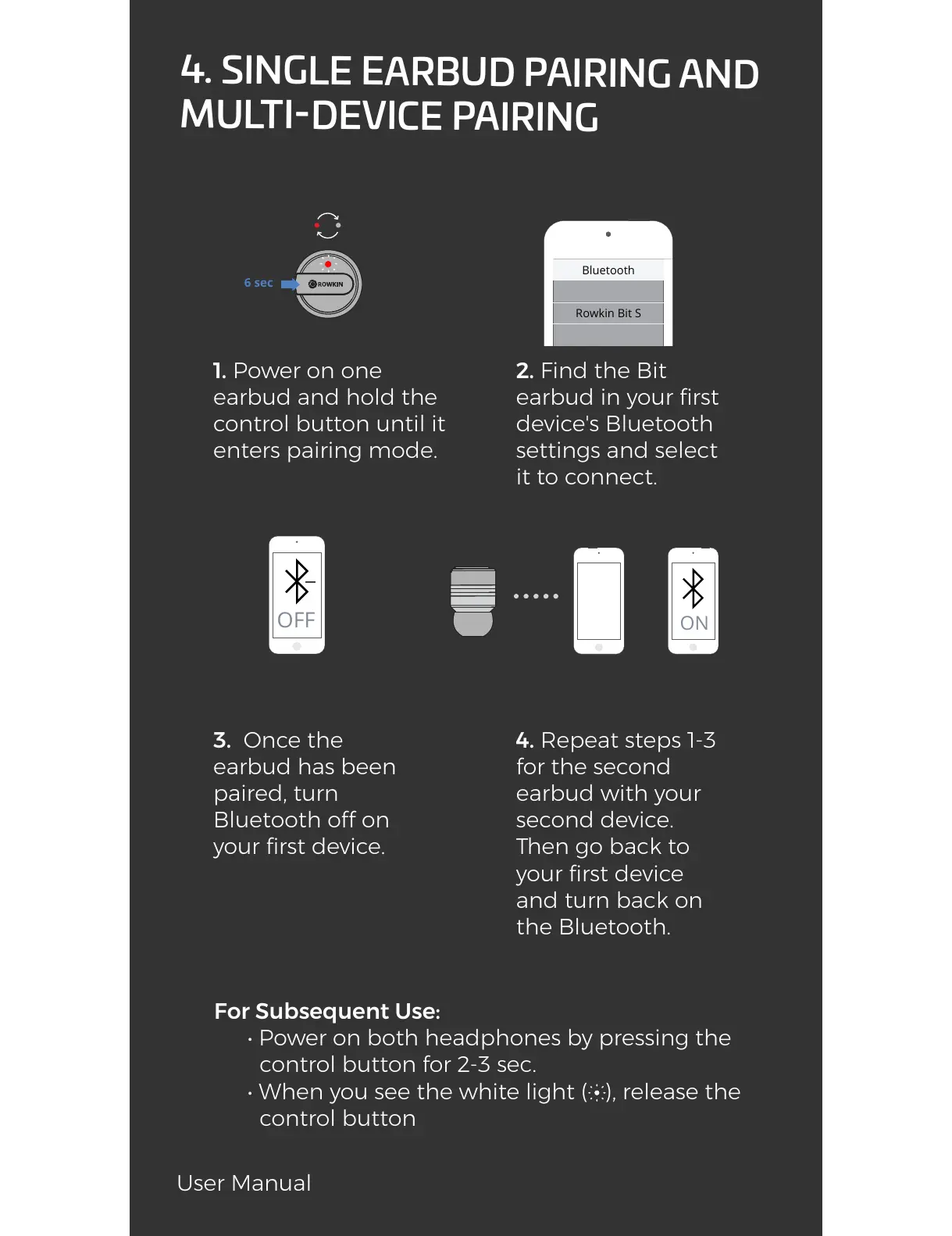
4. SINGLE EARBUD PAIRING AND
MULTI-DEVICE PAIRING
1. Power on one
earbud and hold the
control button until it
enters pairing mode.
2. Find the Bit
earbud in your first
device's Bluetooth
settings and select
it to connect.
3. Once the
earbud has been
paired, turn
Bluetooth off on
your first device.
For Subsequent Use:
• Power on both headphones by pressing the
control button for 2-3 sec.
• When you see the white light ( ), release the
control button
4. Repeat steps 1-3
for the second
earbud with your
second device.
Then go back to
your first device
and turn back on
the Bluetooth.
OFF
6 sec
ON
User Manual
All manuals and user guides at all-guides.com

Other manuals for Rowkin micro