2
3
ENGLISHENGLISH
Use
Power on/off
To start the headset, press the multifunction button for 2 seconds until the LED ashes
blue. Repeat the process to turn it off.
Charging
Connect the USB cable to the charging port and a computer or a USB power adapter.
The LED will shine red during charging and turn blue when the battery is fully charged.
Pairing
1. Keep your Bluetooth device within 1 metre of the earphones.
2. Make sure the headset is off.
3. Press and hold the multifunction button until the LED ashes red and blue.
4. Activate Bluetooth on your device. Search for nearby Bluetooth devices
and choose Flow A+ from the list (enter 0000 if asked for a password).
5. When the LED blinks blue 3-5 times and goes out your
device is ready and paired with the earphones.
Force pairing mode; make sure the headset is off, press and hold the Multifunctional
button to enter pairing mode.
Managing music
Press the multifunctional button to play/pause music or answer/hang up calls.
Press the Volume up or Volume down button to change volume.
Press and hold the Volume up button to skip track.
Press and hold the Volume down button to play previous track.
Overview
Frequency 20 - 20 kHz
Impedance 16Ω
Bluetooth 4.2
Range up to 10 m
Standby time up to 100 h
Talk/play time up to 3.5 h
Charge time 1.5 h
Charging Micro USB
Weight 24 g
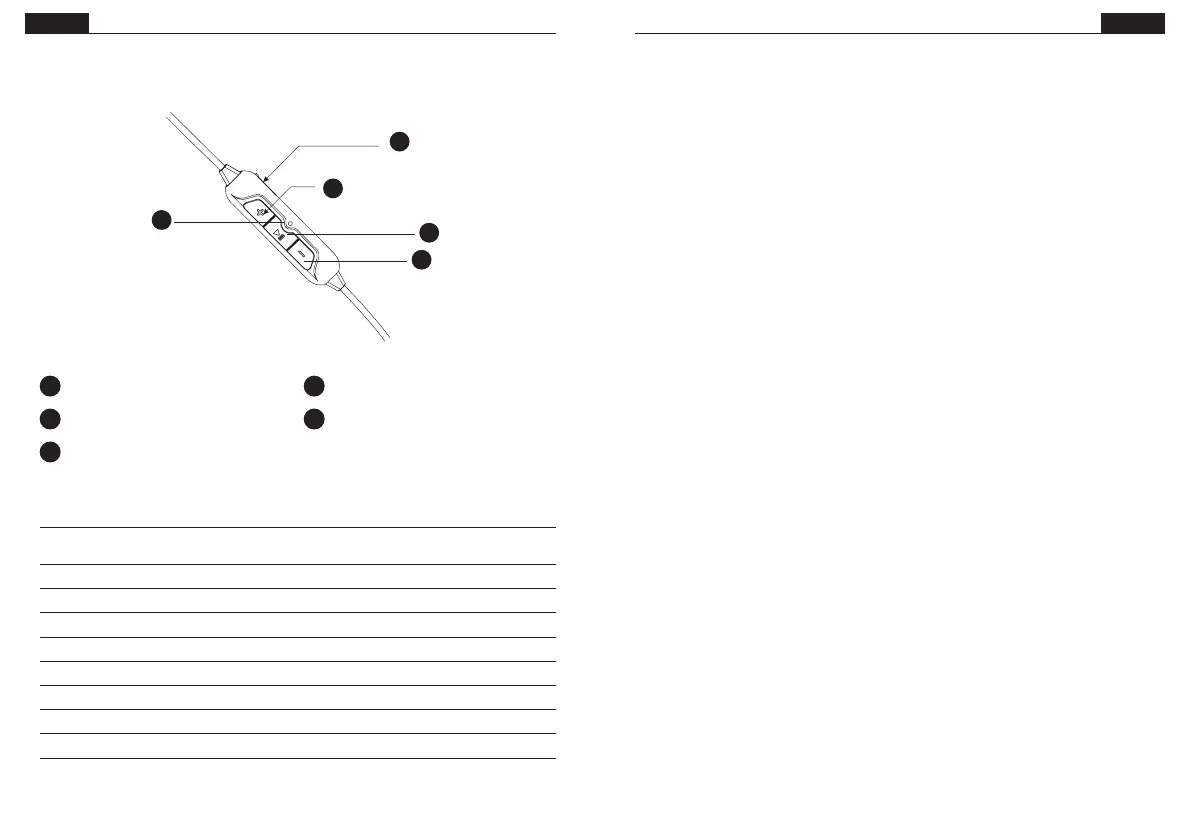
1 Volume up
2 Multifunctional button
3 Volume down
4 Micro USB port
5 LED
1
2
3
4
5


 To Next Page
 Loading...