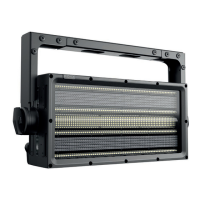
The ROXX CLUSTER B2 FC is a professional lighting fixture designed for event and stage lighting applications. It is a versatile and robust device, offering a wide range of features for various lighting needs.
Function Description
The CLUSTER B2 FC is a high-performance LED lighting fixture capable of producing a variety of colors and effects. It is designed for both horizontal and vertical clustering, allowing for seamless integration into larger lighting arrays. The fixture utilizes an integrated C-Lok system for toolless multiple array configurations, scaling from a single vertical line to massive matrix-like arrays. It supports DMX512-A standard (based on RS-485) and RDM (Remote Device Management) for control, enabling sophisticated lighting designs and monitoring. The device features a user-friendly OLED display with touch-sensitive controls for easy setup and configuration. It can operate in various DMX modes, including 1CH DWE, 2CH DWE, 4CH DWE, 9CH DWE+, 6CH STROBE, 6CH RGB, 10CH BASIC RGB, 14CH BASIC RGB, 13CH STANDARD RGB (default), 22CH STANDARD RGB, 24CH EXTENDED RGB, 33CH EXTENDED RGB, 10CH DIRECT, 12CH DIRECT, 17CH DIRECT, 24CH DIRECT, and 41CH DIRECT. It also offers Stand Alone functions with auto programs, LEE adjusted color macros, custom color templates, and Tunable White settings.
Important Technical Specifications
- Light Source: 2x 300W Red, Green, Royal Blue, Amber, Warm-White LED with Compound Eye Lens.
- LED Expected Lifetime: 50,000 hours.
- LED PWM Frequency: Selectable 800Hz, 1,200Hz, 2,000Hz, 3,600Hz, 12kHz, 25kHz.
- Beam Angles: 50° (50% field), 70° (10% field).
- Color Temperature Range: 2000-10,000K.
- CRI/Ra: 90 @ 5600K / 86 @ 2900K.
- Efficacy: 26.15 lm/W.
- Luminous Flux: 16.215 lm.
- Illuminance Lux:
- @ 1m / 3.3ft (@ 2900K): 17.801lx / 1654fcd
- @ 3m / 9.8ft (@ 2900K): 1920lx / 178fcd
- @ 5m / 16.4ft (@ 2900K): 721lx / 67fcd
- @ 7m / 23.0ft (@ 2900K): 398lx / 37fcd
- @ 10m / 32.8ft (@ 2900K): 198lx / 18fcd
- Cooling: Active, Forced Air, Temperature-regulated.
- Humidity (max.): 95%.
- Temperature Range (Operating): -40°C to 45°C.
- Temperature Range (Start-up): -20°C to 45°C.
- Temperature Range (Storage): -40°C to 80°C.
- Thermal Protection: Automatic overtemperature protection.
- AC Power: 90 – 285V 50/60Hz.
- AC Power (nominal): 100 – 240V 50/60Hz.
- Electrical Protection: Overload protection with automatic recover.
- Max Power Consumption (Boost Mode): 620W.
- Constant Power Consumption (Illumination Mode): 220W.
- Power Max. Out: 13A @ 230V / 9A @ 120V.
- Power Linking @ Max Power Consumption (Boost Mode): 4 units @ 230V / 1 unit @ 120V.
- Power Linking @ Constant Power Consumption (Illumination Mode): 15 units @ 230V / 6 units @ 120V.
- Power Factor: 0.974 PF (230V) / 0.996 PF (120V).
- Power Supply Unit: Inbuilt auto-ranging electronic switch-mode.
- IP Class: IP65.
- IK Class: IK08.
- Body Material: Aluminum, Nylon.
- Lens Material: Tempered glass front.
- Net Dimensions (w x h x d): 400 x 200 x 191mm.
- Net Dimensions (inches): 15.75 x 7.87 x 7.52 inches.
- Net Weight (incl. Yoke): 10.5kg (23.15lbs).
- Tilt: 180°.
- Tilt Locking System: Locking system with toothing and angle indicator.
- Included / Optional Accessories: Yoke 2.2, 2m Power Cable, Puk (included); Yoke 4.3, Yoke Floor Extension, Rigging Bracket, Omega Bracket ST (optional).
- Color Options: Black – RAL 9004 (Standard), Custom color – any RAL (on request).
- Mounting Point by Yoke (included): 3x 13mm / 1/2” holes, 1x centric TV Spigot attachement, 3x integrated Camlocks for Omega Brackets.
- Mounting Point on Fixture: 1/4 turn Omega Bracket on top and rear side.
- Mounting Point with optional Rigging Bracket: 2x 13mm / 1/2” holes for Clamp fixation.
- Orientation: Any.
- Rigging Possibilities: Hanging or ceiling / pendant mount.
- Safety Features: 2x rear mount for safety wire.
- Minimum Distance from flammable materials: 0.3 meters (11.8 inch).
Usage Features
The CLUSTER B2 FC is designed for ease of use and flexibility in various professional lighting environments.
- Start-up: Upon connecting to AC power, the fixture undergoes a boot process, displaying product name and software version. The display fans up quickly to blow out any possible dust from last use.
- Control Display: An OLED display with touch-sensitive controls allows users to access the settings menu, confirm changes, and navigate through options. Arrows are used to scroll up and down and change values, such as DMX address. The display surface is dry and dust-free for smooth navigation. The display automatically jumps back to the home screen after 1 minute of inactivity.
- Display Short Cuts: Recurring functions are accessible via quick and user-friendly shortcuts.
- User Reset or Factory Reset: A Factory Reset or User Reset can be performed by pressing ENTER and ESC simultaneously. Users can select between Factory Reset or User Reset using the up/down arrows and confirm with ENTER. Factory Reset sets all fixture settings to default values, while User Reset restores user-selected reset functions and user default values. A short self-test can also be started.
- Display Off: The display backlight can be turned off by pressing ESC and the up/down arrow simultaneously.
- Manual Display Flip Function: The display can be flipped 180 degrees by pressing both arrows simultaneously, which is useful for different mounting orientations.
- Quick Light Function: For quick and easy operation, the fixture includes a user-friendly Quick Light function (Daylight 5600 Kelvin). Press and hold ENTER for 3 seconds at the home screen to activate. Dimmer can be adjusted from 0-100% using up/down arrows.
- DMX Address Configuration: The DMX address can be changed directly from the Home Screen using up and down arrows. The display blinks to confirm, and if no changes are made within 10 seconds, the display jumps back to the home screen.
- Stand Alone Mode: Users can select from 5 different Stand Alone operating modes (Auto, Color Macro, Quick Color, Tunable White, User Color) and Stand Alone and Color Settings functions. These can be configured using UP/DOWN arrows and confirmed with ENTER. DMX is disconnected in this mode, giving priority to Stand Alone protocols.
- Auto Mode: This mode offers 10 different Auto Effects (Effect 1 - 10) and Stop Program. Users can select their preferred effect and adjust speed and brightness.
- Color Macro Mode: Offers 46 different color macros (34x matched LEE color filters, 6 LED colors, and 6 different Whites) as available presets.
- Quick Color Mode: The standalone mode "Quick Color" allows direct adjustment of the single LED colors R, G, B, A, W, Dimmer, and Shutter.
- Tunable White Mode: The standalone mode "Tunable White" allows color temperature (CCT) adjustment from 2.000K – 10.000K in 100K steps. Brightness and shutter also have +/- green and magenta correction.
- User Color Mode: Allows storage of up to 5 customized color presets out of Red, Green, Blue, Amber, White, brightness, and shutter.
- Color Settings Mode: Users can choose their preferred working color mode for all Stand Alone modes, either Color Calibration or RAW.
- Slave Mode: Allows multiple fixtures to be controlled by a "Master" fixture via DMX. The "Master" device runs in Stand Alone mode, and all "Slave" devices are set to "Slave".
- System Info: Displays firmware version, serial number, RDM UID, temperatures, power on time, LED on time, and errors.
- Mounting: The fixture can be installed in different ways: by integrated 1/4 turn Camlocks on top- or rear side, or by included yoke with several mounting points (3x Camlocks with 1/4 turn adapters, 3x M12 / 1/2", 1x TV Spigot). Optional ROXX RIGGING BRACKET can be used for seamless connection of multiple Blinders.
- Clustering: For seamless connection of multiple Blinders, to avoid gaps due to bracing of the truss structure by variable, sliding mounting positions. Pre-Link Magnets on top and side help to align the fixtures, giving an incredible user-friendly operation and safe interlocking. A specially designed rigging bracket is used for seamless connection of multiple Blinders, to avoid gaps due to bracing of the truss structure by variable, sliding mounting positions. Floor extensions can be used to create vertical structures in single or double rows.
Maintenance Features
- General Preventive Measures: Users are advised to read and follow instructions, store the instructions and information in a safe place, and follow all safety warnings.
- Cleaning: The device needs to be cleaned and serviced regularly. Dirt, dust, moisture, water, smoke, nicotine, or anything similar inside the unit will cause damage/malfunction.
- Power Supply: Ensure the correct voltage and frequency are available. If the plug doesn't fit, contact an electrician.
- Ventilation and Cooling: Always guarantee that ventilation and cooling slots are clean and not blocked.
- Cable Management: Item must be away minimum 20cm from anything around and above it. All cables need to be checked after connecting the device to prevent damage or accidents.
- Device Handling: Do not use this device close to water, do not expose it to flammable materials, and make sure no objects can fall into the device. Only use this device with accessories recommended by the manufacturer.
- Housing Damages: Always check the equipment for housing damages, as water can enter the device. No containers containing liquids of any kind should be placed on top of the unit.
- Opening and Modifying: Opening or modifying this device is only allowed by authorized and qualified persons.
- Transportation: Make sure the device is transported safe and packed properly to prevent damage of any kind.
- Troubleshooting: A troubleshooting section in the manual provides solutions for common problems such as device not responding, fuse defect, power failure, DMX cable issues, and strange operation.
- Firmware Update: The device supports firmware updates via USB port.
- Factory Reset / User Reset: These functions allow for resetting the device to factory defaults or user-defined settings, which can help resolve software-related issues.

 Need help?
 General

 To Next Page