ALARM MODE
To stop the alarm
Press (A) to stop the alarm after it starts to sound.
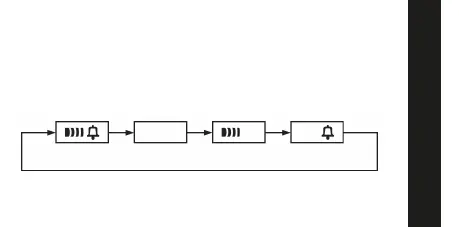
To switch the Daily Alarm and Hourly Time Signal on and off
Press (C) while in the Alarm Mode to change the status of the Daily Alarm
and Hourly Time Signal in the following sequence.
To test the alarm
Hold down (C) while in the Alarm Mode to sound the alarm.
Both ON Both OFF Daily alarm
only
Alarm ON indicator / Hourly Time Signal ON indicator
Hourly Time
Signal only



 To Next Page