Need help?
Do you have a question about the RoyalTek RBT-2210 and is the answer not in the manual?
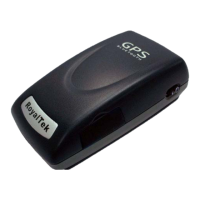
Provides a general introduction to the RoyalTek RBT-2210 Bluetooth GPS receiver.
Details the key technical specifications and capabilities of the GPS receiver.
Outlines important operational parameters like temperature ranges, battery life, and humidity.
Lists various use cases for the GPS receiver, including navigation and tracking.
Ensures all necessary items are present in the RBT-2210 package before proceeding.
Identifies the power switch, power jack, and external antenna port on the GPS device.
Explains the meaning of different LED colors and patterns for device status.
Details specific hardware components and their functions.
Step-by-step guide for initial setup and operation.
Provides instructions on how to safely remove and replace the internal battery.
Guides on connecting the car charger to the device and the vehicle's power outlet.
Instructions to install the PDA software from the CD using the 'Software for Pocket PC' option.
Instructions to install the PC software from the CD using the 'Software for Windows' option.
Instructions to install the Palm OS software from the CD using the 'Software for Palm OS' option.
Launch the RoyalTek GPS Demo application on the PDA from the Programs menu.
Explains the layout of the GPS Demo screen, including satellite views and data displays.
Details how to select the correct COM port or use automatic detection for GPS.
Specifies the recommended baud rate for the GPS connection, typically 57600.
Displays software version and copyright information for the GPS Demo application.
Allows the user to choose specific GPS operations from the menu.
Button or indicator to move to the subsequent screen in the application.
Explains how to initiate different GPS startup modes for faster fixes.
Allows customization of the NMEA data sentences transmitted by the GPS receiver.
Provides details about the GPS Demo software version and licensing.
Instructions to switch the display to show additional GPS bar chart information.
Launch the RoyalTek GPS Demo application on the PC from the Programs menu.
Explains the layout of the GPS Demo screen on a PC, including satellite and data views.
Details how to select the correct COM port or use automatic detection for GPS on PC.
Specifies the recommended baud rate for the GPS connection, typically 57600.
Displays software version and copyright information for the PC GPS Demo application.
Allows the user to choose specific GPS operations from the menu on the PC.
Button or indicator to move to the subsequent screen in the PC application.
Explains how to initiate different GPS startup modes for faster fixes on PC.
Allows customization of NMEA data sentences transmitted by the GPS receiver on PC.
Provides details about the PC GPS Demo software version and licensing.
Instructions to switch the PC display to show additional GPS bar chart information.
Launch the RoyalTek GPS Demo application on the Palm OS device from the Programs menu.
Explains the layout of the GPS Demo screen on Palm OS, including satellite and data views.
Details how to select the correct COM port or use automatic detection for GPS on Palm OS.
Specifies the recommended baud rate for the GPS connection, typically 57600.
Displays software version and copyright information for the Palm OS GPS Demo application.
Allows the user to choose specific GPS operations from the menu on Palm OS.
Button or indicator to move to the subsequent screen in the Palm OS application.
Explains how to initiate different GPS startup modes for faster fixes on Palm OS.
Provides details about the Palm OS GPS Demo software version and licensing.
Instructions to switch the Palm OS display to show additional GPS bar chart information.
Defines TTFF as Time to First Fix, encompassing cold, warm, and hot start methods.
Provides company contact details, website, and support information for RoyalTek.
The RoyalTek Bluetooth GPS Receiver, model RBT-2210, is a compact and lightweight device designed for wireless GPS navigation. It is the successor to the well-known RBT-2210 Bluetooth GPS receiver released in 2006. This receiver integrates a SiRF Star III GPS engine, known for its extreme fast Time To First Fix (TTFF) even at low signal levels.
The RBT-2210 serves as a wireless GPS receiver, providing location data to Bluetooth-enabled devices such as PDAs, cellular phones, and PCs. It supports NMEA0183 compliant protocol, making it compatible with a wide range of navigation software. The device is designed for various applications including PDA and cellular phone navigation, consumer wireless GPS, automotive vehicle tracking, personal positioning, and sporting and recreation. Its Bluetooth connectivity allows for flexible placement within a vehicle or on a person, transmitting GPS data wirelessly to the paired device running navigation software.
The RBT-2210 is designed for ease of use with clear indicators and straightforward setup.


 To Next Page

 General