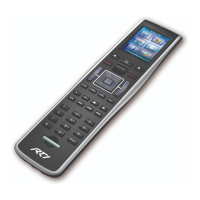
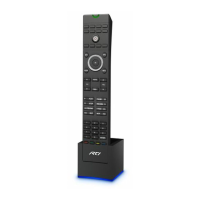
T1-B+
Reference Guide
Wireless Controller
It’s Under Control
®
70-210135-19 V1.1
T1-B+
Wireless Controller
Key Features
Completely customizable and programmable, the T1-B+ allows all other factory
remote controls to be combined into one simple, ergonomic user interface
providing powerful one-handed system control. Featuring a sleek industrial
design and perfect assortment of keypad buttons, the T1-B+ easily operates
today’s sophisticated media system, no matter how complex.
The T1-B+ comes loaded with the following features and much more:
• Dual RF capability uses 433MHz and 2.4GHz (utilizing Zigbee
®
technology).
• Eight source and four general purpose assignable/programmable keypad
buttons with keycap labels.
• Transmits IR and RF (or both - on a single button press!).
• Optional RF receiver allows you to transmit through walls, cabinets, etc.
• System includes a Lithium-Ion battery and docking station.
• Docking station backlight may be disabled.
Safety Suggestions
Read and Follow Instructions. Read all safety and operating instructions before
operating the unit.
Retain Instructions. Keep the safety and operating instructions for future
reference.
Heed Warnings. Adhere to all warnings on the unit and in the operating
instructions.
Heat. Keep the unit away from heat sources such as radiators, heat registers,
stoves, etc., including ampliers that produce heat.
Power Sources. Use only batteries of the type described in the operating
instructions, or as marked on the unit.
Water and Moisture. Do not use the unit near water—for example, near a sink,
in a wet basement, near a swimming pool, near an open window, etc.
Object and Liquid Entry. Do not allow objects to fall or liquids to be spilled into
the enclosure through openings.
Servicing. Do not attempt any service beyond that described in the operating
instructions. Refer all other service needs to qualied service personnel.
Damage Requiring Service. The unit should be serviced by qualied service
personnel when:
• Objects have fallen or liquid has been spilled into the unit.
• The unit has been exposed to rain.
• The unit does not appear to operate normally or exhibits a marked change in
performance.
• The unit has been dropped or the enclosure has been damaged.
Product Contents
Contents within the box include the following items:
• One (1) T1-B+ universal system controller
• One (1) Docking station
• One (1) International 5V/2A power supply for docking station
• One (1) Reference guide
• Two (2) Keycap clusters (32 keycaps per cluster)
• One (1) Wall-mount bracket
• Three (3) Mounting screws for wall-mount bracket
• Two (2) Drywall anchors
• One (1) Lasershark Notication
• One (1) Firmware Update Notication
Limited Warranty
RTI warrants its products for a period of three (3) years (one year for included
battery packs); or for a period of time compliant with local laws when applicable
from the date of purchase from RTI or an authorized RTI distributor.
This warranty may be enforced by the original purchaser and subsequent owners
during the warranty period, so long as the original dated sales receipt or other
proof of warranty coverage is presented when warranty service is required.
Except as specied below, this warranty covers all defects in material and
workmanship in this product. The following are not covered by the warranty:
Damage resulting from:
1. Accident, misuse, abuse, or neglect.
2. Failure to follow instructions contained in this Guide.
3. Repair or attempted repair by anyone other than Remote Technologies
Incorporated.
4. Failure to perform recommended periodic maintenance.
5. Causes other than product defects, including lack of skill, competence or
experience of user.
6. Shipment of this product (claims must be made to the carrier).
7. Being altered or which the serial number has been defaced, modied or
removed.
For news about the latest updates, new product information, and new
accessories, please visit our web site at: www.rticorp.com
For general information, you can contact RTI at:
Remote Technologies Incorporated
5775 12th Avenue East, Suite 180
Shakopee, MN 55379
Tel. (952) 253-3100
Fax (952) 253-3131
Contacting RTI
If you are encountering any problems or have a question about your RTI
product, please contact RTI Technical Support for assistance (see the Contacting
RTI section of this guide for contact details).
RTI provides technical support by telephone or e-mail. For the highest quality
service, please have the following information ready, or provide it in your e-mail.
• Your Name
• Company Name
• Telephone Number
• E-mail Address
• Product model and serial number (if applicable)
If you are having a problem with hardware, please note the equipment in your
system, a description of the problem, and any troubleshooting you have already
tried.
If you are having a problem with software, please note what version you have
installed, the operating system on your PC, a description of the problem, and
any troubleshooting you have already tried. If you are calling about a software
or programming question or problem, please be at your computer when you
place your call. This will considerably speed up the troubleshooting process.
*Please do not return products to RTI without return authorization.*
Service & Support
This equipment has been tested and found to comply with the limits for a Class
B digital device, pursuant to Part 15 of the FCC Rules. These limits are designed
to provide reasonable protection against harmful interference in a residential
installation. Any changes or modications not expressly approved by the party
responsible for compliance could void the user’s authority to operate the device.
This equipment generates, uses, and can radiate radio frequency energy and, if
not installed and used in accordance with the instructions, may cause harmful
interference to radio communications. However, there is no guarantee that
interference will not occur in a particular installation.
If this equipment does cause harmful interference to radio or television
reception, which can be determined by turning the equipment off and on, the
user is encouraged to try to correct the interference by one or more of the
following measures:
• Reorient or relocate the receiving antenna.
• Increase the separation between the equipment and the receiver.
• Connect the equipment into an outlet on a circuit different from that to
which the receiver is connected.
• Consult the dealer or an experienced radio/TV technician for help.
This device complies with Part 15 of the FCC Rules. Operation is subject to the
following two conditions:
1. This device may not cause harmful interference.
2. This device must accept any interference received including interference
that may cause undesired operation.
N27917
DECLARATION OF CONFORMITY (DOC)
The Declaration of Conformity for this product can be found on the RTI website
at: www.rticorp.com/declaration
Contains:
FCC ID: MMURTI1500, IC:3166A-1500
Federal Communications Commission Notice
Copyright © 2018 • Remote Technologies Incorporated • All rights reserved.

 Need help?
 General

 To Next Page