User Manual, DKP-8, DKP-12 and KP-12 Keypanels with Push-button Keys 11
9 0
*
#
1 2 3 4 5 6 7 8
HDST
SPKR
PRGM
CALL MENU
SELECT VOLUME
EGM
DKP-12
TELEX COMMUNICATIONS, INC.
MADE IN U.S.A.
SERIAL NO.
FRAME EXP
90 - 264 VAC 47/63Hz
Telex
®
TM
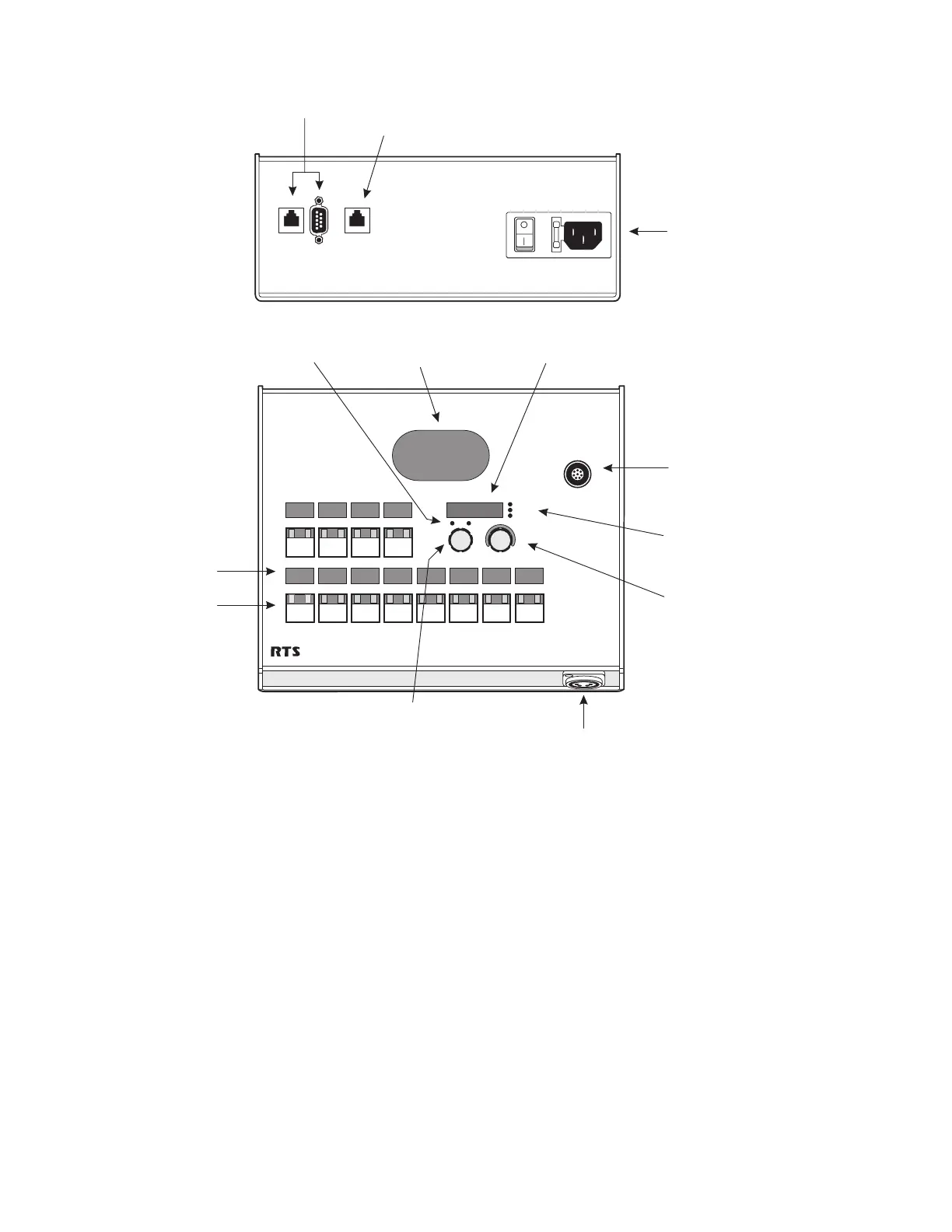
Alpha-numeric
Displays
Call Waiting Window
Call and Menu
Indicators
Headset, Speaker,
and Program Indicators
Panel Microphone
Jack
Talk/Listen Keys
Speaker
Fused AC Power
Connector with
On / Off Switch
(97-264 VAC, 47 / 63 Hz)
Headset
Jack
Menu SELECT Control
Intercom
Connectors
Expansion
Panel
Connector
VOLUME Control &
Headset / Speaker / Program
Select
Figure 2. DKP-12 Keypanel Reference View (Push-button version shown)
☞
Although the DKP-12 has an Expansion Connector for connection of Expansion Panels and
Level Control Panels, this feature is generally not used, since the DKP-12 is a desktop unit,
while Expansion Panels and Level Control Panels are designed for rack mounting.


 To Next Page