EN-7
EN
DA
DE
FR
IT
ES
NL
NO
KR
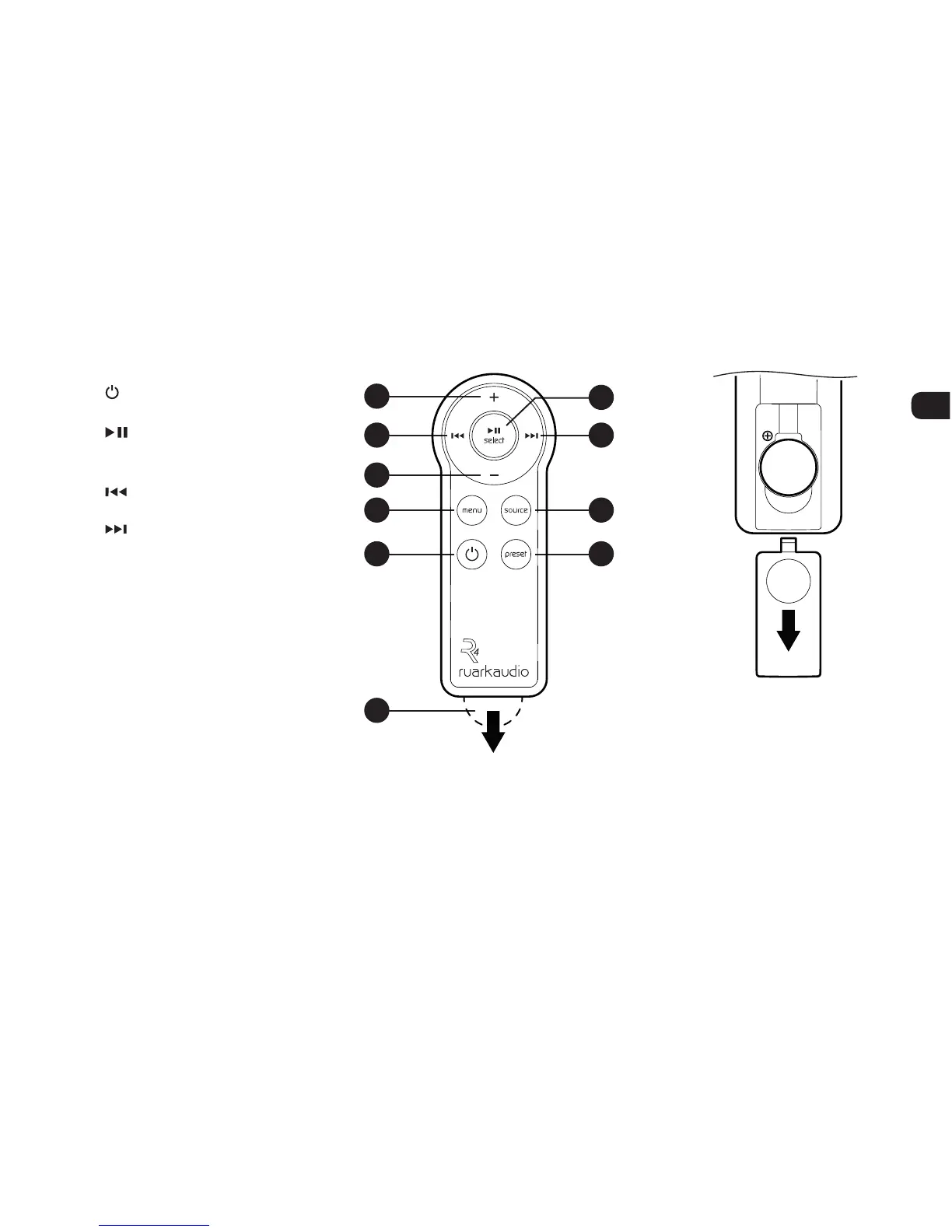
34. (STANDBY) – press to
power on or off the radio
35.
/ SELECT – Press to play/
pause a track or mute radio or
to select a menu item
36.
– press to skip to previous
station/track/menu option
37. – press to skip to next
station/track/menu option
38. SOURCE – press to change
audio source
39. MENU – press to show the
menu or navigate back to the
previous menu or folder
40. VOL – press + or - to change
the volume
41. PRESET – press to recall a
saved station or press and
hold for two seconds to save a
radio station.
Remote control
Fitting battery
1. Press and slide the battery
cover to remove it
2. Replace the CR2032
Lithium coin cell by sliding
it under the spring contact,
ensuring the at side
marked with + faces up
3. Slide the battery cover back
36 37
35
38
41
40
40
39
34
42
CR2032
NOTE: before using your
remote for the first time
you must remove the
orange plastic tab (42) to
activate the battery.
PULL


 To Next Page