EasyManua.ls Logo

Rubicson 48421 - Managing Available Sensors; Sensor Information and Indicators; Sensor Settings Configuration; App Settings and Specifications

Default Icon
5 pages
Print Icon
To Next Page IconTo Next Page
To Previous Page IconTo Previous Page
Loading...
tLitilm
Load
saved
settings
There
are
two
available
menus
for
settings
(
USDA
Temperature
.
Tempura
0
-
1
Temperature
)
.
Beneath
is
a
list
of
your
own
saved
settings
(
User
Gusto
p
:
Remove
saved
settings
by
dragging
it
to
the
left
and
choose
delete
(
IOS
)
or
hold
the
settings
and
choose
delete
(
Android
)
.
Settings
Press
the
cog
symbol
on
the
front
page
to
reach
the
main
settings
Choo
e
wh
temperature
unit
to
display
.
Choose
"
Roset
All
Data
"
to
return
to
default
s
Specifications
Wireless
technology
Temperature
range
Temperature
unit
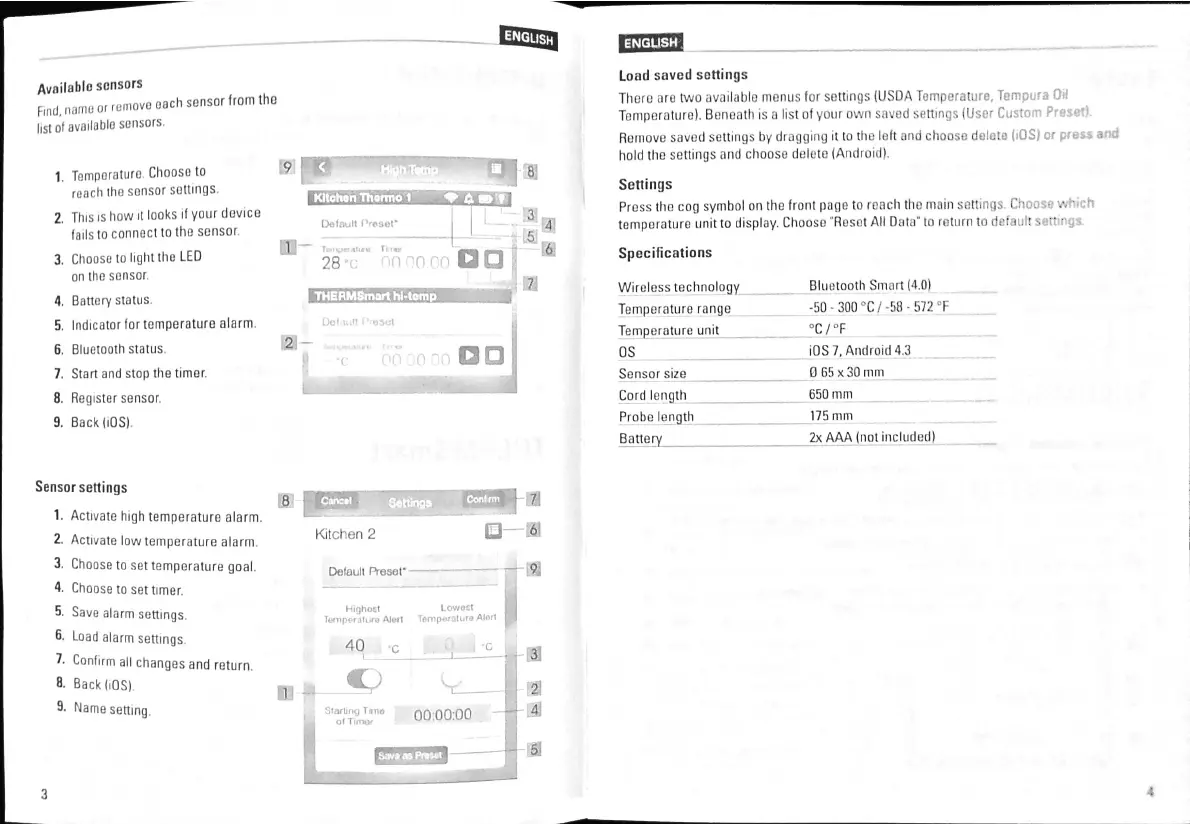
Available
sensors
Find
,
name
or
i
_
list
of
availablo
sensors
.
remove
each
sensor
from
tho
9
1
.
Tomporaturo
Choose
to
roach
tho
sonsor
soilings
.
2
.
This
is
how
it
looks
if
your
device
fails
to
connect
to
the
sensor
3
.
Choose
to
light
tho
LED
on
tho
sonsor
.
4
.
Battery
status
.
5
.
Indicator
for
temperature
alarm
6
.
Bluetooth
status
.
7
.
Start
and
stop
the
timer
.
8
.
Register
sensor
.
9
.
Back
(
iOS
)
Kitchon
Thermo
1
Default
Preset
*
n
-
,
Ti
iw
.
1
V
"
»
'
>
*
«
28
Bluetooth
Smart
(
4.0
)
-
50
-
300
°
C
/
-
58
-
572
°
F
°
C
/
°
F
iOS
7
,
Android
4.3
0
65
x
30
mm
650
mm
175
mm
2
x
AAA
(
not
included
)
THERMSmart
hl
-
tomp
Dot
lull
Pn
©
5
et
2
-
os
on
*
c
Sensor
size
Cord
length
Probe
length
Battery
Sensor
settings
1
.
Activate
high
temperature
alarm
.
2
.
Activate
low
temperature
alarm
3
.
Choose
to
set
temperature
goal
.
4
.
Choose
to
set
timer
.
5
.
Save
alarm
settings
.
6
.
Load
alarm
settings
7
.
Confirm
all
changes
and
return
.
8
-
Back
(
iOS
)
.
9
-
Name
setting
.
m
8
:
r
J
6
:
Kitchen
2
T
9
Dofaull
Preset
*
Highoct
Lov
/
oct
Temperature
Alert
Tempornturo
Alort
I
\
MLsJ
m
40
c
IB
-
-
2
-
4
-
4
Starling
Tana
of
Timor
00
:
00
:
00
-
B
4
3

Related product manuals