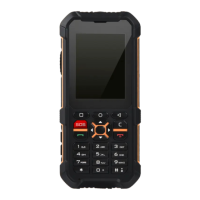
Need help?
Do you have a question about the RugGear RG100 and is the answer not in the manual?
Addresses potential phone safety compromises and immediate actions required.
Details important precautions for phone usage, charging, and environmental conditions.
Provides detailed technical specifications including frequencies, memory, processor, and IP rating.
Offers solutions for common phone issues like not powering on or insufficient standby time.
Details the device's compliance with international guidelines for radio wave exposure.
Lists the highest SAR values for head and body-worn conditions according to ICNIRP guidelines.
 General
| Dimensions | 145 x 75 x 13.5 mm |
|---|---|
| Weight | 210 g |
| Display Size | 5.0 inches |
| Memory Card slot | microSD, up to 32 GB |
| Phonebook | Yes |
| Call records | Yes |
| Alert types | Vibration; MP3, WAV ringtones |
| Loudspeaker | Yes |
| 3.5mm jack | Yes |
| WLAN | No |
| Radio | FM radio |
| USB | microUSB 2.0 |
| Games | Yes |
| Java | Yes |
| Battery | Removable Li-Ion 1800 mAh battery |
| Talk time | Up to 12 h |
| Front Camera | No |
| Battery Capacity | 1800 mAh |
| Expandable Memory | microSD, up to 32 GB |
| SIM | Dual SIM (dual stand-by) |
| Resolution | 240 x 320 pixels |
| Bluetooth | A2DP |
| Messaging | SMS, MMS |
| Protection | IP67 dust/water resistant (up to 1m for 30 min) |
| Network | GSM |
| Browser | WAP |


 To Next Page