
 Need help?
Do you have a question about the Ruijie Networks RG-EW1200G PRO and is the answer not in the manual?
 General
| Frequency Bands | 2.4 GHz, 5 GHz |
|---|---|
| Antenna Type | External |
| Antennas | 4 |
| MU-MIMO | Yes |
| Wireless Standards | IEEE 802.11a/b/g/n/ac |
| WAN Ports | 1 x 10/100/1000Mbps |
| Security | WPA-PSK/WPA2-PSK |
| Maximum Wireless Speed | 1267 Mbps (400 Mbps at 2.4 GHz, 867 Mbps at 5 GHz) |
| Ethernet Ports | 3 x 10/100/1000 Mbps LAN |
Device offers 4 Gigabit Ethernet ports and wireless rates up to 1267M with a dual-core CPU.
Supports 2.4GHz and 5GHz bands for better performance and user experience.
Increases 2.4GHz band access rate to 400Mbps for more smart device connections.
Supports 802.11ac Wave2 MU-MIMO for concurrent transmission to multiple terminals.
Features independent FEM design for improved signal reception and coverage.
Enables plug-in and one-key pairing for easy multi-device network setup.
Supports seamless roaming and fast switching between 2.4GHz and 5GHz bands.
Allows parents to control internet access and set usage limits via Ruijie Cloud App.
Enhances Wi-Fi performance to reduce game delays and improve user experience.
Enables temporary authorization for remote network inspection and diagnosis.
Features metal sheet for heat dissipation, ensuring stable operation at high speeds.
Supports deployment with Ruijie Reyee enterprise gateways and APs for unified management.
Details wireless capabilities including bands, rates, antennas, and protocols.
Lists WAN and LAN ports, indicators, reset button, and power input.
Provides dimensions and weight of the router.
Specifies power input requirements and maximum power consumption.
Lists the product's certification.
Details operating temperature and humidity ranges.
Covers routing modes, Wi-Fi features, DHCP, DDNS, and UPnP.
Details wireless security protocols, ARP protection, SSID hiding, and access control.
Includes Easy Link, Wi-Fi optimization, bandwidth management, and auto network inspection.
Outlines local web page and cloud management options via MACC and Ruijie Cloud app.
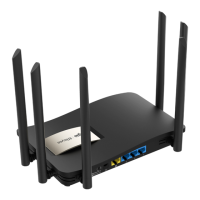
Details the router's physical layout and port identification.
Lists all accessories and components included with the router.
Step-by-step guide for initial setup, connecting to the internet, and configuration.

 To Next Page