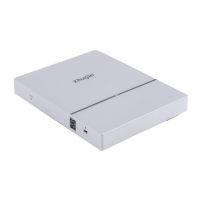
The Ruijie RG-AP720-L Series Access Points are designed for wireless network deployment, offering robust performance and a range of features suitable for various environments. These access points support the 802.11ac Wave2 standard, providing dual-radio dual-band performance with speeds up to 1.167Gbps per device. They are ideal for a variety of scenarios, including large-scaled campuses, governments, financial services, and enterprises, where reliable and high-speed wireless connectivity is crucial.
Function Description
The Ruijie RG-AP720-L Series Access Points serve as a central component in a wireless network, enabling devices to connect to the network and access resources. They support both 2.4GHz and 5GHz frequency bands, ensuring compatibility with a wide range of wireless clients and optimizing network performance by utilizing the less congested 5GHz band. The devices are designed for indoor installation, offering flexible deployment options such as ceiling or wall mounting.
Key functions include:
- Wireless Connectivity: Provides high-speed Wi-Fi access according to 802.11ac Wave2 standards, supporting 2x2 MIMO for efficient data transmission.
- Dual-Band Operation: Operates on both 2.4GHz (802.11b/g/n) and 5GHz (802.11a/n/ac) frequencies, allowing for flexible client connections and reduced interference.
- Power over Ethernet (PoE) Support: Can be powered via an Ethernet cable (IEEE 802.3af/at), simplifying installation and reducing cabling requirements.
- Console Port: Includes a Micro USB Console port (V1.XX) or RJ45 Console port (V2.XX) for local management and configuration.
- LED Indicators: Provides visual feedback on the device's status, including power, initialization, Ethernet activity, and wireless client association.
- Reset Button: Allows for device reboot or restoration of default settings.
Important Technical Specifications
The RG-AP720-L Series Access Points come in two main versions, V1.XX and V2.XX, with slight differences in specifications.
Radio:
- RF: 2.4GHz: 2 x 2MIMO; 5GHz: 2 x 2MIMO
- Transmission Protocol: Support concurrent 802.11b/g/n and 802.11a/n/ac.
- Operating Bands: 802.11b/g/n: 2.4 GHz to 2.4835 GHz; 802.11a/n/ac: 5.15 GHz to 5.35 GHz, 5.47 GHz to 5.725 GHz, 5.725 GHz to 5.85GHz (Depending on which country the AP is installed).
- Antenna: Built-in antenna.
- Spatial Streams: 2.
- Access Rates: 2.4GHz: up to 300Mbps; 5GHz: up to 867Mbps; Total: up to 1.167Gbps.
Modulation:
- OFDM: BPSK@6/9Mbps, QPSK@12/18Mbps, 16-QAM@24Mbps, 64-QAM@48/54Mbps.
- DSSS: DBPSK@1Mbps, DQPSK@2Mbps, and CCK@5.5/11Mbps.
- MIMO-OFDM: BPSK, QPSK, 16QAM, 64QAM and 256QAM.
Receive Sensitivity (example for 5GHz):
- 11a/g: -89dBm (6Mbps), -80dBm (24Mbps), -76dBm (36Mbps), -71dBm (54Mbps).
- 11n: -83dBm@MCS0, -65dBm@MCS7, -83dBm@MCS8, -65dBm@MCS15.
- 11ac HT20: -83dBm (MCS0), -57dBm (MCS9).
- 11ac HT40: -79dBm (MCS0), -57dBm (MCS9).
- 11ac HT80: -76dBm (MCS0), -51dBm (MCS9).
Maximum Transmit Power: 20 dBm (Depending on the country of use, laws and regulations).
Transmit Power Adjustment: 1 dBm.
Physical Dimensions:
- 194 mm x194 mm x 37 mm (7.64in x7.64in x 1.46in).
- Weight: 0.42 kg.
Service Ports: One 10/100/1000BASE-T Ethernet port (PoE-capable).
Management Ports:
- V1.XX: One Micro USB Console port.
- V2.XX: One RJ45 Console port.
- Button: One Reset button.
- LED: 1 LED (red, green, blue, orange, and flashing modes, flashing mode for smart device access, and the indicator can be switched off to silent mode).
Power Supply:
- V1.XX: Adapter: DC 5V/3A (optional); PoE: IEEE 802.3af.
- V2.XX: Adapter: DC 12V/1.5A (optional); PoE: IEEE 802.3af.
- Maximum Power Consumption: 12.95W.
Environmental Specifications:
- Temperature: Operating: -10°C to 50°C (14°F to 122°F); Storage: -40°C to 70°C (-40°F to 158°F).
- Humidity: Operating: 5% to 95% RH (non-condensing); Storage: 5% to 95% RH (non-condensing).
- Installation: Ceiling/wall mount.
- IP Rating: IP41.
Safety Standards: GB4943, IEC 60950-1, GB9254, EN300 389, EN 50155, EN 50121, EN 55032, EN 61000, EN 55035.
Vibration Standards: IEC61373.
Radio: EN300 328, EN301 893.
MTBF: >400,000H.
Usage Features
The RG-AP720-L Series Access Points are designed for ease of installation and operation, with features that enhance user experience and network reliability.
- Flexible Installation: Supports both ceiling and wall mounting, allowing for optimal placement within an indoor environment. The installation process involves securing a mounting bracket and then attaching the AP to the bracket.
- PoE for Simplified Deployment: The ability to power the AP via Power over Ethernet (PoE) eliminates the need for separate power outlets, reducing cabling complexity and installation costs. Users should ensure their PoE device supports the IEEE 802.3af/at standard.
- LED Indicators for Status Monitoring: The single LED indicator provides clear visual cues about the AP's operational status. Different colors and blinking patterns signify various states, such as:
- Off: No power or Do Not Disturb mode.
- Blinking green (3Hz): uBoot program initialization.
- Solid green: Main program initialization.
- Blinking red (3Hz): Initialization complete, but no Ethernet activity.
- Solid blue: Normal operation, no wireless clients associated.
- Blinking blue (3Hz): Normal operation, at least one wireless client associated.
- Blinking orange (Fit AP mode): Firmware upgrade in progress.
- Console Port for Local Management: The console port (Micro USB or RJ45) allows for direct connection to a computer for command-line interface (CLI) configuration and troubleshooting, which is particularly useful during initial setup or in scenarios where network access is unavailable.
- Fanless Design: The fanless cooling solution ensures silent operation, making the AP suitable for noise-sensitive environments. It also reduces the number of moving parts, potentially increasing reliability.
- Environmental Resilience: Designed to operate within a wide range of temperatures (-10°C to 50°C) and humidity levels (5% to 95% RH non-condensing), ensuring stable performance in various indoor conditions.
- Security Features: The device can be optionally secured with a hidden lock mechanism, providing physical protection against unauthorized removal.
- Cable Management Recommendations: The manual provides guidelines for proper cable bundling and routing to prevent damage, ensure optimal signal quality, and maintain a tidy installation. This includes recommendations for minimum cable bend radius and avoiding excessive cable lengths.
Maintenance Features
Maintaining the Ruijie RG-AP720-L Series Access Points involves monitoring their status, performing necessary configurations, and addressing any issues that may arise.
- LED Monitoring: The LED indicator is a primary tool for quick status checks. Understanding the different LED states allows administrators to quickly identify if the AP is powered on, initializing, operating normally, or experiencing issues like lack of Ethernet connectivity or firmware upgrades.
- CLI Commands for Monitoring and Configuration: The command-line interface (CLI) provides comprehensive tools for monitoring the AP's performance, checking configurations, and managing the device. This can be done locally via the console port or remotely via Telnet if the AP is operating as a Fat AP or managed by an AC.
- Remote Maintenance: For APs operating as Fat APs, remote login via Telnet is possible for maintenance. For Fit APs, management is typically handled centrally by an Access Controller (AC).
- Troubleshooting Flowchart: The manual includes a troubleshooting flowchart to guide users through common issues, such as the AP not working after installation, power supply problems, LED indicator issues, or cable connection problems.
- Power Supply Verification: Regular checks of the power supply (either DC adapter or PoE) are crucial. For PoE, verifying compliance with IEEE 802.3af/at standard is essential.
- Cable Connection Checks: Ensuring all cable connections are secure and properly fastened is a fundamental maintenance step to prevent intermittent connectivity or performance degradation.
- Environmental Considerations: Maintaining the recommended operating environment, including temperature, humidity, and proper ventilation, is vital for the long-term reliability of the fanless AP. Sufficient space around the AP should be maintained to permit airflow.
- Software Updates: The LED blinking orange in Fit AP mode indicates a firmware upgrade, highlighting the importance of keeping the device's software up-to-date for optimal performance and security.
- Reset Functionality: The reset button allows for both device reboots (short press) and restoration of default settings (long press), providing a recovery mechanism in case of misconfiguration or operational issues.
- Technical Assistance: In case of hardware faults or complex issues, users are advised to contact Ruijie Networks Technical Assistance Center (TAC) for support. The manual provides contact information for the Ruijie Networks website, technical support, case portal, community, email, and Skype.

 Need help?
 General












 To Next Page