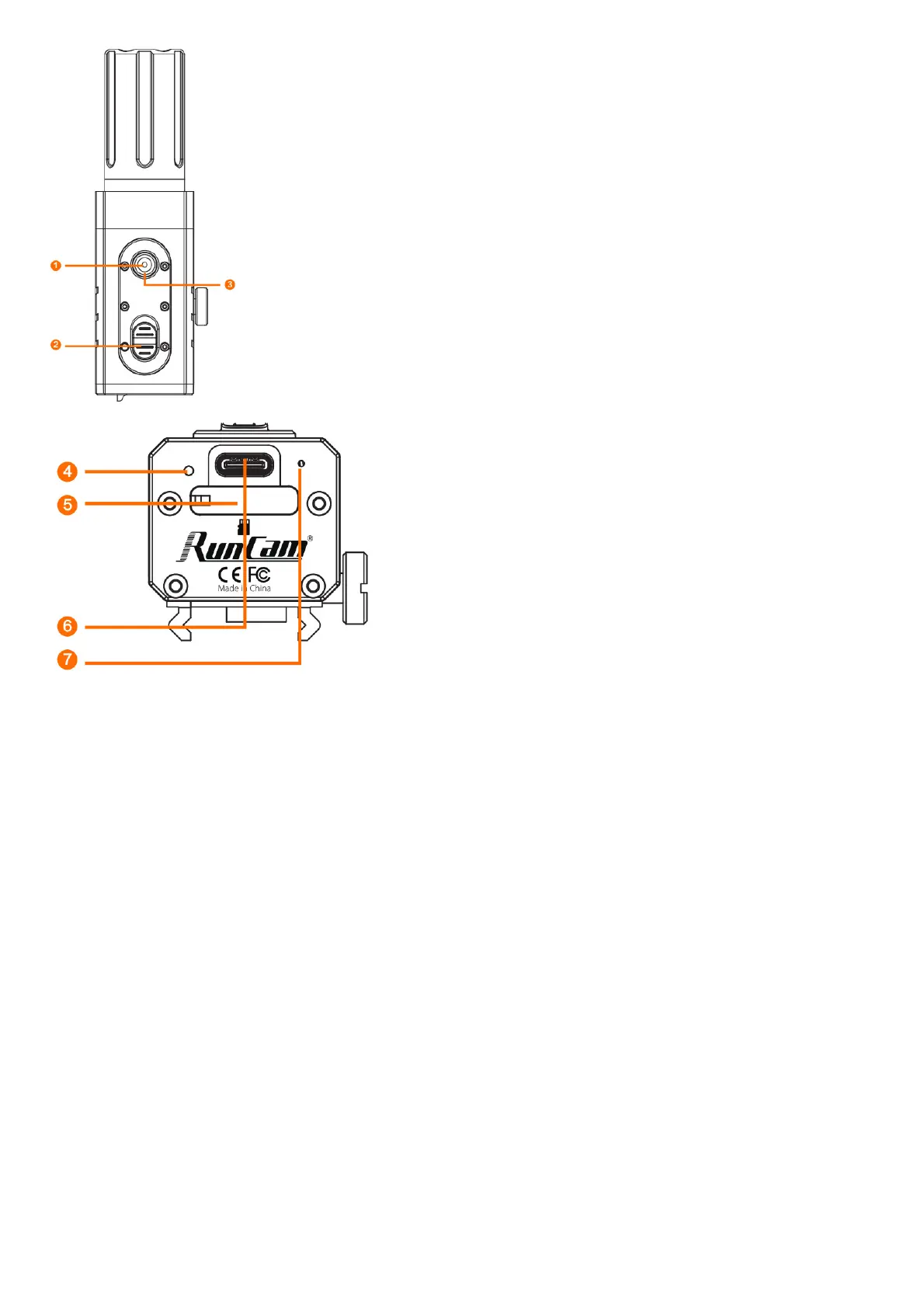
1. WiFi Button
2. Powering on /off SwItCh
3. LEDI Red Light (Recording Status) / Blue Light(WIR Status)
4. LED2 Red Ughtf Recording Status)/ Green Light (Charging Status)
5. Micro-SDCad Slot
6. Type-C
7. MICROPHONE
Charging:
Type-C only supports DC 5V power supply, please use a conventional phone charger or power bank. Greenlight will turn on during charging, while it will turn off when it is fully charged.lt
takes about 2 hours to get fully charged.
Low Battey Reminder:
When the battery is lower than 896, the camera vibrates 4 times continuously, the 30s each vibration.
MicroSD Card Capacity up to 128GB; High-Speed SD card (Class 10/UHS-VUHS-IVUHS-III )is highly recommended
Note: The camera only supports FAT32 or exFAT format, SD cards over 64GE: must be formatted via the App.
Basic Camera Operation



 To Next Page