
 Need help?
Do you have a question about the RunningSnail MD-090P and is the answer not in the manual?
Connect Micro USB cable to charge the built-in lithium battery. 4 blue indicator lights show charging status.
Charge by turning the handle at the back. 1 min at 130 rpm yields 30 min illumination or 6 min radio.
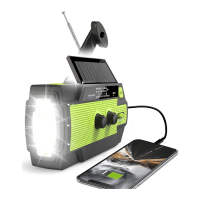
The MD-090P is a versatile emergency radio designed to provide essential functions in various situations, from daily use to critical emergencies. It integrates multiple features, including radio operation, an SOS alarm, flashlight, reading lamp, motion sensor, and charge/discharge capabilities, all powered by four different methods.
The radio function allows users to tune into FM, AM, and WB (Weather Band) frequencies. To operate the radio, you first turn the "Volume" dial clockwise to power on the device and adjust the sound level. Next, select the desired band (FM/AM/WB) using the radio band switch. For optimal signal reception, especially when listening to FM or NOAA broadcasts, extend the antenna. The "Tuner Dial" is used to select a station; a green tune indicator illuminates when a station is fully engaged, indicating a strong signal. To turn off the radio, simply turn the "Volume" dial to the OFF position.
In an emergency, the MD-090P features an SOS alarm. By holding the SOS button once, the device activates a loud siren accompanied by a flashing far beam, designed to attract attention and signal for help. To deactivate the alarm, press the SOS button again.
The device includes a multi-mode flashlight. The first press of the flashlight button activates the far beam. A second press switches to the dipped beam. The third press turns on both the far and dipped beams simultaneously, providing maximum illumination. A fourth press turns off all flashlight beams.
For illumination in darker environments, the MD-090P has a reading lamp. To activate it, turn the sensor switch to the "LIGHT" position and open the solar panel. The reading lamp will then light up. Closing the solar panel will turn off the reading light.
The reading lamp also features a motion sensor function. By turning the sensor switch to the "AUTO" position and opening the solar panel, the reading lamp will illuminate when movement is detected within 3 meters. If no movement is detected within this range for 30 seconds, the reading lamp will automatically turn off. Closing the solar panel will also extinguish the reading lamp. It is recommended to turn the sensor switch to the "LIGHT" position when the motion sensor is not in use to conserve power.
The MD-090P is equipped with a waterproof cover on its side, revealing both a USB output port and a USB input port. This allows the device to function as a power bank. You can connect a USB device to the USB output port via a USB cable to charge it. When the unit is used to discharge power (as a power bank), the blue power indicator lights will diminish, indicating the power level. It's important to note that this feature is primarily intended for emergency use and should not be relied upon as a normal power bank.
The emergency radio incorporates a battery protection feature. It is designed to shut down in low voltage conditions to protect the internal chip. The power supply will be cut off to prevent damage to the battery from overload or short circuit. Specifically, the power source will be disconnected if the voltage drops below 2.7V, safeguarding the battery from over-discharge and potential damage.
The MD-090P offers four distinct methods for charging its internal battery:
USB Charging: Connect the supplied Micro USB cable to the Micro USB Input port on the right side of the unit. This will charge the built-in lithium battery, and the four blue power indicator lights will illuminate in sequence, indicating the charging process. It is recommended to charge the radio at least once every three months to maintain battery health.
Hand Crank: The radio can also be charged manually by turning the handle located at the back of the device. This activates the internal dynamo. The handle can be turned either clockwise or counter-clockwise. Spinning the handle for 1 minute at a speed of 130 rpm can provide enough power for 30 minutes of high beam illumination or 6 minutes of radio operation.
Solar Power: The device features a solar panel. Exposing this panel to clear sunlight allows it to charge the battery as efficiently as possible. A red power indicator light will illuminate when the radio receives sufficient sunlight to begin charging. This method is primarily intended for maintaining the battery charge and prolonging its overall life.
Replaceable Li-ion Battery: The MD-090P uses replaceable 18650 Li-ion batteries. To replace them, open the battery cover using a screwdriver, remove the two existing 18650 Li-ion batteries, and insert two brand new ones into the battery compartment before closing the cover. This feature is useful if the built-in battery is damaged or if you need to quickly replace a dead battery with fully charged ones during a power outage.
The unit is equipped with four blue power indicator lights that display the remaining power capacity. These lights will illuminate for 30 seconds when the radio, flashlight, or reading lamp is turned on. They will also remain lit during charging and discharging processes. The lights indicate capacity as follows:
For first-time use or if the unit has been idle for over 60 days, it is advised to hand crank the device for 1 minute to activate the internal battery. To ensure the device's longevity, it should not be exposed to dripping or splashing liquids, and no objects filled with liquids should be placed on it. Avoid over-discharging the unit, as this can reduce the internal battery life or even damage the battery. Furthermore, avoid shining the flashlight directly into the eyes, as it can cause harm.
 General
| Battery Capacity | 2000mAh |
|---|---|
| Power Source | Hand Crank, Solar Panel, USB, AAA Batteries |
| Tuning Type | Analog |
| Features | SOS Alarm, LED Flashlight |
| Battery Type | Lithium-ion Battery |
| Radio Bands Supported | AM, FM, NOAA |
| Frequency Range | AM: 520-1710 kHz, FM: 87.5-108 MHz |
| Speaker | Built-in |

 To Next Page