SHOCKWAVE BASICS
TURN ON
TURN OFF
CHARGING
CHARGED
REBOOT
RESET
Press the Intercom Button Media Button for 1
second to switch on the Shockwave system, you
will hear a “Power On” message
Press the Intercom Button & Media Button for 1
second to switch off the Shockwave system, you
will hear a “Power Off” message
Plug the USB-C cable into the charging port, the
LED will light up RED and stay static to indicate it is
charging
To reboot the Shockwave, hold the Intercom
Button & Media Button for 10+ seconds. A voice
message of ‘Power Off’ will sound, and power up
the system as normal
To factory reset the Shockwave hold the Intercom
Button & Media Button & Select/Phone Button for
5+ seconds, a voice message of ‘Reset’ will sound,
and power up the system as normal
When the device is fully charged the red LED will
flash to indicate that it is fully charged
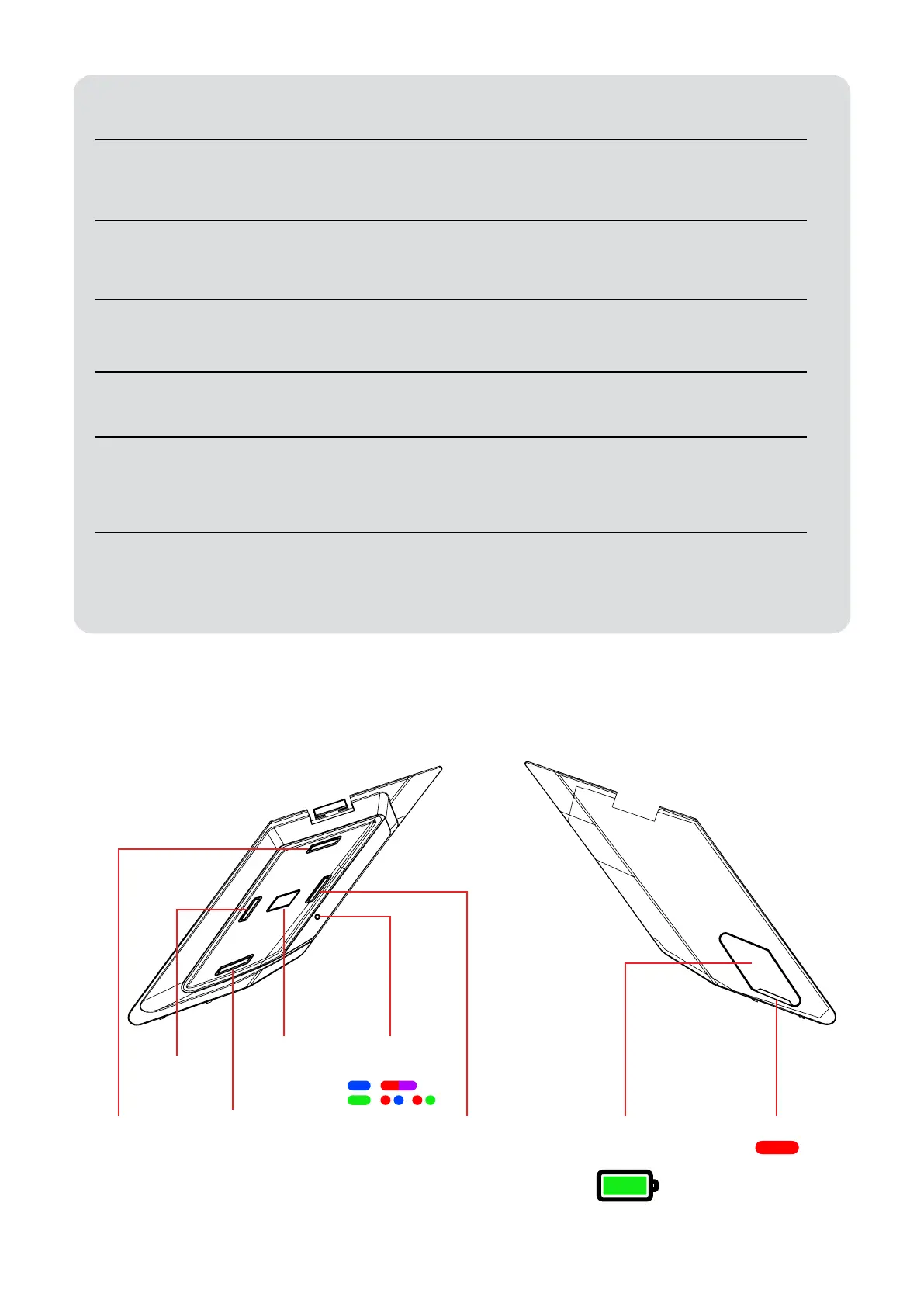
VOLUME UP
MEDIA
VOLUME
DOWN
SELECT/
PHONE
LEDUSBC
CHARGING
PORT
INTERCOM
LED
INDICATOR
SHOCKWAVE UNIT BATTERY



 To Next Page