
 Need help?
Do you have a question about the Russell Hobbs Colour Control Pro 2400W and is the answer not in the manual?
Specifies the appliance is designed and intended for domestic use only.
Instructions for initial preparation before using the iron for the first time.
Details the automatic shut-off function for safety and energy saving.
Guide to selecting the correct iron temperature based on fabric care symbols.
Instructions for filling the water reservoir for steam iron functions.
Steps for plugging in and activating the iron, including standby mode.
Guide for using the steam function effectively during ironing.
How to use the spray function to dampen fabrics for easier ironing.
Instructions for using powerful steam bursts for tough creases.
Guidelines for using the iron without the steam function.
How to use the steam function for refreshing hanging fabrics.
Steps to follow for safely unplugging, draining, and storing the iron.
Instructions for performing the self-cleaning function to remove limescale.
Information about the built-in anti-scale agent and its care.
Guidelines for responsible disposal of electrical and electronic appliances.
How to contact customer service for troubleshooting and support.
Information regarding the product's warranty and terms.
Instructions for registering the product online for additional benefits.
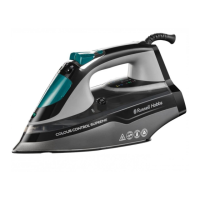
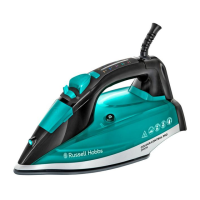
The Russell Hobbs Colour Control Pro 2400W iron is designed for efficient and safe garment care, offering a range of features to simplify the ironing process. This appliance is suitable for household use and incorporates several safety precautions to ensure user well-being.
The primary function of this iron is to remove wrinkles from fabrics through a combination of heat, steam, and pressure. It offers various ironing modes, including dry ironing, steam ironing, shot of steam, and vertical steaming, catering to different fabric types and garment needs. The iron features a temperature button for selecting the desired heat setting, indicated by a temperature light that changes color to reflect the current mode. A swivel cord enhances maneuverability, while the spray nozzle allows for targeted moisture application. The soleplate, the heated surface that comes into contact with fabrics, is designed for smooth gliding and effective wrinkle removal.
Before first use, it is recommended to remove all labels, stickers, and packaging from the iron and soleplate. The iron may emit a slight smoke initially as the heating element cures, which is normal. Ironing an old piece of cotton fabric is advised to clean the soleplate. The appliance is equipped with an auto shut-off feature for safety and energy saving: if left motionless with the soleplate down, it will switch off after approximately 30 seconds; if left upright on its heel, it will shut off after about 8 minutes. When the auto shut-off activates, the temperature light will flash yellow until the iron is moved again.
The iron is designed to be used with tap water, but in hard water areas, distilled water (not chemically descaled or softened) is recommended to prevent scale build-up. When filling the reservoir, the iron should be held with the soleplate down, and water should be poured slowly to allow air to escape, preventing airlocks and overflow. The reservoir should not be filled past the "max" mark.
To switch on the iron, it should be placed on its heel, and the plug inserted into a power socket. The iron will beep, and the handle light will turn yellow, indicating standby mode. The temperature button is then pressed to select the desired temperature, with the light changing color according to the setting: yellow for standby, blue for cool (nylon, acrylics, polyester), purple for warm (wool, polyester mixtures), green for hot (cotton, linen), and red for max (denim). The temperature light will flash while heating and remain continuously lit once the set temperature is reached. Reducing the temperature takes longer as the iron needs to cool down.
For steam ironing, the temperature must be set to "hot" (green) or "max" (red) to avoid water spotting. Once the temperature light stops flashing, the steam trigger can be pulled and held for continuous steam. The spray function, useful for both dry and steam ironing, requires water in the reservoir. The spray nozzle is aimed at the fabric, and the spray button is pressed, possibly multiple times, to pump water. The shot of steam feature also requires water and a "hot" or "max" temperature setting. After lifting the iron off the fabric, the shot of steam button is pressed, with a 4-second interval between shots to allow steam to build up.
Dry ironing is performed without steam. If dry ironing for an extended period (20 minutes or more), it is advisable to empty the reservoir to prevent spontaneous bursts of steam. The desired temperature is selected, and ironing begins once the temperature light stops flashing, without pressing the steam trigger.
Vertical steaming is effective for removing wrinkles from hanging clothes, curtains, and furnishing fabrics. It requires adequate ventilation behind the fabric to prevent moisture build-up and mildew. The iron should be held close to, but not touching, the fabric, with the temperature set to "max" (red). The steam trigger is pulled and held for steam.
After each use, the iron should be unplugged and allowed to cool on its heel. The water reservoir should be drained by turning the iron upside down over a sink, and the water inlet cover closed. Outer surfaces can be wiped with a damp cloth, and any spots on the soleplate can be removed with a little vinegar. Storing the iron on its heel helps prevent corrosion.
The iron incorporates a self-clean function to reduce scale build-up, which should be used at least monthly in normal water areas, and more frequently in hard water areas. For self-cleaning, the reservoir is filled to the max mark, and the iron is placed on its heel. After plugging in and setting the temperature to "max" (red), the iron is held over a basin or bowl with the soleplate down. The self-clean button is pressed and held, and the iron is gently moved back and forth. Water and steam will flush out scale and dust through the soleplate. Once the reservoir is empty, the button is released, the iron is unplugged, and allowed to cool.
An anti-scale agent is incorporated into the iron to help prevent scale build-up. It is important not to use descaling solutions, as this can destroy the anti-scale agent and potentially damage the iron.
 General
| Power | 2400W |
|---|---|
| Soleplate Material | Ceramic |
| Steam Output | 45 g/min |
| Anti-Drip | Yes |
| Anti-Scale | Yes |
| Vertical Steam | Yes |
| Self-Cleaning | Yes |
| Auto Shut-off | Yes |


 To Next Page