6 7
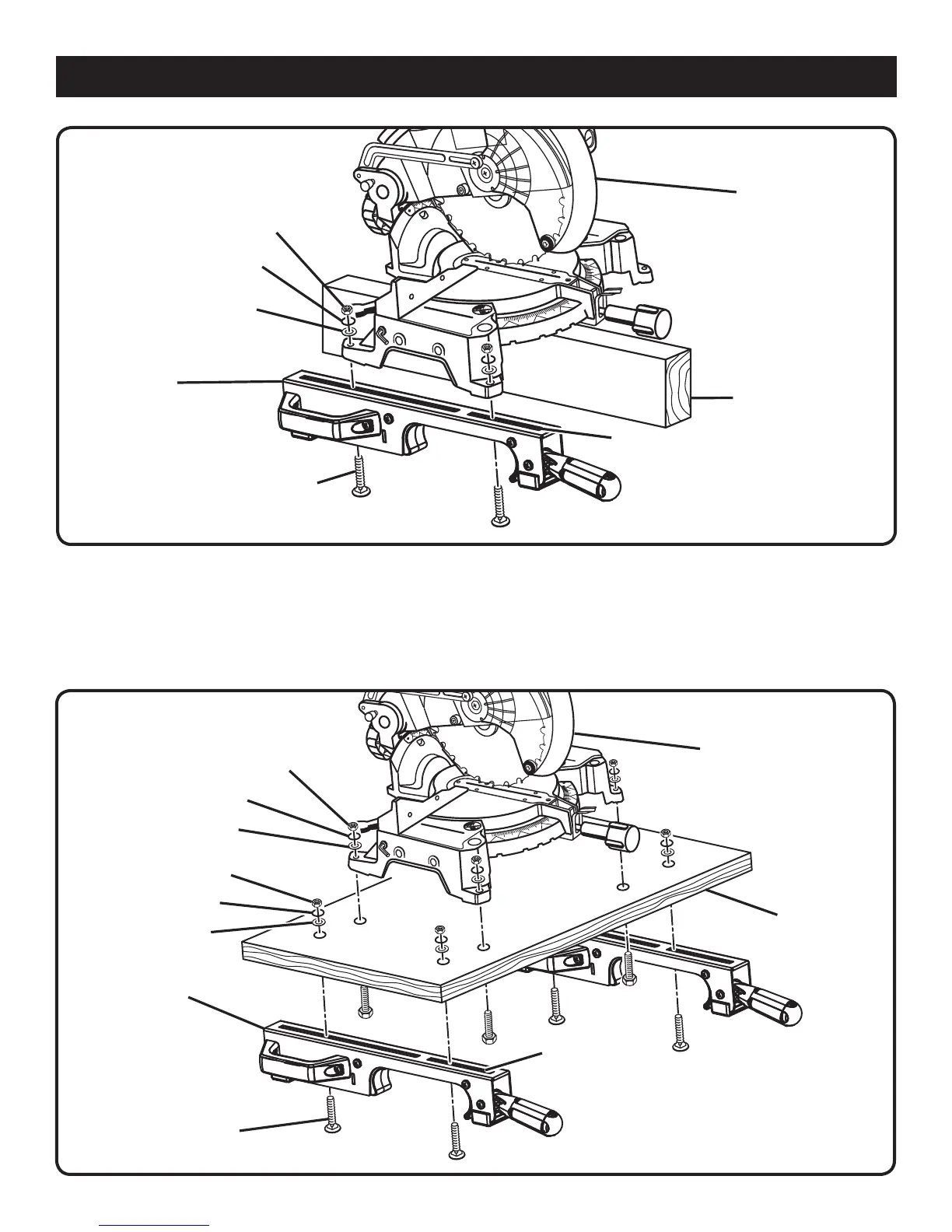
Fig. 6
MITER SAW
SAW MOUNTING
BRACKET
CARRIAGE BOLT
FLAT WASHER
NUT
n Install carriage bolts as previously described.
n After making sure both brackets are parallel to each other,
finger tighten all four nuts to hold in position.
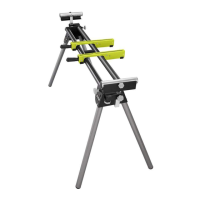
If the saw has holes that do not line up with the slots in
the saw mounting brackets:
n Unplug the saw and lock saw arm in the down position.
SLOT
2 x 4
ASSEMBLY
n Mount the saw to a mounting surface at least 1/2 in.
thick using 5/16 hex head screws, washers, and nuts
(not included).
n Drill holes in the mounting surface to match the slots in
the saw mounting brackets.
n Proceed with installation as previously described.
MITER SAW
SAW MOUNTING
BRACKET
SLOT
CARRIAGE BOLT
NUT
MOUNTING
SURFACE
Fig. 7
LOCK WASHER
LOCK WASHER
NUT
FLAT WASHER
LOCK WASHER
FLAT WASHER


 To Next Page