EasyManua.ls Logo

Ryobi AIRgrip MultiTASKit EMM0001 - User Manual

Ryobi AIRgrip MultiTASKit EMM0001
16 pages
Print Icon
To Next Page IconTo Next Page
Loading...
OPERATOR’S MANUAL
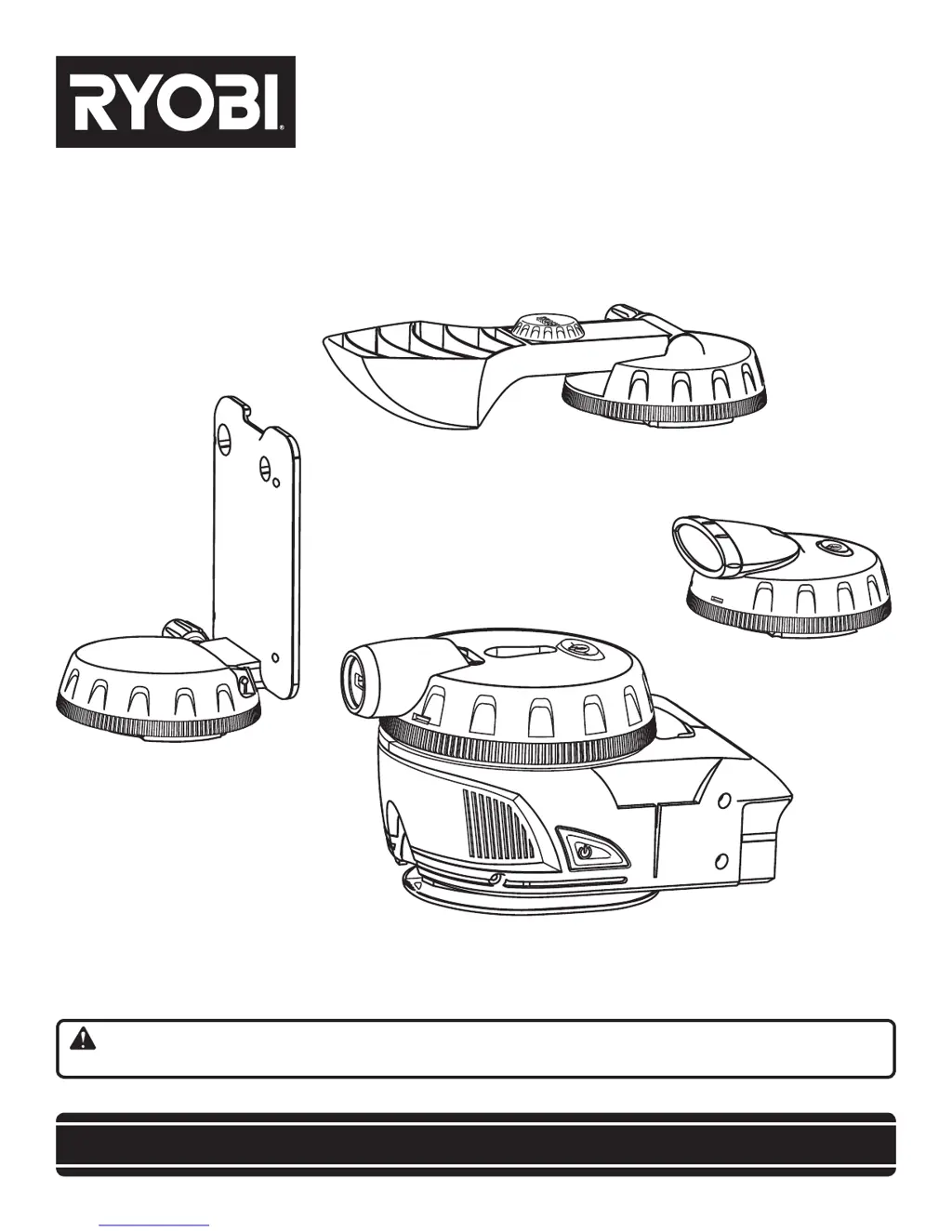
AIRgrip MultiTASKit
EMM0001
SAVE THIS MANUAL FOR FUTURE REFERENCE
Your product has been engineered and manufactured to Ryobi’s high standard for dependability, ease of operation, and
operator safety. When properly cared for, it will give you years of rugged, trouble-free performance.
WARNING: To reduce the risk of injury, the user must read and understand the operator's manual before using
this product.
Thank you for buying a Ryobi product.

Questions and Answers

  • E
    Erica PerezAug 17, 2025
    Why Ryobi AIRgrip MultiTASKit EMM0001 Laser Level light is not working?
    • J
      Joseph WattsAug 17, 2025
      If the light on your Ryobi Laser Level isn't working, it could be due to a couple of reasons. First, ensure that the power is turned on by pressing the on/off button. If that doesn't solve the issue, the batteries might be low and need replacing.
  • J
    Jason JohnsonAug 19, 2025
    What to do if Ryobi Laser Level laser line is hard to see?
    • C
      cscottAug 20, 2025
      If the laser line on your Ryobi Laser Level is hard to see, it might be because the light in the area is too bright. Try dimming the light in the work area or consider using laser-enhancing glasses.
  • W
    William GomezAug 22, 2025
    Why is Ryobi AIRgrip MultiTASKit EMM0001 light dim?
    • M
      merrittstevenAug 22, 2025
      If the light on your Ryobi Laser Level is dim, the batteries are likely low. Replace them to restore the light's brightness.
  • J
    Jeffrey LewisAug 25, 2025
    Why Ryobi AIRgrip MultiTASKit EMM0001 laser line projection is weak?
    • V
      Vanessa LongAug 26, 2025
      If the laser line projection on your Ryobi Laser Level is weak, the batteries are likely low. Replace them to restore the laser's projection strength.
  • M
    Megan PerryAug 28, 2025
    What to do if Ryobi Laser Level vacuum is not running?
    • J
      John KhanAug 28, 2025
      If the vacuum on your Ryobi Laser Level isn't running, there are a couple of things you can check: * Make sure the batteries aren't low, and replace them if needed. * Ensure the power is turned on by pressing the on/off button.
  • H
    hancockelizabethAug 30, 2025
    Why is my Ryobi AIRgrip MultiTASKit EMM0001 Laser Level laser line not level?
    • D
      Douglas ShawAug 30, 2025
      If the laser line on your Ryobi Laser Level isn't level, it could be due to a couple of reasons. First, make sure the leveling bubbles are centered in the vials. Also, if the level is mounted on a base, ensure the bubbles are centered after installing the multi-function base onto the vacuum base.
  • S
    sotoronaldSep 2, 2025
    What to do if Ryobi AIRgrip MultiTASKit EMM0001 Laser Level magnetic tray is too tight?
    • M
      Mckenzie OconnorSep 2, 2025
      If the magnetic tray on your Ryobi Laser Level is too tight and won’t move, it's likely because the handle is tight. Rotate the height adjustment screw counterclockwise to loosen it.
  • D
    Daniel ChaneySep 5, 2025
    What to do if Ryobi AIRgrip MultiTASKit EMM0001 Laser Level magnetic tray is loose?
    • D
      David AbbottSep 5, 2025
      If the magnetic tray on your Ryobi Laser Level is loose or won’t stay in position, it's likely because the handle isn’t tight. Rotate the height adjustment screw clockwise to tighten it.
  • M
    Mr. Gregory Rodriguez DVMSep 7, 2025
    What to do if Ryobi Laser Level magnetic tray isn’t holding items?
    • J
      Jacob RamirezSep 7, 2025
      If the magnetic tray on your Ryobi Laser Level isn’t holding items, it's likely because the items are not placed on the magnet. Put items in the center of the tray where magnets are located.
  • T
    Travis Fowler MDSep 12, 2025
    What to do if Ryobi AIRgrip MultiTASKit EMM0001 Laser Level vacuum base won’t stick to wall?
    • A
      Andrew PaulSep 12, 2025
      If the vacuum base of your Ryobi Laser Level won’t stick to the wall, it's likely because the surface is incompatible for vacuum. Use the rough-surface adapter on stucco and textured surfaces.

Summary

Introduction

General Safety Rules

Symbols

Features

Product Specifications

Details on vacuum base, laser head, lighting head, and helping hand specifications.

Assembly

Unpacking

Instructions for safely removing the tool and accessories from the box.

Operation

Turning the Vacuum Base On;Off

How to use the ON/OFF button to activate and deactivate the vacuum base.

Using the AIR-GRIP Vacuum Base

Explains how to attach the unit to smooth surfaces using vacuum grip technology.

Using the Rough-Surface Adaptor

Instructions for using the adaptor on non-smooth surfaces like brick or cinder block.

Operation

Using the Multi-Function Base

How to install and use the multi-function base with straps or magnetic mounts.

Installing Batteries in Attachments

Steps to install batteries into the laser level and lighting attachments.

Operation

Removing;Installing Attachments

Procedure for attaching and detaching accessories from the vacuum base.

Using the Laser Level Attachment

How to operate the laser level, project lines, and ensure accuracy.

Operation

Using the Lighting Attachment

How to use the LED lights for illumination in dark areas.

Using the Magnetic Tray Attachment

How to position and use the magnetic tray for holding small items.

Using the Helping Hand Attachment

How to use the helping hand for supporting light workpieces.

Maintenance

General Maintenance

Instructions for cleaning the unit, lenses, and battery care.

Troubleshooting

Service and Replacement Parts

Ryobi AIRgrip MultiTASKit EMM0001 Specifications

General IconGeneral
BrandRyobi
ModelAIRgrip MultiTASKit EMM0001
CategoryLaser Level
LanguageEnglish

Related product manuals