13
OPERATION
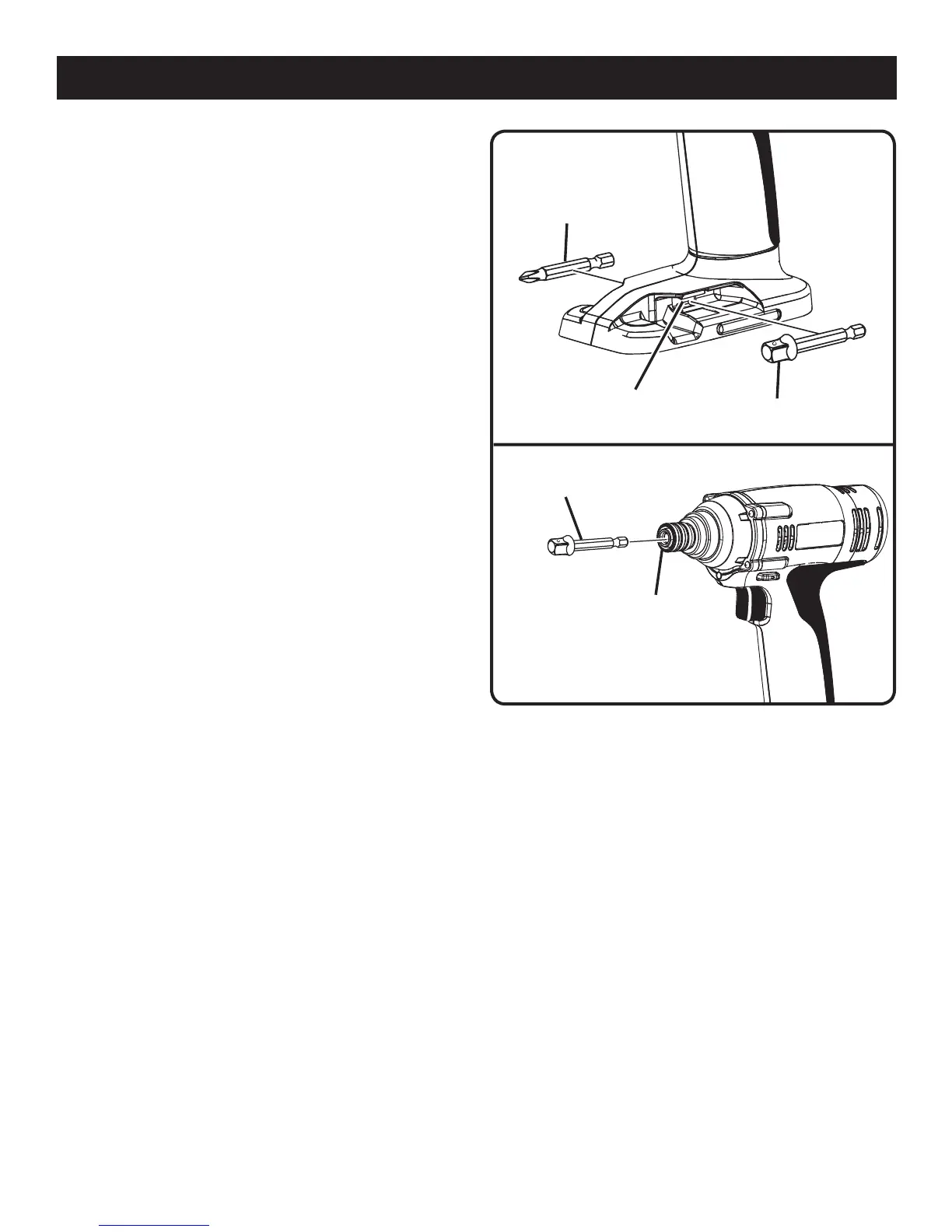
Fig. 5
BIT STORAGE AREA
ADAPTOR
BIT
COUPLER
ADAPTOR
BIT
Fig. 6
BIT STORAGE
See Figure 5.
When not in use, bits provided with the tool can be placed in
the storage area located at the bottom of the tool handle.
INSTALLING BITS
See Figure 6.
n Lock switch trigger on the tool by placing the direction
of rotation selector in center position.
n Slide the coupler forward and hold in position.
n Insert bit straight into coupler.
n Slide the coupler back slowly and release.
REMOVING BITS
See Figure 6.
n Lock switch trigger or the drill by placing the direction of
rotation selector in center position.
n Slide the coupler forward and hold in position.
n Pull bit straight out of coupler.
DRIVE BIT


 To Next Page