6
settings.
Ŷ To increase the volume, press
.
Ŷ To decrease the volume, press
.
NOTE: To change volume quickly, hold
or .
CAUTION
Do not use the product at maximum volume for an
extended period of time with the bass and treble at
maximum levels. It could cause damage to the speakers
DQGRUDPSOL¿HUVLQWKHSURGXFW
FM/AM TUNING
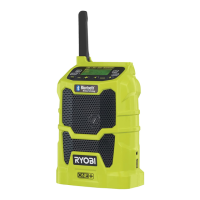
See figure 3.
Use
and to tune to the desired radio frequency. The
selected frequency is displayed on the LCD display.
To tune frequency manually:
%ULHÀ\SXVKHLWKHU or (not press and hold) to tune
one frequency step at a time.
1. Press and release
to tune to a lower frequency.
2. Press and release
to tune to a higher frequency.
To tune frequency automatically:
1. Press and hold or for one second to tune
frequency automatically.
2. Press
or to stop scanning and select a frequency.
To decrease interference or electrical noise, adjust the
position of the antenna or move the product to a higher
elevation.
STORING A PRESET IN MEMORY
See figure 3.
The memory feature saves up to 20 frequencies as
presets in the product’s memory. You can save up to 10
frequencies each for FM and AM modes.
To store a frequency in memory:
1. Tune to the desired FM or AM frequency.
2. Press and hold
until “MEMORY” and the
preset position number flash on the screen.
3. Press
and to choose a preset position number.
NOTE: There are 10 preset positions for FM and 10
for AM. Only one station can be saved in each preset
position.
4. Press
again to store the frequency.
To tune to presets (FM or AM mode):
Ŷ Press and release
to cycle through each
preset position number and its associated frequency.
EQUALIZER FUNCTION
To adjust the bass and/or treble settings:
1. Press and hold
until “b” (BASS) is displayed.
Press again and “t” (TREBLE) is displayed.
2. Press
or until the desired bass or treble level
(–5 to 5) is achieved . Press to store your
selection.
SETTING THE CLOCK
See figure 3.
Press
to view the frequency in the digital display
for 10 seconds. The display will return to the current time
after 10 seconds.
NOTE: In all modes, the time is the default display.
To set the clock:
1. Press and hold
until the hour time blinks.
2. Press
or to select the hour.
3. Press and release
to lock in the hour setting.
Minute time blinks.
4. Press
or to select the desired minute.
5. Press and release
again to confirm the time.
The clock is now set.
NOTE: If AAA batteries are removed or lose charge for
more than 15 seconds, clock settings will be lost. Settings
are not affected by the removal of the 18 V battery.
AUXILIARY MODE
See figure 3, 4.
7KHSURGXFWFDQEHXVHGDVDQDPSOL¿HUIRU03SOD\HUV
CD players, smartphones, tablets, and other music devices.
To use the auxiliary mode:
1. Press
until AUX mode is highlighted.
2. Connect auxiliary cable (not included) to the device.
3. Connect the other end of the auxiliary cable to the
auxiliary input port.
NOTE:
– The external device must be on and in play mode
for sound to be heard through the speakers.
– All external device controls can be used normally
while connected to radio.
– Volume for any device connected through the



 To Next Page