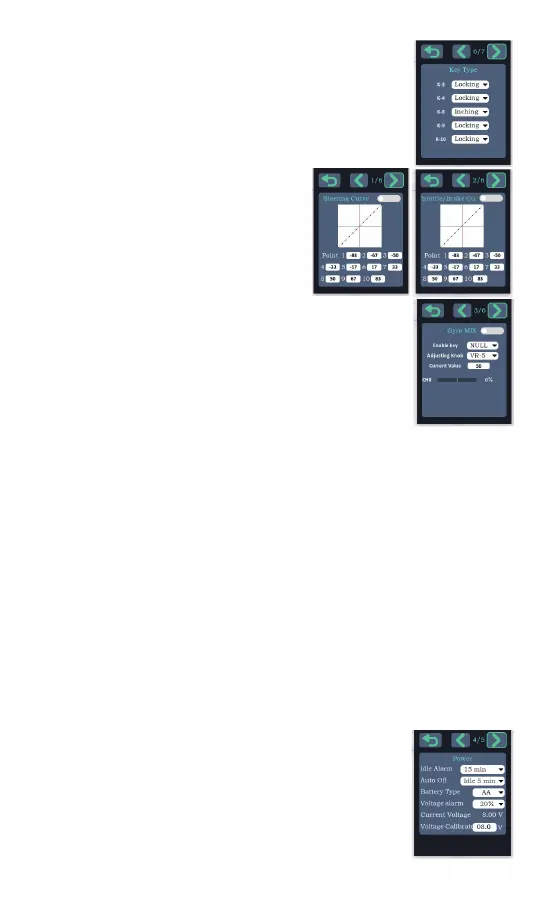
The keys of ch3, ch4 and ch8-10 of the remote control can be
set to locking signal or inching signal.
Locking signal:press the key is on, and then press it is off;
Inching signal:press the button is on, release is off.
Key type
Steering curve:This function is used to
change the sensitivity of the steering servo
around the neutral position.
Throttle/brake curve:This function makes the
throttle operation quicker or milder.
Steering throttle brake curve
With the gyroscope on the receiver, turn the car left and right by hand to see if the
gyroscope is correcting the wheel.
That is, the wheels are corrected to the right when the car is turned to the left, and the
wheels are corrected to the left when the car is turned to the right.
If the wheel is corrected in reverse direction, short press the set key once quickly (each
interval should be less than 1 second), the red light flashes once, and the gyroscope
phase correction is completed.
Gyro Reverse
You can set how many minutes without using the transmitter alarm
sound prompt, and after this idle period, how many minutes
automatically shut down.
The transmitter battery supports AA battery and 2-3S battery, please
choose the corresponding parameters according to the actual
battery model.The transmitter will indicate low voltage when the set
percentage voltage is reached. Please replace the battery as soon
as possible.
If the measured battery voltage is inconsistent with the current
voltage displayed in the transmitter, you can manually input the
correct voltage into the voltage calibration input box to complete the
voltage calibration.
Power Settings
The gyroscope of the receiver is turned off by
default, and the gyroscope function of the receiver
can be turned on according to the instructions of each receiver.
To adjust the gyroscope sensitivity through the transmitter, the
gyroscope mixing control option of the transmitter needs to be
enabled.
We can choose to VR - 5, VR - 6 knob or NULL, choose NULL
can manually enter a value directly to the current value.
When we change the value of the adjustment knob, the number of
the corresponding CH8 channel will change, the higher the ratio
value, the higher the sensitivity of the gyroscope, the ratio value is 0, the gyroscope has
no enable.
If you find it difficult to turn on and off the gyroscope sensitivity through the knob, you can
use an enable switch. By setting an enable switch, it is easy to switch between the
activation/deactivation of the gyroscope function by pressing a button.
Gyro mixing control
- 17 -


 To Next Page
 Loading...