User Manual
VISUAL SIGNALS
This paragraph describes the displays of the 4 status LEDs during the different operational phases of the battery
charger.
REF DESCRIPTION
DL4 LED
(green)
DL3 LED
(yellow)
DL2 LED
(green)
DL1 LED
(red)
DISPLAY
S1 Only battery power supply OFF OFF OFF OFF OFF
S2 Only mains power supply OFF OFF OFF OFF ON
S3
Both mains and battery power
supply
ON OFF OFF OFF ON
S4 Perform Autostart BL BL BL BL ON
F1 Phase 1 – Initial charge CI BL OFF OFF OFF ON
F2-F7 Phase 2 – Phase 7 BL ON OFF OFF ON
F8 Equalisation period ON ON ON OFF ON
EQU
ON
Equalisation charge ON
(in progress)
BL BL ON OFF ON
OFF ON
EQU
OFF
Equalisation charge OFF
(paused)
ON ON ON OFF ON
M Maintenance BL BL ON OFF ON
END Charge Finished ON ON ON OFF ON
Where:
OFF = the led is off
ON = the led is constant
BL = the led is blinking (Blink, T=1 second)
- - = the led can be in any condition
LCD DISPLAY
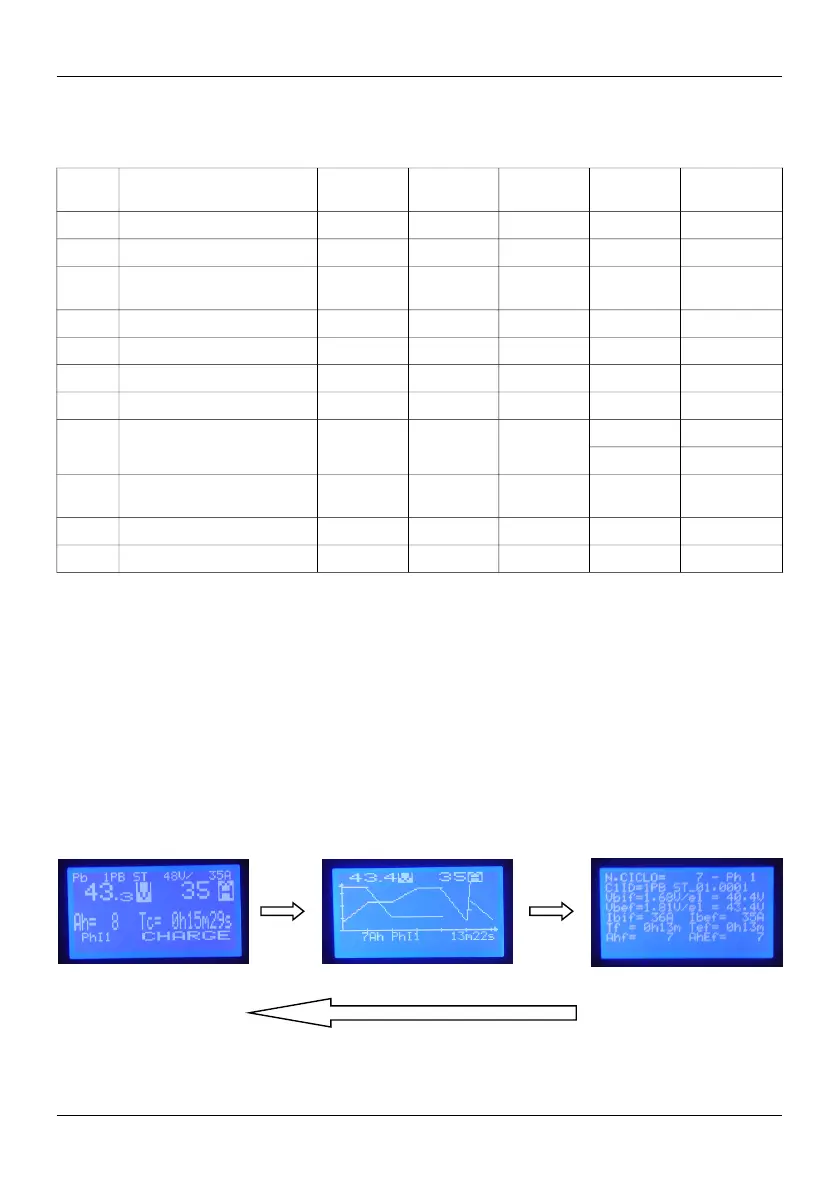
During charging, the battery charger offers 3 monitor menus, which you can move between by pressing the P2
button, and whose detailed meaning was previously illustrated
Below is a summary of the information given respectively on the 3 MONITOR displays.
D00582-02 9
P2 P2
P2
MONITOR1 MONITOR2 MONITOR3



 To Next Page