18
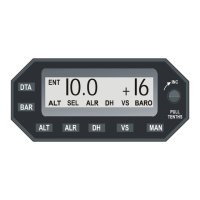
D. Push VS Switch to activate VS Selector and rotate selector
switch knob to input desired climb (+) vertical speed.
E. Push ALT Switch to address altitude set mode - ALT SEL.
F. Push DTA switch to exit data entry mode.
5. Autopilot -
A. Engage HDG Mode.
B. Simultaneously depress VS and ALT switches on the autopi-
lot programmer Computer (VS and ALT annunciations will both
illuminate).
C. Rotate altitude selector knob CCW to change selected alti-
tude to match field elevation. VS annunciation on autopilot pro-
grammer Computer should extinguish when the ALT SEL setting
on the Altitude Selector/Alerter is within 100' of the indicated
altitude on the altimeter. Extinguishing of the VS annunciation
with the ALT remaining on indicates the altitude hold mode has
been engaged.
NOTE: Due to tolerances of the Encoder/Altimeter, altitude en-
gagement may not occur within +/- 100 ft of indicated altitude. If
altitude engagement does not occur within 100' of indicated alti-
tude, readjust the BARO CAL or calibrate the Encoder/Altimeter.
6. Disengage Autopilot - Adjust Altitude Selector/Alerter for desired
altitude and vertical speed used after takeoff and during climb out.
7. Conduct autopilot preflight per the FAA/DAS approved Pilots
Operating Handbook and Airplane Flight Manual Supplement for the
autopilot system installation.


 To Next Page