8
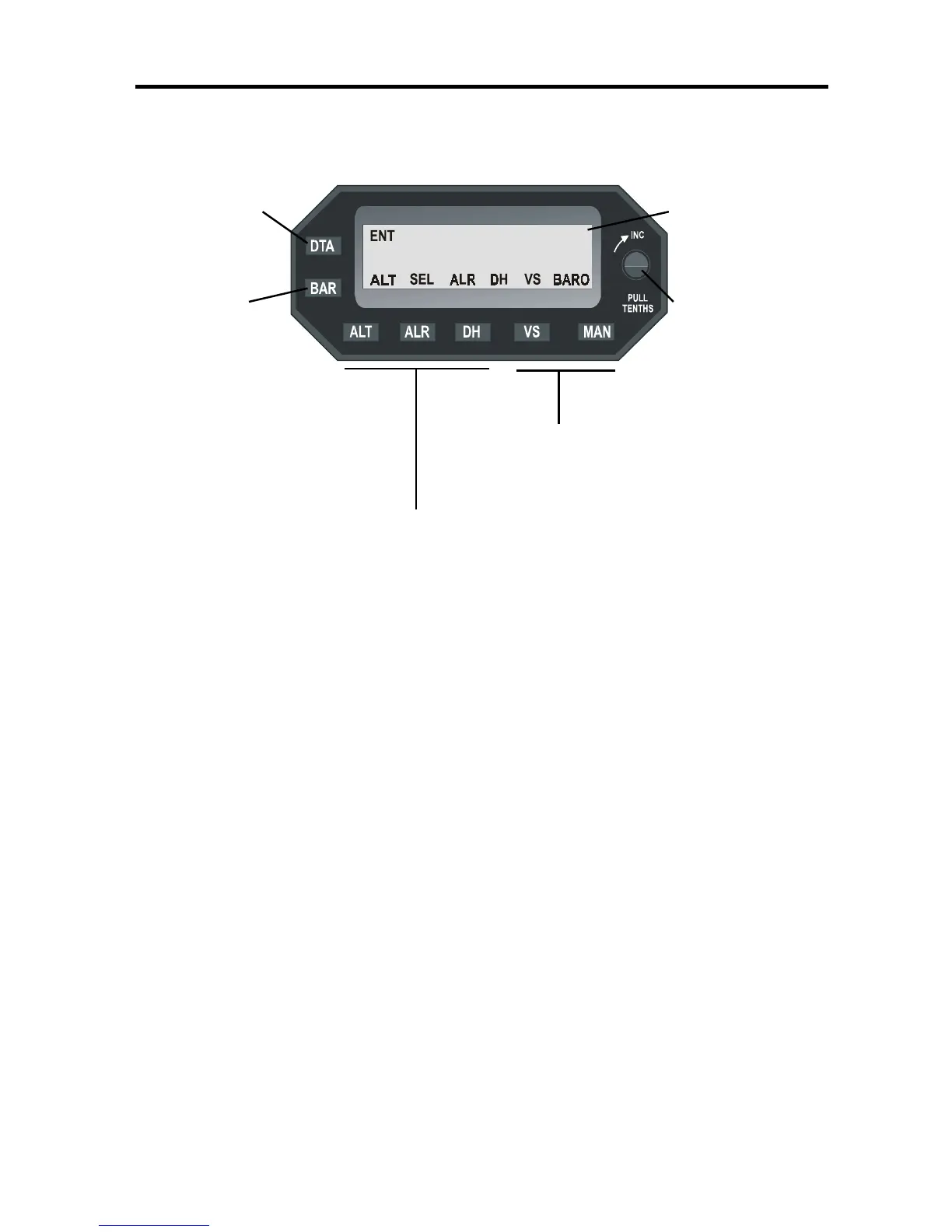
Data Entry - Liquid Crystal
Operate Switch Display Panel
Barometric Input Selector
Calibration Knob -Turn CW
(BARO) Mode to Increase, Pull
Switch for Decimals
Vertical Speed Selector and
Manual Mode Switches
Altitude Read Out/Altitude Selector, Alert (ALR)
and Decision Height (DH) Alert Mode Switches
ALTITUDE SELECTOR/ALERTER
Quick Reference
Important Points to Remember
1. Set Barometric calibration, Altitude and Vertical Speed following
initial self-test. System will be in data entry mode following self-test.
2. Push "DTA" to enter or change any data EXCEPT vertical speed -
VS. Once entered, push DTA to close the entry mode or the unit
cannot communicate your input/settings to the autopilot.
3. To activate pre-selected altitude and vertical speed, push both ALT
and VS buttons on the autopilot at the same time. This is confirmed
by the annunciation of both ALT and VS Modes on the autopilot.
4. For best accuracy relative to the target altitude, see "adjustment:
baro calibration" on page 10-11.
5. If you are unsure of the correct operation, turn off the Altitude
Selector/Alerter or push the MAN (Manual) button and revert to nor-
mal autopilot operation.
I0.0
+
I6


 To Next Page