
 Need help?
Do you have a question about the S2Tech 699Plus and is the answer not in the manual?
Explains the MANU procedure, TARE, and HI points for calibration.
Details specific error codes (ER.01 to ER.FF) and their causes for calibration failures.
Displays differences between HI and TARE calibration points in AD points.
Shows live measurements as a percentage of stored reference calibration.
Procedure to reset working configuration parameters to default settings.
Provides the link to download product instruction manuals.
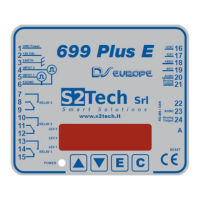
The S2Tech 699Plus is a sophisticated weight controller designed for lift systems, offering precise load measurement and comprehensive troubleshooting capabilities. This device is crucial for ensuring the safe and efficient operation of lifts by accurately monitoring the weight within the cabin.
The primary function of the 699Plus is to convert internal measurement signals into a reliable weight indication. It achieves this through a calibration process that establishes a conversion function between measured analog-to-digital (AD) points and a reference load. The device is designed to detect and signal various issues that may arise during installation or operation, ensuring the integrity of the weight measurement system.
The 699Plus features several error messages and troubleshooting functions that provide detailed feedback on the system's status. These messages can indicate problems ranging from incorrect sensor installation and electrical connections to structural issues affecting load measurement. For instance, "Er.01" signals a negative measurement, prompting a check of zeroing, electrical connections, and calibration. "Er.22" indicates high load sensitivity, suggesting a review of calibrated screws and rope diameter. "Er.23" and "Er.24" point to insufficient load values during calibration, requiring an increase in the calibration load. An "Er.28" indicates an overflow state in the ADC, which can lead to the lift being blocked if the AREL parameter is set to 1. "Er.30" signifies a continuously pressed pushbutton during calibration, while "Er.FF" indicates that calculated ADC points exceed working limits, potentially blocking the lift if AREL is set to 1.
The 699Plus offers a user-friendly interface with pushbuttons for navigation and configuration. Calibration is a key aspect of its usage, involving the acquisition of two points: TARE (empty cabin) and HI (cabin loaded near maximum capacity). The device then uses these points to define the conversion function.
For troubleshooting, the 699Plus includes a "DELTA view" that displays the difference between HI and TARE calibration points in internal AD units. This view helps assess the sensitivity of the measurement element, providing insights into potential issues with sensors, ropes, or the car frame. A "PERCENTAGE view" is also available, which displays live measurements as a percentage of a stored reference calibration. This feature is particularly useful for verifying if load changes correspond to appropriate percentage value changes, ensuring correct electrical connections and calibration.
Activating the troubleshooting functions involves pressing the 'E' pushbutton for at least 5 seconds until "tbls" appears, followed by a blinking comma. This activates the Percentage displaying view, which can be recalled during normal measurement or in case of an error. The internal AD points corresponding to the difference of HI-TARE can also be displayed.
The device also supports resetting working parameters to default settings. This is useful if configuration parameters become unpredictable. The reset procedure involves a specific sequence of pushbutton presses and entering a password supplied by S2Tech.
The 699Plus is designed with maintenance in mind, providing clear indications of potential issues that require attention. The error messages guide installers and technicians to specific problems, facilitating efficient troubleshooting. For example, if "Er.22" appears, it directs the user to verify the calibrated screws and rope diameter, which are critical for accurate load sensing. Similarly, "Er.23" and "Er.24" prompt an increase in the calibration load, indicating that the initial load was insufficient for proper calibration.
The "DELTA view" and "PERCENTAGE view" are invaluable maintenance tools. They allow technicians to quickly assess the health of the measurement system and identify any deviations from expected behavior. For instance, if the DELTA value is lower than typical, it might suggest a need to increase rope deflection, while a higher value might indicate the need to decrease deflection to avoid sensor overloading. The PERCENTAGE view helps confirm that electrical connections are sound and that the system is responding correctly to load changes.
In cases where the unit's behavior becomes unpredictable due to misconfigured parameters, the reset function provides a straightforward way to restore default settings, ensuring the device operates as intended. It is important to avoid power loss or pressing the reset pushbutton during this procedure to prevent further issues.
Instruction manuals for the 699Plus are readily available online, accessible via a datamatrix code found on the instruments, which can be scanned by mobile devices for direct access. This ensures that users always have access to the latest documentation for proper installation, operation, and maintenance.
 General
| Analog Sticks | 2 |
|---|---|
| Vibration Feedback | Dual Vibration Motors |
| Platform | PC |
| Compatibility | Windows |
| Cable Length | 1.8m |

 To Next Page