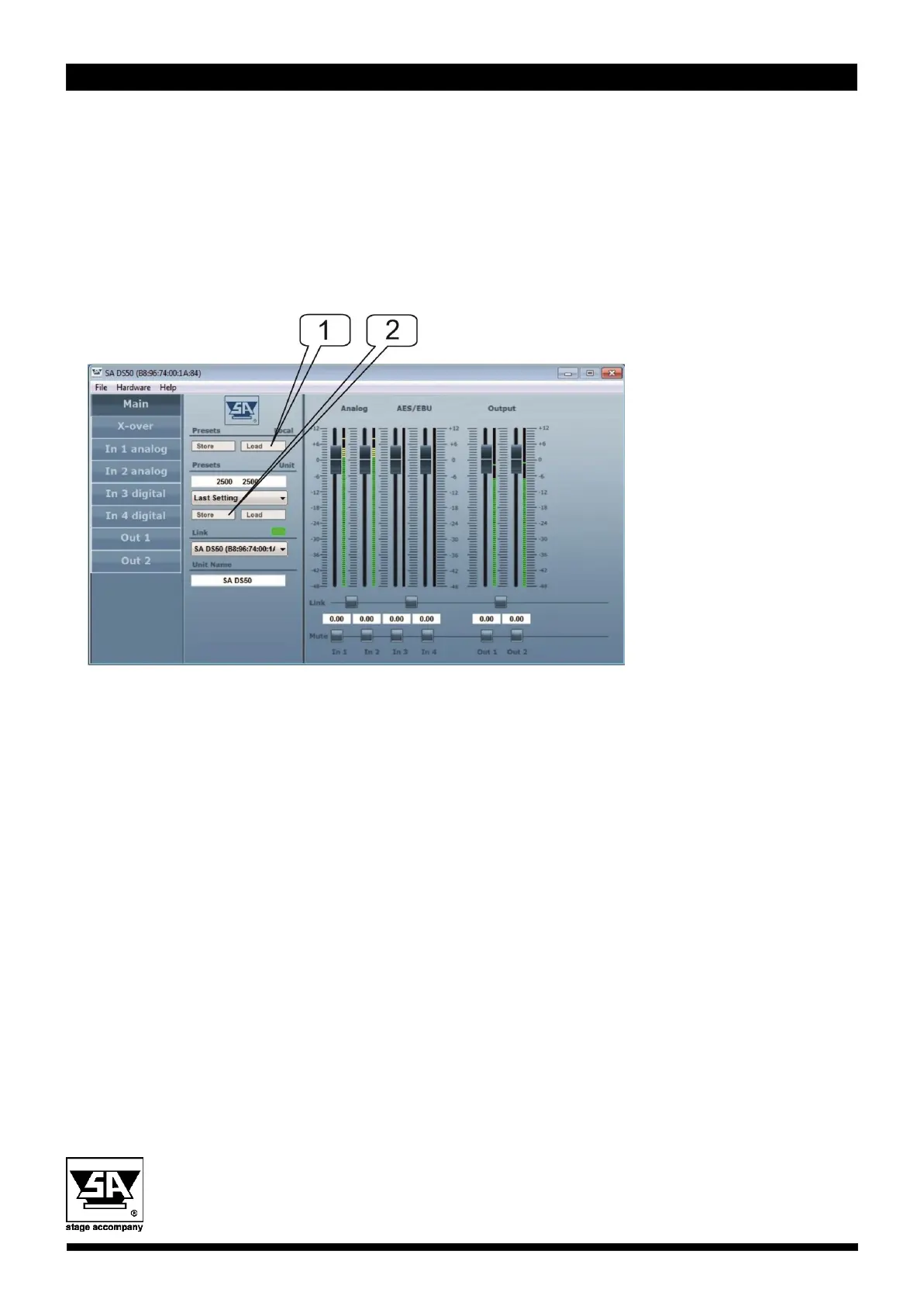
2. Loading preset from external storage and store to internal DS20,
DS50 or HE50 memory
When the desired presets are not available in the internal DS20, DS50 or HE50 loading from
external storage is needed. Follow the next steps:
Stage Accompany bv
Haven 28
2984 BR Ridderkerk
The Netherlands
Tel; 31 (0)180 426225
Fax: 31 (0)180 421831
E-mail: info@StageAccompany.com
Copyright 2020 Stage Accompany bv .
The information in this document is continually being developed. Whilst every effort has been made to make it as accurate as
possible, no warranty of accuracy is made or implied by the makers. Stage accompany shall have neither liability, nor responsibility to
any person or entity with the respect to loss or damages in connection with or arising from the information contained in this document
That’s How Music Should Sound!
1. Press “load” in the Local section to select a preset from an external storage.
A window to choose a preset file will appear. Search for the map where your presets are
located and select the desired preset.
Select “open” and the preset will be opened in your DS20/DS50/HE50
2. Press “store” to store this preset on a preset number 40 or higher.
(Preset 1-40 are locked against storing because of the factory preset function)
If you like to store a preset at location 1-40 please ask your local distributor for support.


 To Previous Page
 Loading...