2� A
n extension cord with the power cord must be arranged so that
it will not drape over the countertop or table top where they can
be pulled on by children or tripped over accidentally
�
3� If the supply c
ord is damaged, it must be replaced by the
manufacturer or its service agent, or a similarly qualied person
in order to avoid a hazard
�
P
reparing for use
1� Unpack the unit�
2� C
heck the contents against the accessories list
�
3� S
elect a suitable position for the unit on a at surface close to a
power socket but away from a heat producing appliance or areas
where cooking grease or water may splatter onto it
�
4� Plug in
to a suitable power outlet
�
W
e recommend that you run it at MAX temperature for
approximately 15 minutes to eliminate any packing oil
that may remain after shipping.
O
perating Instructions
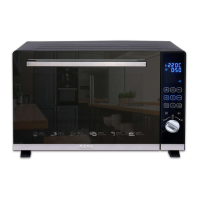
CONTROL PANEL
DISPLAY WINDOW
Shows set time or temperature and
oven function
�
1� P
ress this button the oven
start to work
�
2� P
ress this button can show
dierent cooking operation on
display window
3
� P
ress this button one time, the
oven will pause working; press two
times, the oven will stop working
�
4� P
ress this button to start
convection function; if wan stop
convection, then press this button
again
�
5� P
ress this button the inner
light will start work; then press
again the inner light will stop work
�
6� P
ress this button to start
rotisserie function; if wan stop
rotisserie, then press this button
again
�
3029
GB GB


 To Next Page