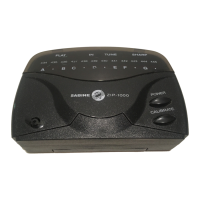
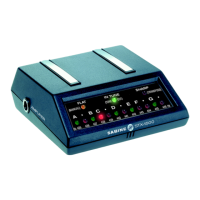
AX2000 Series Contact AutoTuner
Operating Guide
AX2000
Now that you’re the owner of a patented Sabine AX2000
Contact AutoTuner, the most unique and innovative chro-
matic tuner available, you’ll find tuning your instrument has
never been easier. This removable, business card-sized
tuner is always at your fingertips.
The AX Tuner’s highly accurate advanced digital technol-
ogy allows superior performance when tuning most stringed
instruments, particularly electric or acoustic guitars, banjos,
mandolins, violins and bass guitars.
OUTSTANDING FEATURES
• Highly Accurate
• Mounts Directly on Your Guitar
• InTouch™ Contact Microphone Picks Up Your
Instrument's Vibrations
• It's Cordless!
• Easy-To-Read Three-Color LED Display
• World's Smallest Tuner
• Full-Range Chromatic Scale
• Automatic Recalibration
• Automatic Power Down
• Longest Battery Life
• Quartz Accuracy
• Available with Rich Wood Finish (AX2000-W)
INSTRUCTIONS for TUNING
CAUTION: The AX Tuner is not recommended for use on
instruments with antique or cracked finishes. See cautions
on reverse side.
1. PLACE THE TUNER DIRECTLY ON YOUR INSTRU-
MENT WHEREVER IT IS MOST CONVENIENT AND
EASY TO SEE. You will want to experiment with the tuner
to find where its peak performance can be reached on
your particular instrument. For example, the tuner may
work best on your guitar when placed near where the
fingerboard meets the top or on the side next to the neck's
heel.
2. PRESS THE POWER BUTTON ("P") TO TURN ON
YOUR TUNER. When the power is turned on, the D#
note indicator will blink once per second. Tones gener-
ated by both acoustic and electric instruments are de-
tected by the AX Tuner’s InTouch™ sensitive internal
contact microphone. The AX Tuner picks up vibrations
from the top of the instrument rather than the air so it is
less affected by background noise than other tuners. It is
therefore not necessary to play loudly; plucking the string
lightly once per second usually gives the best results.
Heavy plucks may make tuning more difficult.
THE TUNER WILL TURN ITSELF OFF AFTER TWO
MINUTES. However, if you wish to defeat the power down
timer to have the tuner stay on throughout the perfor-
mance instead of automatically turning off after two min-
utes, turn the tuner off; then hold down the calibrate ("C")
button and press the power ("P") key. Release the power
key first and then the calibrate button. Two LEDs will light
initially to indicate the tuner is in the non-timer mode.
3. LIGHTLY PLUCK THE STRING YOU WISH TO TUNE.
Adjust the instrument’s pitch until the desired NOTE INDI-
CATOR LED lights. For example, if you wish to tune a D
string on a guitar, pluck the string and tune it until the "D"
LED lights. Pluck the string every second or so to keep
the note "fresh" and to prevent the note from fading flat.
Also, to eliminate extraneous overtones, mute the other
strings after each pluck.
4. SLOWLY ADJUST THE INSTRUMENT’S PITCH UNTIL
THE DESIRED NOTE’S LED TURNS GREEN, INDICAT-
ING THE STRING IS IN TUNE.
Note that the LED turns yellow when the tone is flat and
turns red when the tone is sharp. The LED blinks rapidly
when the tone is far from being in tune and blinks slower
and slower as the tone approaches being in tune.
Repeat steps 3 and 4 for the other notes until the entire
instrument is tuned.
5. TO REMOVE THE AX, GENTLY TWIST AND LIFT THE
TUNER. Store the AX in its DomeHome™.
RECALIBRATING your AX TUNER
Most other tuners allow the user to recalibrate only a few
Hertz from standard A = 440 Hz. They are almost useless if
you wish to tune to an instrument that is more than a few
Hertz out of tune. However, you can recalibrate your AX
Tuner to match the pitch of any reference instrument simply
by touching the calibrate ("C") button.
Example: If you wish to tune a guitar so it will be in tune
with a certain piano, place the tuner on the piano, defeat the
two-minute power down timer, play an "A" (or any other note)
and wait a moment for the note to register on the tuner’s
display. Then lightly press the calibrate button on the tuner.
The "A" LED will turn green, indicating that the tuner now
considers the piano to be in perfect tune. Now if you tune
your instrument to the tuner, your instrument will be in tune
with the piano.
Note: To reset the tuner to standard a = 440 Hz, press the
power button to turn the tuner off and then back on. The ax
tuner always returns to a = 440 Hz when it is turned on.
CLEANING THE SafeMount™ PAD
Only dampen the pad. Do not immerse the tuner in
water or place it directly under a faucet. This may dam-
age the tuner and will void the warranty. If the tacky
material gets dirty, there are two ways to clean it.
1. Use a little isopropyl rubbing alcohol and a toothbrush
(preferably an old one!). For quick & easy cleaning, carry
around some foil pack alcohol wipes to clean the pad.
CAUTION: Make sure the alcohol has dried completely
before placing the AX Tuner on your guitar. - or -
2. Place a dab of
NONABRASIVE, NON-MOISTURIZING
soap on your finger and spread the soap on the material.
Then rinse your finger and use it like a squeegee to clear
the pad of soap. Allow the pad to air dry for about 10
minutes. The SafeMount™ becomes tacky again when it
dries.
To keep the pad tacky longer between cleanings: Keep the
guitar surface clean, avoid touching the SafeMount™ pad,
and keep your AX Tuner in its DomeHome™ when not in
use.
AX2000-W

 Need help?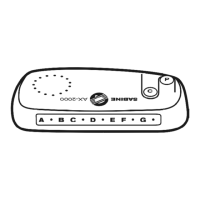

 To Next Page
 General