5
understanding SAD Solutions BLUElight
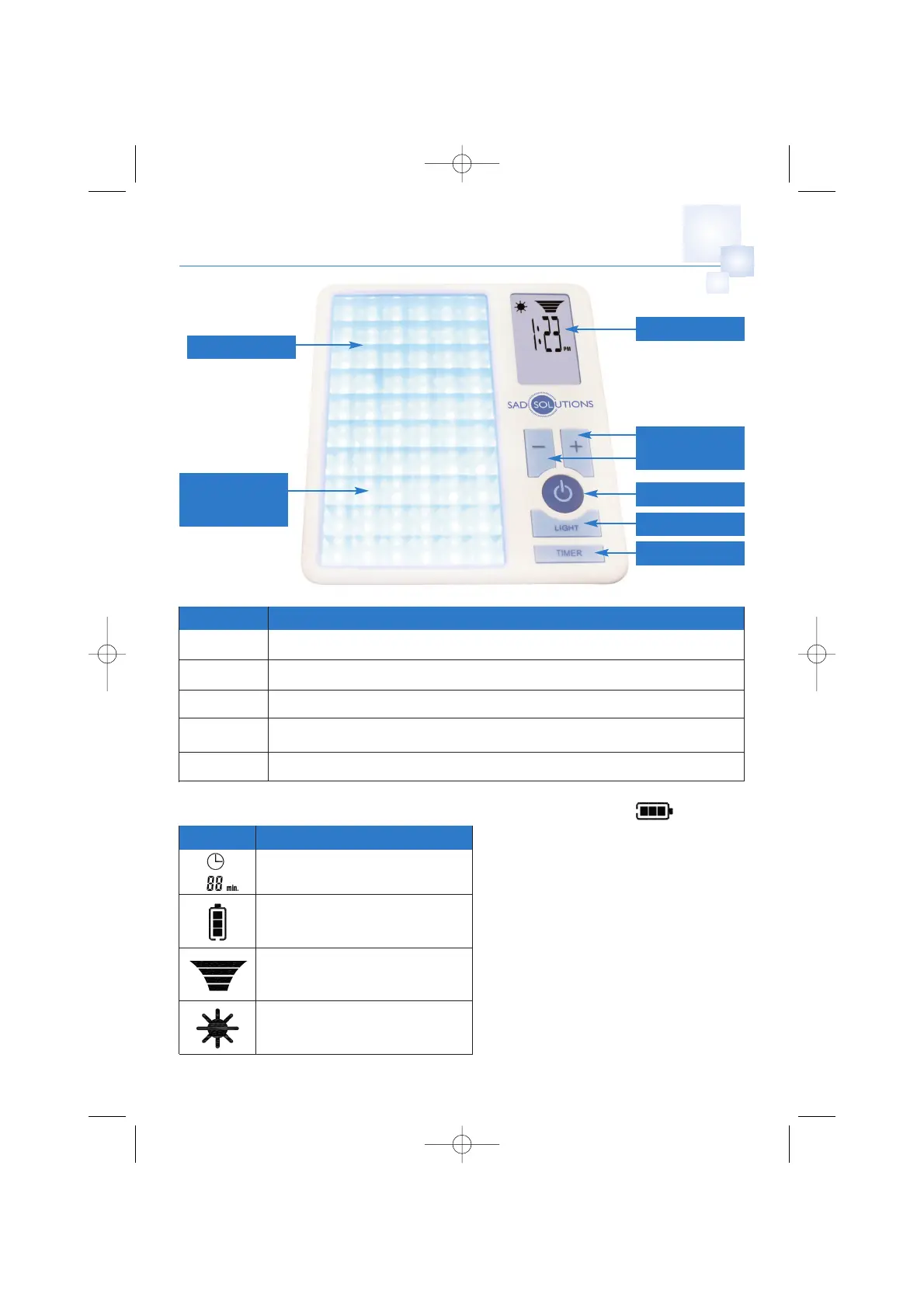
product LCD display
product keys
user interface
key description
Power Turns the Unit on and off
Light Turns the Blue LED’s on / off
Timer Sets the treatment time / sets the clock
+ Used for Increasing LED intensity, setting the time and setting timed treatment
_
Used for Decreasing LED intensity, setting the time and setting timed treatment
symbol description
Treatment session timer indicator
Battery capacity / charge indicator
LED intensity indicator
Sun Symbol will always remain on
• No bars indicates ≤ 20% level. Product
should be charged.
• No bars flashing indicates battery is
empty – must be charged as product will
auto shut off.
• 1 bar indicates 20% - 40% charged
• 2 bars indicates 40%-80% charged
• 3 bars indicates 80% - 100% charged.
Low Battery
• The battery symbol will flash showing no
bars indicating battery needs charging.
battery charge level
60 Blue LEDs
LCD Screen
Adjust Up or
Down Buttons
Anti-glare
Reflector/
Diffuser
Light
Timer
Power


 To Next Page