4. Mounting and electric connection
4.1 Desktop model(SDE-S60)
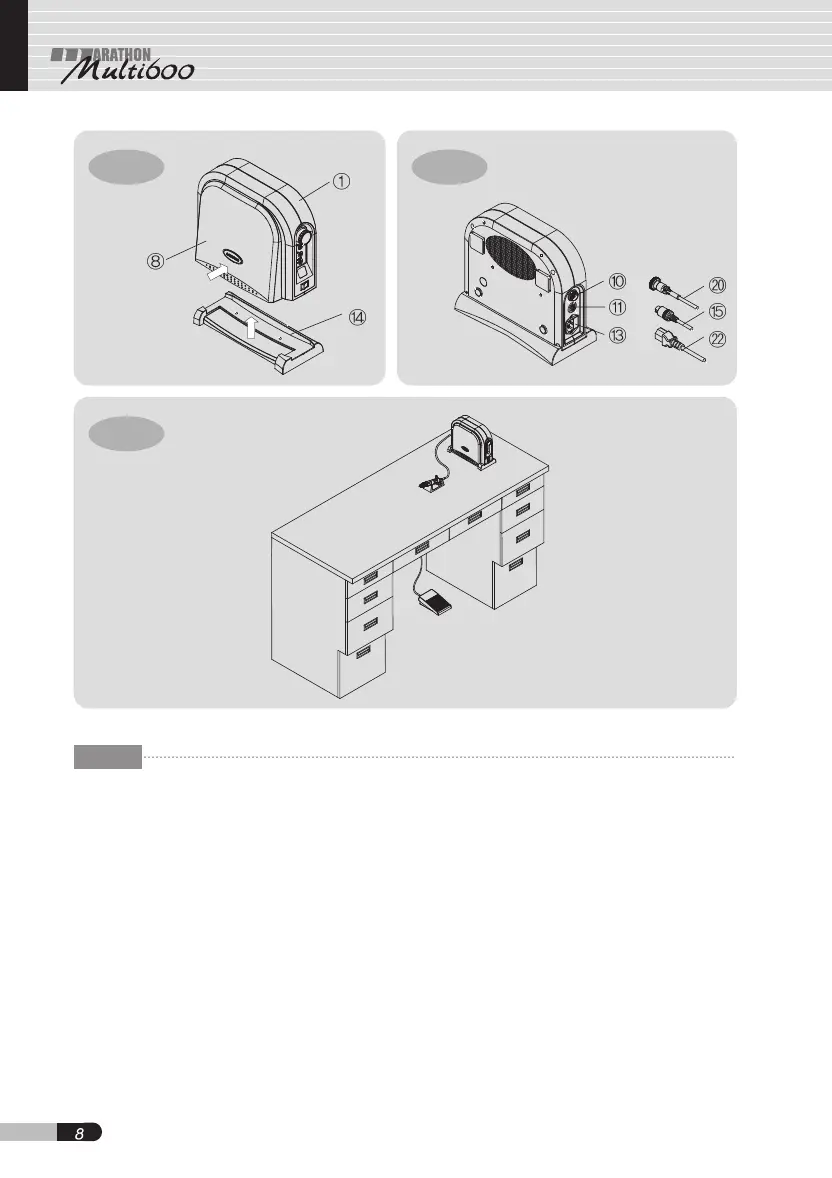
4.1.1 Tighten the bolts for control unit stand ⑭
on the bottom of control unit ① while
keeping knee control panel ⑧ pressed
fully[Fig. 6].
4.1.2 Plug motor cord into motor connector ⑩
located in the rear of the control unit and
then tighten plug nuts[Fig. 7].
4.1.3 Plug foot pedal cord ⑮ into foot pedal
connector ⑪ located in the rear of the
control unit[Fig. 7].
4.1.4 Plug power cord into power connector
⑬ in the rear of the control unit[Fig. 7].
CAUTION
1. After setting up the control unit stand,
make sure that the knee control pedal is
fully closed.
2. Make sure that the bolts for the control
unit stand are firmly tightened to set the
control unit in proper condition.
3. Make sure that all the cords are connected
safely and properly before plugging the
power cord.
Fig-6
Fig-8
Fig-7
GB


 To Next Page