The Nuance Mx Proximity Reader series consists of multiprotocol proximity ID devices designed to work with SafeCom products, enabling users to authenticate themselves by presenting a contactless ID card, tag, or key fob to the reader. These readers utilize Radio Frequency Identification (RFID) technology, supporting both low frequency (125kHz) and high frequency (13.56MHz) protocols. The supported protocols include popular ones like Mifare, HID Prox, EM, Hitag, iClass, Indala, and Legic, among many others.
Function Description:
The primary function of the Nuance Mx Proximity Reader is to facilitate user authentication within SafeCom Smart Printing solutions. Users present their ID card, tag, or key fob to the reader, which then reads the embedded ID code. This code is used by the SafeCom system to verify the user's identity, allowing access to printing services or other authenticated functions. The readers come with preloaded firmware with all supported protocols enabled, making them ready for deployment in most scenarios. However, they can be configured to support selective card reading by enabling or disabling specific protocols, which is particularly useful for adhering to organizational security policies or managing multiprotocol cards.
Important Technical Specifications:
- Technology: Radio Frequency Identification (RFID)
- Frequencies Supported: Low frequency (125kHz) and High frequency (13.56MHz)
- Protocols Supported: Mifare Classic, Mifare Mini, Mifare DESFIRE EV1, Mifare Plus S,X, Mifare Pro X, Mifare SmartMX, Mifare Ultralight, Mifare Ultralight C, SLE44R35, SLE66Rxx, Legic Prime, Legic Advant, Pay Pass, Calypso, CEPAS, Moneo, Pico Pass, SRI512, SRT512, SRI4K, SRIX4K, Sony Felica, NFC Forum Tag 2-4, EM4x33, EM4x35, HID iClass, ICODE SLI, M24LR16/64, MB89R118/119, Tag-it, SRF55Vxx (my-d vcinity), AWID, Casi Rusco, Cotag, EM4100, 4102, 4200, EM4150, EM4305, FDX-B, G-Prox, HID Prox, Hitag 1,2, S, Indala, ioProx, Keri, Miro, Nexwatch, Pyramid, Q5, T5557, T5567, TITAN, UNIQUE, ZOODIAC.
- Connectivity: Available with 2.0 meter cable with either a USB or Serial (PS2) connector. A module (print circuit board without casing) with a mini-USB connector is also available, primarily for mounting inside HP device's hardware integration pockets (HIP).
- Emulation Modes: Readers can be ordered as keyboard (KBD) emulating or non-keyboard emulating. Firmware can be swapped to change emulation mode.
- Part Numbers (Examples):
- Nuance Mx Proximity Reader, USB: SC0970920
- Nuance Mx Proximity Reader, USB, KBD: SC0970930
- Nuance Mx Proximity Reader Module: SC0970940
- Nuance Mx Proximity Reader, Serial: SC0970910
- Nuance Mx Legic Proximity Reader, USB: SC0976920
- Nuance Mx Legic Proximity Reader, USB, KBD: SC0976930
- Nuance Mx Legic Proximity Reader Module: SC0976940
- Nuance Mx Legic Proximity Reader, Serial: SC0976910
- SafeCom Color Front-ends:
- SafeCom Color Front-end, Mx: SC0970900
- SafeCom Color Front-end, Mx Legic: SC0976900
- Supported SafeCom Server Products: SafeCom G4 Server version S82 070.520*03 or newer.
- Supported SafeCom Device Products: Fuji Xerox, HP, HP Sx, HP Pro, Sharp, Xerox, Canon, HP FutureSmart, Kyocera, Lexmark, Ricoh, Samsung, SafeCom Controller, SafeCom ID Controller (specific versions listed in the manual).
Usage Features:
- Authentication: Users authenticate by presenting their contactless ID card, tag, or key fob.
- Multiprotocol Support: The readers can handle various RFID protocols, allowing flexibility in card types.
- Selective Card Reading: Through the AppBlaster application, specific protocols can be enabled or disabled. This is crucial for environments where only certain card types are authorized or to prevent ambiguity when a multiprotocol card is presented.
- Keyboard Emulation: Readers can be configured to emulate a keyboard, allowing the ID code to be directly typed into applications like Notepad.
- Non-Keyboard Emulation: For integration with SafeCom Administrator and other device products, readers can operate in non-keyboard emulation mode.
- Card Testing: The manual outlines methods for testing cards using SafeCom Administrator or Notepad. A "tracer firmware" can be loaded onto the reader to output detailed information about the protocol and ID code of presented cards, aiding in troubleshooting and configuration.
- User Behavior Considerations: Users are advised to present only one card or key fob at a time to avoid conflicts, especially with multiple proximity cards in a wallet or multiple key fobs chained together.
- ID Code Conversion: Existing
filtercard.dll installations can perform on-the-fly ID code conversion, which may result in different ID codes appearing in SafeCom Administrator versus Notepad.
Maintenance Features:
- Firmware Updates: The AppBlaster application is used to update the reader's firmware. This allows for bug fixes, new feature additions, or changes in emulation mode (e.g., from non-keyboard to keyboard emulation).
- Configuration Changes: AppBlaster enables comprehensive configuration, including enabling/disabling protocols, adjusting output bits, format (Binary, Decimal, Hexadecimal), and bit/byte order.
- Project Saving: It is highly recommended to save configurations as projects (
.abp files) within AppBlaster. This allows for future modifications and facilitates sharing with Nuance Imaging Customer Support for troubleshooting.
- Production Image Creation: Users can create production images (
.bix firmware files) from saved projects. These images simplify updating multiple readers with a consistent configuration.
- USB Driver Installation: The manual provides instructions for installing the necessary USB driver if the Windows computer does not recognize the Nuance Mx Proximity Reader. This is a critical step for initial setup and communication with the AppBlaster.
- Hardware Access: For modules or serial readers, the manual details steps for opening the device casing to access the print circuit board for direct cable connections (e.g., using the E33 USB Cable) for configuration.
- Electrostatic Discharge (ESD) Handling: Strict adherence to ESD handling procedures is cautioned when working with print circuit boards or opening products to prevent damage.
- RMA Process: Readers returned through the Return Material Authorization (RMA) process are shipped with default configurations. If a specific configuration was previously applied, it must be reapplied to the replacement unit before deployment.
- Labeling: It is recommended to label units that have been modified (e.g., firmware updates or configuration changes) to track their status.

 Need help?
 General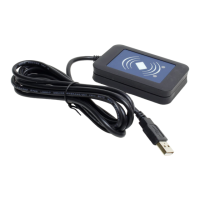

 To Next Page