EasyManua.ls Logo

Safeline GL2 - User Manual

Safeline GL2
8 pages
Print Icon
To Next Page IconTo Next Page
Loading...
SafeLine GL2
Installation manual
ENGLISH V. 2.61
07.2012
A GSM alternative for all of our lift telephones.
Question and Answer IconNeed help?

Do you have a question about the Safeline GL2 and is the answer not in the manual?

Summary

Installation

Components

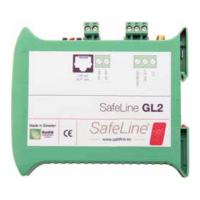
Details the physical parts and connections of the SafeLine GL2 unit, including the SMA antenna connector and RJ12 port.

Connecting the Unit

Instructions for connecting the SafeLine GL2 to power sources (12 or 24VDC) and external telephones.

Using the SIM Card

Guide to preparing and inserting the SIM card, including PIN code management and network compatibility.

Menu

LED Indication

Explains the meaning of the LED lights (LED 1-4) for various operational states and errors.

Increase RX Audio Level

Procedure to adjust the GSM receiving audio level via setup mode for improved voice clarity.

Service

Troubleshooting

Common issues like non-flashing LEDs, SIM card errors, and call interruptions with their solutions.

Interference; Poor Sound Quality

Guidance on minimizing interference and improving sound quality, including antenna placement advice.

Summary

Installation

Components

Details the physical parts and connections of the SafeLine GL2 unit, including the SMA antenna connector and RJ12 port.

Connecting the Unit

Instructions for connecting the SafeLine GL2 to power sources (12 or 24VDC) and external telephones.

Using the SIM Card

Guide to preparing and inserting the SIM card, including PIN code management and network compatibility.

Menu

LED Indication

Explains the meaning of the LED lights (LED 1-4) for various operational states and errors.

Increase RX Audio Level

Procedure to adjust the GSM receiving audio level via setup mode for improved voice clarity.

Service

Troubleshooting

Common issues like non-flashing LEDs, SIM card errors, and call interruptions with their solutions.

Interference; Poor Sound Quality

Guidance on minimizing interference and improving sound quality, including antenna placement advice.

Safeline GL2 Specifications

General IconGeneral
BrandSafeline
ModelGL2
CategoryGSM/GPRS Modules
LanguageEnglish