Need help?
Do you have a question about the Safety Vision OBSERVER 4401-HVR and is the answer not in the manual?
The Safety Vision Observer 4401-HVR is a robust hardware device designed for mobile video recording and surveillance, primarily used in commercial environments. This Hardware User Guide provides comprehensive details on its components, installation, and basic operation, serving as one of two essential user guides for the Observer Series Recorders, the other being the Configuration User Guide. The device is engineered to capture and store video data, offering features that facilitate efficient monitoring and data management.
At its core, the Observer 4401-HVR functions as a Hybrid Video Recorder (HVR), capable of managing both analog high-definition (AHD) and IP camera inputs. This hybrid capability allows for flexible camera system integration, accommodating various surveillance needs. The device is designed for in-vehicle installation, with a focus on durability and ease of access for essential functions.
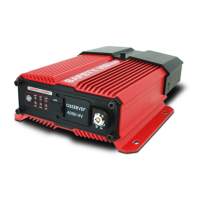
The front panel of the Observer 4401-HVR is equipped with several key components that enable user interaction and status monitoring. An IR Remote Sensor is prominently featured, allowing the device to receive signals from an HVR Remote Control, which is crucial for remote operation and control. This sensor ensures that users can manage the HVR without direct physical interaction, enhancing convenience in a mobile setting.
Adjacent to the IR sensor are a series of Status LEDs, which provide immediate visual feedback on the HVR's operational status. These LEDs include indicators for Power (PWR), USB activity (USB), Alarm (ALM), Recording (REC), Error (ERR), and Network connectivity (NET). Each LED illuminates to signify a specific status: PWR indicates that the DVR is receiving power, REC confirms that the DVR is actively recording video, USB shows USB port activity, NET signifies that the HVR is connected to OMS PRO (likely a management system), and ALM indicates that an event or alarm has occurred. The ERR LED alerts users to potential errors, prompting further investigation. This comprehensive set of indicators allows users to quickly assess the device's health and activity at a glance.
For data management, the front panel includes a USB Port. This port is a critical feature for quick data transfers, allowing users to insert a USB flash drive to download recorded events without the need to remove the primary storage media. Additionally, this USB port can be used to upload firmware updates, ensuring the device remains current with the latest software enhancements and security patches. This functionality streamlines maintenance and data retrieval processes, making it more efficient for operators.
The Observer 4401-HVR also incorporates dual SD card slots for storage. The Primary SD Card Slot is designed for the main recording function. Users can insert an SD card into this slot until it clicks into place. To remove the card, a brief press will cause it to eject. A second slot, designated as the Mirror/Secondary SD Card Slot, offers additional storage capabilities. This slot can be configured for mirror recording, providing redundancy by simultaneously saving data to a second card, or it can serve as a secondary storage device that activates once the primary SD card is full. This dual-slot design enhances data security and extends recording capacity, which is vital for continuous surveillance operations. It is important to note that only SD cards obtained from Safety Vision should be used, and users are warned against removing SD cards while the NVR is powered on or forcing cards into the slot incorrectly.
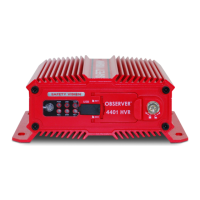
The rear panel of the Observer 4401-HVR hosts a variety of connectors for integrating the device into a complete surveillance system. A WiFi Antenna Connector (SMA) allows for the connection of an external antenna, which is necessary for the internal WiFi module to function, enabling wireless communication and data transfer. A GPS Antenna Port is available for connecting an external GPS antenna, providing crucial data such as date, time, speed, and mapping information, which can be invaluable for incident reconstruction and fleet management.
For video output, an A/V OUT Port is provided for connecting optional CP4-series monitors, allowing for local viewing of recorded or live footage. A LAN Port facilitates connection to IP cameras, though this requires an external Power over Ethernet (POE) switch or WiFi radio. The default IP addresses for the LAN port are specified for network configuration.
Power is supplied through the Power Port, which connects to the 41-PWRHRNS main power harness, ensuring a stable and reliable power supply for the HVR. The device also features AHD IN Ports for connecting analog high-definition (AHD) camera harnesses, supporting up to four AHD cameras. A Sensor & Serial Port is included for connecting the sensor harness, enabling the integration of external sensors and serial devices, which can trigger recordings or provide additional data inputs.
Installation of the Observer 4401-HVR involves securing the device and connecting all necessary cables. After connecting all cables to the rear of the HVR, a security cover is snapped into place and secured with a security Torx screw, protecting the connections from tampering or accidental dislodgement. The device is designed for flat mounting, requiring four #10 machine screws with nyloc nuts, self-tapping screws, or rivets to secure it to a surface. It is crucial to ensure that the front panel remains accessible and that there is a minimum of 2.5 inches of clearance for cables. Furthermore, the NVR should not be installed in any area of the vehicle cabin that could interfere with the safe operation of the vehicle, emphasizing safety in its deployment.
Maintenance features primarily revolve around data management and firmware updates. The USB port simplifies the process of downloading events and uploading firmware, reducing the need for more complex procedures. The dual SD card slots offer flexibility in storage management, including mirror recording for data redundancy. Users are reminded to turn off the NVR before removing SD cards to prevent data corruption.
In summary, the Safety Vision Observer 4401-HVR is a versatile and user-friendly mobile video recorder designed for demanding commercial applications. Its hybrid camera support, comprehensive status indicators, multiple storage options, and robust connectivity features make it an effective solution for capturing and managing critical video data in various mobile environments. The design prioritizes ease of installation, operational clarity, and data integrity, ensuring reliable performance for surveillance needs.
 General
| Video Channels | 4 |
|---|---|
| Storage Capacity | 2TB |
| Video Compression | H.264 |
| Video Output | HDMI, VGA |
| Mobile App Support | Yes |
| Audio Input Channels | 1 |
| Power Supply | 12V DC |
| Operating Temperature | 14°F ~ 131°F (-10°C ~ 55°C) |
| Hard Drive Support | 1 SATA HDD |
| Frame Rate | 30 FPS |

 To Next Page