EasyManua.ls Logo

Safety Vision SV-CLCD56B1 - User Manual

Safety Vision SV-CLCD56B1
6 pages
Print Icon
To Next Page IconTo Next Page
Loading...
COLLISION AVOIDANCE CAMERA SYSTEMS
Copyright © 2008 Safety Vision, L.P. All Rights Reserved.
05/08
CORPORATE HEADQUARTERS
6100 W. Sam Houston Pkwy. N.
Houston, TX 77041-5113
Toll Free: 800.880.8855
Main: 713.896.6600
Fax: 713.896.6640
ww w.safety vision.com
Question and Answer IconNeed help?

Do you have a question about the Safety Vision SV-CLCD56B1 and is the answer not in the manual?

Summary

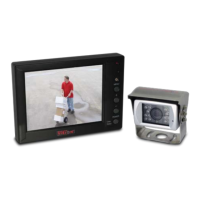
SV-CLCD56 B1 System Features

Returning the Unit for Service

Monitor Controls

Troubleshooting: Power LED Issues

Power LED Not On

Steps to diagnose and resolve issues when the monitor's Power LED is not illuminated.

Power LED On, No Picture

Guidance for when the Power LED is active but no image is displayed on the monitor.

Troubleshooting: Audio and Picture Issues

Power LED On, No Picture (Continued)

Continuation of troubleshooting for Power LED on but no picture displayed.

No Audio

Steps to diagnose and resolve issues when there is no audio output from the system.

Tools and Instructions for Troubleshooting

Tools Required for Troubleshooting

Lists essential tools needed for performing troubleshooting procedures.

Operating and Troubleshooting Instructions

General guidance on operating the system and initial troubleshooting steps.

Safety Vision SV-CLCD56B1 Specifications

General IconGeneral
BrandSafety Vision
ModelSV-CLCD56B1
CategoryAutomobile Accessories
LanguageEnglish