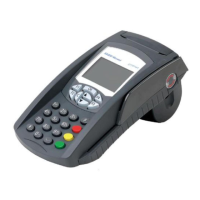
The SAGEM Monetel EFT930S is a stationary terminal designed for various payment and communication tasks. This installation guide provides comprehensive instructions for setting up, using, and maintaining the device.
Function Description
The EFT930S serves as a payment terminal, capable of processing transactions via magnetic stripe cards and smart cards. It integrates with telephone and Ethernet networks for communication and data transfer. The terminal features a thermal printer for issuing receipts and a keypad for user interaction. It also includes multiple access points for SAM (Secure Access Module), SIM (Subscriber Identity Module), MMC (MultiMediaCard), and SDCARD (Secure Digital Card) modules, as well as USB connectivity for peripherals and data exchange.
Important Technical Specifications
- Physical Characteristics (Portable Unit):
- Weight: 300 g (without paper roll)
- Dimensions: 180 x 80 x 77 mm (Length x Width x Height)
- Physical Characteristics (Main Cable):
- Weight: 160 g
- Dimensions: 1.80 m (twisted)
- Telephone cable length: 3 m
- Power supply cable length: 3 m
- Weight of the power adapter: 100 g
- Power Supply:
- Class II equipment
- Electrical network: 100-240 VAC; 50-60 Hz
- Consumption: 150 mA
- Power adapter: 2-pin 3 A plug
- Environmental Conditions:
- Ambient temperature (use): +5°C to +45°C
- Maximum relative humidity (use): 85% at +40°C
- Storage temperature: -20°C to +55°C
- Maximum relative humidity (storage): 85% at +55°C
- Connectivity:
- Serial link: RS 232 / V28 levels
- Mini-USB A serial link: Max. consumption 500 mA
- Mini-USB B serial link
- Modem (telephone network)
- Ethernet network
- Paper Reference:
- SAGEM Monetel approved thermal paper is required for full warranty.
- Paper roll diameter: 40 mm
- Compliance:
- CE Marking: Conforms to European Directive 1999/5/CE (R&TTE) for health, safety, and electromagnetic compatibility.
- Harmonized Standards: EN 60950-1 (Safety), EN 55022 (Radio disturbance), EN 55024 (Immunity).
- European Council Decision 98/482/EC.
- CTR 21 (DTMF terminal equipment to PSTN).
- Network Compatibility: TBR21 for analog public switched telephone networks (STN) in various European countries (Germany, Austria, Belgium, Denmark, Spain, Finland, France, Greece, Ireland, Iceland, Italy, Liechtenstein, Luxembourg, Norway, Netherlands, Portugal, United Kingdom, Sweden, Switzerland).
- FCC Compliance: Part 15 (Class B digital device) and Part 68 (Modem version only). FCC IDs: TTSEFT930SE (Ethernet), TTSEFT930SM (Modem). USOC jacks: RJ11C.
Usage Features
- Installation: The terminal should be connected to a power supply and either a telephone or Ethernet network via a connection stub. The stub should be securely attached under the terminal's worktop to minimize stress on connections.
- Card Reading:
- Magnetic Stripe: Hold the card with the magnetic stripe on the back, face to the right, and the card's top edge (relative to text direction) at the reader entry. Pull the card through manually.
- Smart Card: Insert the card with the chip visible on top.
- Keypad: The keypad includes navigation buttons, function button (F), cancel (red), correction (yellow), and confirm (green) buttons for interactive dialogue with the display.
- Paper Roll Installation:
- Remove the first turn of paper from a new roll.
- Open the paper holder cover by lifting the catch at the rear and pulling the cover open.
- Place the paper roll in its compartment, unwinding from the top.
- Draw the paper out to the top of the terminal.
- Close the cover, ensuring it clips into place.
- Contrast Adjustment: Increase or decrease screen contrast by simultaneously pressing the "Dot" and "▲" buttons, or "Dot" and "▼" buttons, respectively. Hold the buttons as long as needed.
- USB Connectivity:
- Side USBs: Two mini-USB ports are located on the side. One is a master port for peripherals (mouse, USB key), and the other is a slave port for connection to a PC.
- Under Connection Cover USB: A USB port is available under the connection cover, requiring a specific cable for use. Installation involves opening the cable cover, connecting the USB cable, and securing it.
- Emergency Telephone Use: If the EFT930S is using the telephone line and an urgent call is needed, the dial tone can be recovered by leaving the handset in the hang-up position and either pressing the red (CANCEL) button or disconnecting the telephone cable from the EFT930S and plugging in the telephone's connector. The dial tone should be available within six seconds.
Maintenance Features
- Lithium Battery: The EFT930S contains a non-user-accessible lithium battery. Replacement should only be performed by trained and qualified personnel using a battery of the same or equivalent type recommended by the manufacturer. Incorrect replacement poses an explosion risk. Used batteries must be disposed of according to recycling instructions.
- Cleaning:
- Disconnect all cables from the stub.
- Clean the terminal's covers and base with a soft cloth, very lightly moistened with soapy water.
- Do not clean the electrical connectors.
- SAM/SIM/MMC/SDCARD Access:
- Access: The SAM cover, located underneath the terminal, provides access to SAM, SIM, MMC, and SDCARD slots.
- Precaution: Always disconnect the terminal from power before opening the SAM cover.
- Opening: Press firmly in the center of the cover and slide it forward.
- Installation: Insert SAM/SIM modules with the angled corner positioned as indicated. For MMC/SDCARD, insert fully into the slot with the angled corner correctly oriented.
- Removal: For MMC/SDCARD, press to eject.
- Closing: Set the cover clips into the terminal slots and slide the cover in by pressing firmly on the ribbed zone. The SAM reader access cover must be in place during normal use.
- Transportation and Storage:
- Use the original packaging for transport and storage.
- It is recommended to disconnect all cables from the terminal during transportation.

 Need help?
 General

 To Next Page