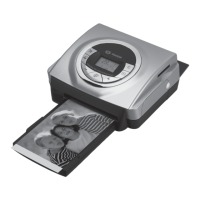
Need help?
Do you have a question about the Sagem PHOTO EASY 160 and is the answer not in the manual?
Welcomes the user and outlines the printer's capabilities and benefits.
Lists the items included in the photo printer package for user verification.
Explains the function of each button on the printer's control panel.
Details the icons and data displayed on the printer's screen.
Step-by-step guide for connecting the printer to power and a wall socket.
Procedure for installing the initial ink ribbon cartridge in the printer.
Instructions for replacing the ink ribbon when it is depleted.
Guide on how to load paper sheets into the paper tray correctly.
How to insert various types of memory cards into the printer's slots.
Steps for printing photos directly from inserted memory cards.
Method for quickly printing multiple copies or photos.
Instructions to print an index of all photos on a memory card.
Using the print basket to select and queue multiple photos for printing.
Printing photos selected via DPOF format from a digital camera.
Guide to printing photos directly from PictBridge-compatible digital cameras.
Steps for transferring photos from devices using infrared technology.
Instructions for wireless photo transfer using Bluetooth.
How to enable/disable Crystal Image features like optimization and red-eye correction.
Guide for installing printer driver and image processing software on a PC.
Managing photos on memory cards using the PC via the printer.
Information on replacing ink cartridges and ordering paper.
Procedure to clean the print head for optimal print quality.
Steps to resolve a paper jam issue.
Guide to diagnosing and solving frequent printer issues.
Explanation of printer error codes and their solutions.
Information on product packaging, recycling, and proper disposal.
Details of the warranty terms and conditions for the product.
Conditions under which the product guarantee is not valid.
 General
| Type | Photo Printer |
|---|---|
| Maximum Print Resolution | 4800 x 1200 DPI |
| Connectivity | USB |
| Media types | Photo Paper |
| Card Reader | Yes |
| Paper Capacity | 20 sheets |
| Print Technology | Inkjet |
| Supported Media Sizes | 10 x 15 cm |
| Paper Sizes | 10 x 15 cm |

 To Next Page