EasyManua.ls Logo

SainSmart UNO R3 - User Manual

SainSmart UNO R3
67 pages
Print Icon
To Next Page IconTo Next Page
Loading...
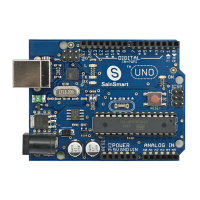
SainSmart UNO R3 Starter Kit For Arduino
Arduino Introduction
Overview
What is Arduino?
Arduino is a tool for making computers that can sense and control more of the physical world
than your desktop computer. It's an open-source physical computing platform based on a simple
microcontroller board, and a development environment for writing software for the board.
Arduino can be used to develop interactive objects, taking inputs from a variety of switches or
sensors, and controlling a variety of lights, motors, and other physical outputs. Arduino projects
can be stand-alone, or they can be communicated with software running on your computer (e.g.
Flash, Processing, MaxMSP.) The boards can be assembled by hand or purchased preassembled;
the open-source IDE can be downloaded for free.
The Arduino programming language is an implementation of Wiring, a similar physical computing
platform, which is based on the Processing multimedia programming environment.
Feature
Schematic design of the open source development interface free download, and also
according to the needs of their own changes
Download the program is simple and convenient.
Simply with the sensor, a wide range of electronic components connection (such as: LED
light, buzzer, keypad, photoresistor, etc.), make all sorts of interesting things.
Using the high-speed micro-processing controller (ATMEGA328).
The development of language and development environment is very simple, easy to
understand, very suitable for beginners to learn.
Performance
Digital I/O 0~13.
Analog I/O 0~5.( R3 is 0~7 )
Suppor
Input voltage: when connected to the USB without external power supply or external 5 v
output and external power input.
Atmel Atmega328 micro-processing controller. Because of its many supporters, the
company has developed 32-
Arduino size: width of 70 mm X high 54 mm.
Special Port
1. VIN. The input voltage to the Arduino board when it's using an external power source (as
Question and Answer IconNeed help?

Do you have a question about the SainSmart UNO R3 and is the answer not in the manual?

Summary

Overview

What is Arduino?

Defines Arduino as a tool for sensing and controlling the physical world.

Arduino C Grammar

Chapter 1 Hello World!

Serial Communication Basics

Introduces serial interface tools for displaying data and explains Serial.begin().

Chapter 2 Blink LED

LED Blinking Circuit

Explains connecting an LED to pin 13 for the basic blink experiment.

Blink Program Code

Provides the Arduino code for making an LED blink.

Chapter 3 LED Blink

LED Flashing Experiment Setup

Lists components and connection instructions for flashing an LED.

Chapter 4 PWM

Pulse Width Modulation Explained

Defines PWM and its use in simulating analog results with digital signals.

Using analogWrite()

Details the analogWrite function, its parameters, and supported pins.

Chapter 5 Advertising LED

Chapter 6 Traffic Light

Traffic Light Program Code

Provides the code to simulate a traffic light sequence.

Chapter 7 Buzzer

Chapter 8 Tilt Switch

Chapter 9 Potentiometer

What is a Potentiometer?

Defines a potentiometer and how it controls values.

Potentiometer Example Code

Provides code to use a potentiometer to control LED blink rate.

Chapter 10 Photoresistor

Chapter 11 LM35 Temperature Sensor

LM35 Working Principle

Explains the linear voltage output of the LM35 with temperature.

Chapter 12 Nixie Tube

Chapter 13 4-bit Nixie Tube

Digital Tube Display Code

Provides code for displaying numbers on a 4-bit digital tube.

Chapter 14 74 HC595

What is the 74 HC595?

Introduces the 74HC595 shift register for controlling multiple LEDs with fewer I/O pins.

74 HC595 Wiring Diagram

Shows the schematic for connecting the 74HC595 to LEDs and Arduino.

74 HC595 Example Code

Provides code to control LEDs using the 74HC595 shift register.

Relay Module Control

Relay Module Code

Provides the Arduino code for controlling a relay module.

Chapter 15 8 x8 Matrix LEDs

8 x8 Matrix LED Wiring Diagram

Illustrates the wiring connections for an 8x8 matrix LED.

8 x8 Matrix LED Control Code

Provides code to control individual LEDs in an 8x8 matrix.

Chapter 16 Infrared Remote Control

Infrared Remote Control Experiment

Introduces the experiment and the NEC protocol for remote control.

Infrared Receiving Code Structure

Details the code structure for timer initialization and data presentation.

Pulse Decoding Logic

Explains the logic for decoding pulse signals from the remote control.

SainSmart UNO R3 Specifications

General IconGeneral
BrandSainSmart
ModelUNO R3
CategoryMotherboard
LanguageEnglish