EasyManua.ls Logo

sais Scudo 600 - User Manual

sais Scudo 600
11 pages
Print Icon
To Next Page IconTo Next Page
Loading...
1
Standby UPS Quick Guide
Version: 1.0
1. Package Contents
You should have received the following items inside of package:
- UPS Unit
- Quick Guide
- Power cable (only for the IEC-type model)
2. Product Introduction
This UPS provides comprehensive protection in a small and economic package. The UPS
is more compact and offers greater comprehensive power protection against surges and
spikes. This UPS will continue providing stable power to connected equipment and enable
to shutdown PC safely during power failure. Its embedded microprocessor controller
guarantees high reliability and it’s perfect for any home or small office application.
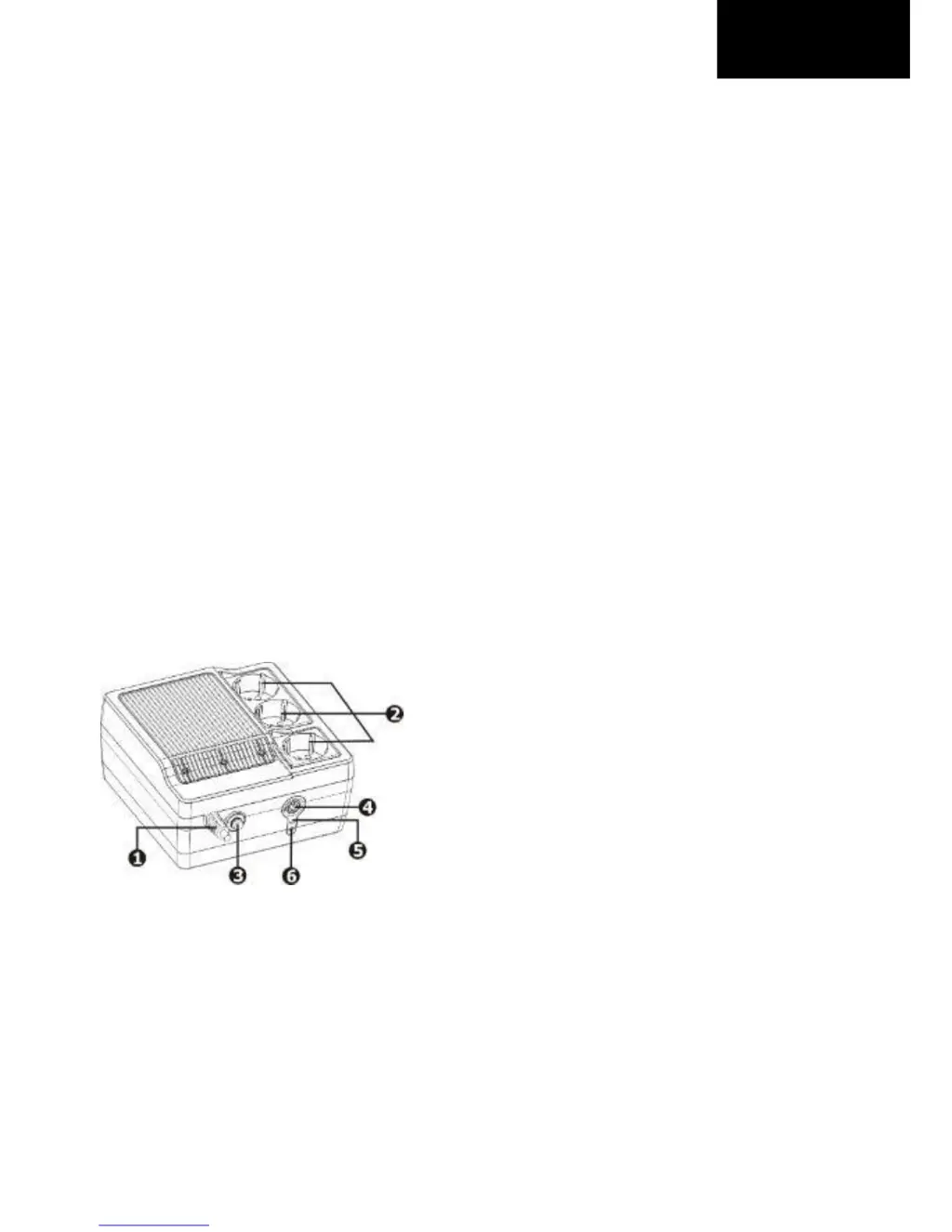
3. Product Overview
AC input
Output receptacles
Circuit breaker
Power switch
UPS status indicator
Fault status indicator
(Check the Indicator & Alarm Table for the details)
EN

Questions and Answers

  • A
    andrewriceAug 1, 2025
    Why does my sais Scudo 600 UPS alarm keep sounding when the power is on?
    • J
      Jonathan TuckerAug 1, 2025
      If the alarm on your Sais UPS sounds continuously when the mains is normal, it could be due to an overload. Try removing some loads. Before reconnecting equipment, verify that the load matches the UPS capability specified in the specs. Alternatively, there may be a UPS fault, in which case you should return the unit to the service center.
  • M
    Matthew GarciaAug 8, 2025
    Why is the backup time so short on my sais Scudo 600 when power fails?
    • D
      Dr. Marvin YorkAug 8, 2025
      If your Sais UPS backup time is short when the power fails, it could be due to several reasons. First, the UPS might be overloaded, so try removing some critical load. Second, the battery voltage may be too low; in this case, charge the UPS for at least 8 hours. Finally, there could be a battery defect, potentially due to high temperature operation or improper battery operation. If this is the case, replace the battery with the same type.
  • T
    tfrankAug 13, 2025
    What to do if sais Scudo 600 alarm sounds every 2 seconds when the power is normal?
    • J
      Jeffrey LewisAug 13, 2025
      If the Sais UPS alarm sounds every 2 seconds when the mains is normal, it may indicate a battery defect. In this case, replace the battery with the same type. Alternatively, the charging board might be damaged, requiring you to return the unit to the service center.
  • B
    Brett FreemanAug 20, 2025
    How to fix no LED display on sais Scudo 600?
    • E
      Emily CarterAug 20, 2025
      If there is no LED display on the front panel of your Sais UPS, several issues could be the cause. The battery might be low, so charge the UPS for at least 8 hours. Alternatively, there could be a battery fault, requiring you to replace the battery with the same type. It's also possible that the UPS is not turned on; press the power switch again to turn it on.
  • D
    dbeardAug 26, 2025
    What does it mean when the LED is flashing on my Sais UPS?
    • A
      Andrea ArmstrongAug 26, 2025
      If the LED on your Sais UPS is flashing while the mains is normal, it might be due to a loose power cord. Try reconnecting the power cord properly.

Summary

Package Contents

Product Introduction

Product Overview

Installation and Initial Startup

Placement & Storage Conditions

Guidelines for installing the UPS in a protected area, ensuring adequate airflow and avoiding extreme conditions.

Connect to Utility and Charging

Instructions for connecting the UPS to a wall outlet and charging the battery before initial use for optimal performance.

Connect the Loads

Steps for connecting equipment to the UPS output receptacles for protection during operation.

Turn On;Off the Unit

Procedure for operating the UPS power switch to turn the unit on and off.

Indicators & Alarm Table

Important Safety Warnings

General Safety Precautions

Crucial safety instructions to prevent fire, electric shock, and damage during UPS installation and operation.

Trouble Shooting

Specifications

sais Scudo 600 Specifications

General IconGeneral
Capacity600VA/360W
Communication InterfaceUSB
Operating Temperature0-40°C
Storage Temperature-15-45°C
Frequency50/60Hz
Humidity0-95% non-condensing
Safety CertificationsCE