Need help?
Do you have a question about the Saitek Eclipse II and is the answer not in the manual?
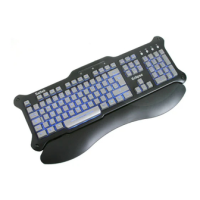
Overview of the Saitek Eclipse II keyboard's features and design for low-light use.
Highlights laser-etched keys, media controls, adjustable backlighting, and ergonomic design.
Step-by-step instructions for connecting and installing the keyboard on Windows systems.
Caution regarding potential hand, wrist, arm, back, or neck injury from keyboard use.
Tips for proper posture, breaks, and keyboard/mouse positioning to reduce strain.
Details on media playback controls and backlighting intensity/color adjustment.
Guidance for resolving common installation and operational problems with the keyboard.
Information on accessing online resources and contacting Saitek Technical Support.
Details on FCC rules, compliance, and potential interference with digital devices.
Explains the warranty period, terms, conditions, and exclusions for the keyboard.
Lists operating system compatibility for the keyboard in multiple languages.
Provides connection instructions for the device in various languages.

 To Next Page
 General